65
Part 9 - Controls
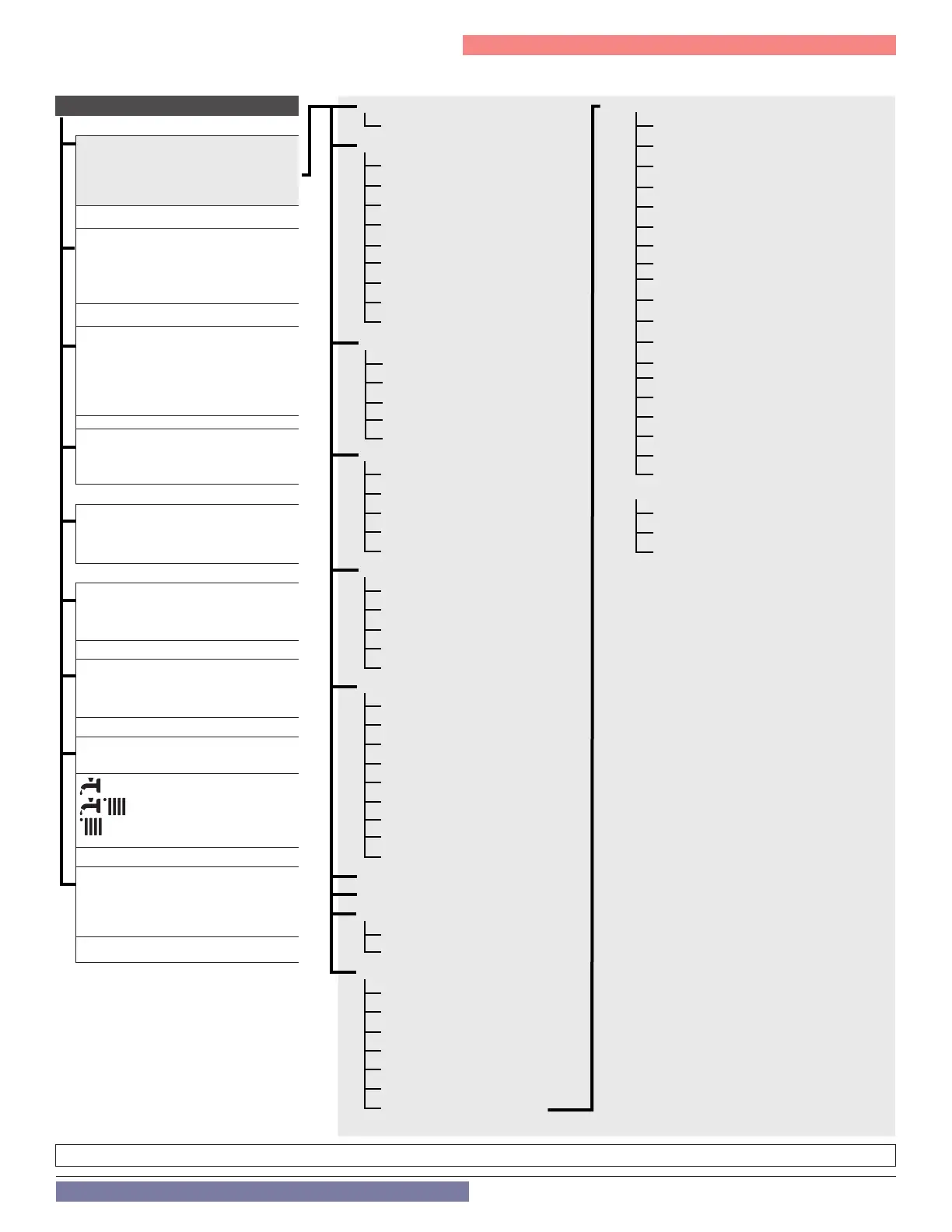
Q. Technical Menu - Menu Structure
Figure 70 - Menu Structure
0 NETWORK 34...40 Cascade Follower 1 - 7 Parameters
4 User Interface 0 General
2 Boiler Parameters 1 Free Parameters
0 General 2 Settings
1 Free Parameters 3 Central Heating-1
2 Settings 4 Central Heating-2
3 Central Heating-1 5 Domestic Hot Water
4 Central Heating-2 6 Boiler Manual Settings
5 Domestic Hot Water 7 Test & Utilities
6 Boiler Manual Settings 8 Reset Factory Settings
7 Test & Utilities 9 Other-1
8 Reset Factory Settings 10 Other-2
4 Zone1 Parameters 11 Boiler Statistics-1
0 Setpoint 12 Boiler Statistics-2
1 S/W Changeover 13 Boiler
2 Z1 Settings 14 Boiler Temperature
3 Z1 Diagnostics 15 Storage
7 Z1 Regulation parameters 16 Service
5 Zone2 Parameters 17 Error History
0 Setpoint 18 Free Parameters
1 S/W Changeover 42 BMS Parameters
2 Z2 Settings 0 General
3 Z2 Diagnostics 1 Analog Level Settings
7 Z2 Regulation parameters 2 Diagnostics
6 Zone3 Parameters
0 Setpoint
1 S/W Changeover
2 Z3 Settings
3 Z3 Diagnostics
7 Z3 Regulation parameters
8 Service Parameters
0 Boiler Statistics -1
1 Boiler Statistics -2
2 Boiler
3 Boiler Temperature
4 Storage
5 Service
6 Error History
7 Free parameters
8 Reset Factory Settings
9 Other - 1
10 Other - 2
11 NTI Zone Controller Parameters
0 General
1 Diagnostics
25 Cascade Manager Parameters
0 General
1 System Settings
2 Domestic Hot Water
3 System Diagnostics
4 Cascade Diagnostics
5 Error History
6 Reset Menu
Quick Access Menus
MENU
Complete menu, with access to all
parameters - see the following pages
for details.
ERR - Fault
The display shows the last 10 errors
with the code, description, and date.
Press “+” (2) to scroll through errors
PCB
Direct Access to the Parameters:
219, 220, 228, 229, 231 - 234, 247,
250, 253, 257 (only when parameter
228 =1)
DHW - Domestic Hot Water settings
Direct Access to the Parameters:
200, 228
CH1 - Heating Zone 1 settings
Direct Access to the Parameters:
420, 422, 423, 425, 426, 475
CH2- Heating Zone 2 settings
Direct Access to the Parameters:
520, 522, 523, 525, 526, 575
CH3- Heating Zone 3 settings
Direct Access to the Parameters:
620, 622, 623, 625, 626, 675
MODE - Boiler working MODE
Press “+” (2) to select:
(Only DHW) -
(CH + DHW) -
(Only CH)
BMS - Building Management
System settings
Only applicable with 0-10V / 4-20mA
Clip-In Board installed



 To Next Page