67
Part 9 - Controls
Menu
Sub-Menu
Parameter
Description Value
Default
Setting
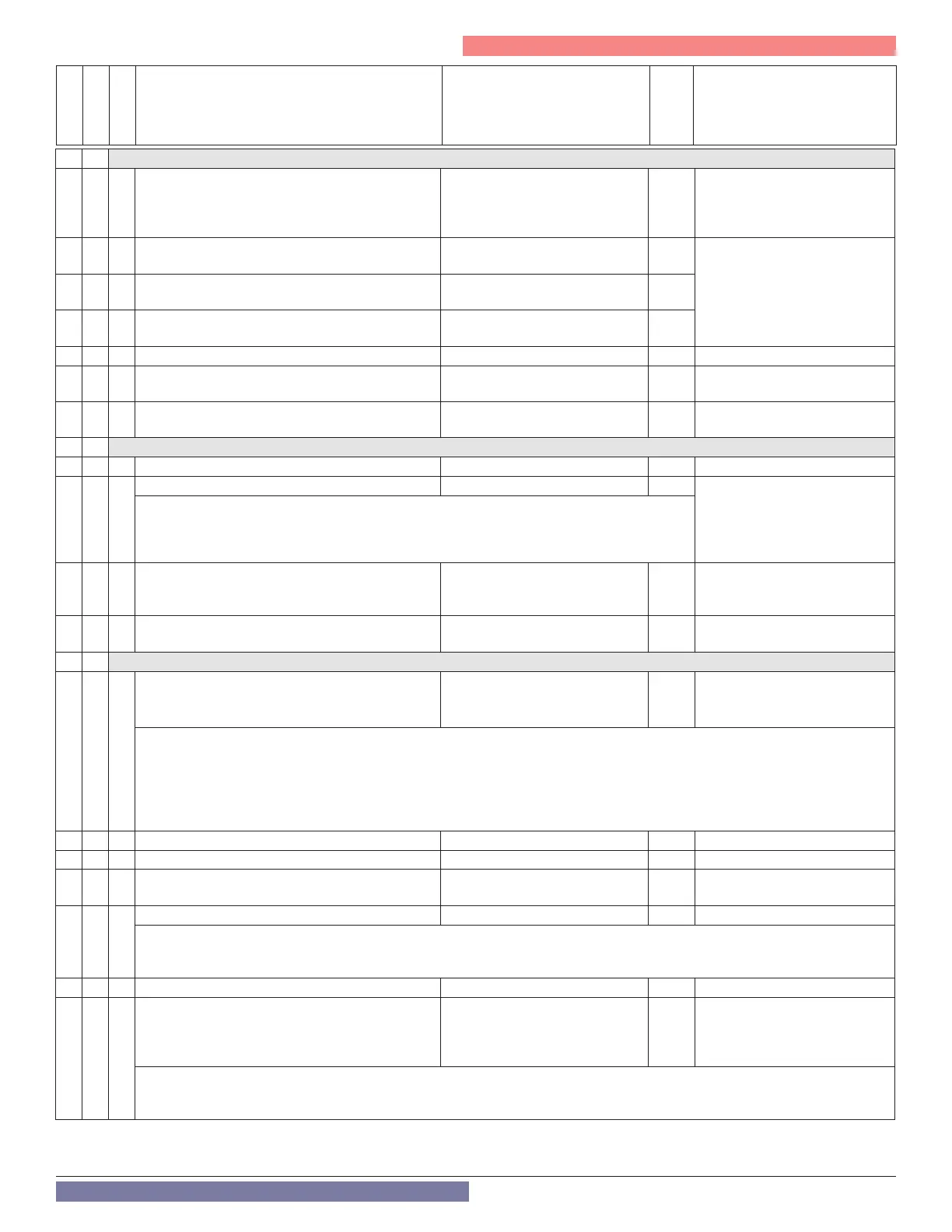
2 3 BOILER CH PARAMETERS 1
2 3 1 Adjustable max CH power percentage 0 - 100 100
Limited by the absolute values
dened by parameters 2.3.3 and
2.3.4, i.e., 0 = min power and 100
= max power.
2 3 2
Absolute Max DHW power percentage
CANNOT BE MODIFIED
0 - 100
RESERVED FOR TECHNICAL
ASSISTANCE
Only if the gas or PCB is
changed. See Table 31.
2 3 3
Absolute Min boiler power percentage
CANNOT BE MODIFIED
0 - 100
2 3 4
Absolute Max CH percentage
CANNOT BE MODIFIED
0 - 100
2 3 5 CH Anti-cycling time mode 0 = Manual, 1 = Automatic 1
2 3 6
CH Anti-cycling Ignition Time Delay
(when 2.3.5 = 0)
0 - 7 (minutes) 3
2 3 7 Boiler Pump Post Circulation Time (After CH)
0 - 15 minutes or OC (On Conti-
nuously)
3
2 4 BOILER PARAMETER PART 2
2 4 3 CH Fan Post-Purge 0 = 2 minutes, 1 = 5 minutes 1
2 4 4
CH Boost Interval 0 - 60 (minutes) 16 Only applicable when the type
of temperature control is set to
Basic Temp. Control
(Parameter 4.2.1 - 5.2.1 - 6.2.1
= 1)
Sets the time delay between the automatic adjustments of the boiler target temperature in
increments of +/- 7°F.
2 4 7 CH Pressure Safety 1 = pressure switch at minimum 1
RESERVED FOR TECHNICAL
ASSISTANCE
Only if the PCB is changed
2 4 9 Outdoor Temperature Reading Correction -5 - +5 (°F) 0
Only active with outdoor sensor
connected
2 5 DOMESTIC HOT WATER PARAMETER
2 5 0
DHW COMFORT function
0 = deactivated, 1 = timed,
2 = always on
0 -
Combi
2 -
Boiler
FTVN Non-Combi models set to 2 – Always On = This is not changeable.
FTVN Combi models set to 0 – Deactivated = COMFORT function is not active.
FTVN Combi models set to 1 or 2 – On (activates conditionally once per Comfort Anti-cycling Time) = Activating the COMFORT
function keeps the DHW heat exchanger temperature warm when a DHW demand is not active. This reduces the amount of time it
takes for the boiler to meet a hot water demand. COMFORT will display when this function is active.
NOTE: Parameter 251 ”Comfort Anti-cycling Time”, is defaulted to 60 min, and has a range [0 -120] min.
2 5 1 DHW Comfort Anti-cycling Time 0 - 120 (minutes) 60
2 5 2 DHW Start Delay 5 - 200 (0.5 to 20 seconds) 5 Anti “water hammering”
2 5 3 DHW Switch O Logic
0 = anti-scale (stop at > 144°F)
1 = + 7 °F /setting
0
2 5 4
DHW Post Purge and Pump Cycle 0 = OFF, 1 = ON 1
OFF = 30 second post-circulation and 2 minute post-ventilation (or 3 minute post-circulation and 5 minute post-ventilation if the
boiler temperature requires it)
ON = When setting is ON, time for post-circulation is 3 minutes, while the time for post-ventilation is 5 minutes.
2 5 5 CH Start Delay Following DHW 0 - 30 (minutes) 0
2 5 7
Anti-legionella Function
0 = OFF
1 = ON
0
FTVN Non-Combi = Activated
when the boiler is connected to
a tank by an NTC sensor.
(Parameter 228 = 1)
This function prevents the formation of Legionnaire’s disease bacteria which may develop in piping and indirect water heaters
(IWH) at temperatures between 68°F and 104°F. When activated, if the IWH temperature stays below 138°F for over 100 hours, the
boiler will heat the water in the IWH until it reaches 149°F for 30 minutes.



 To Next Page