68
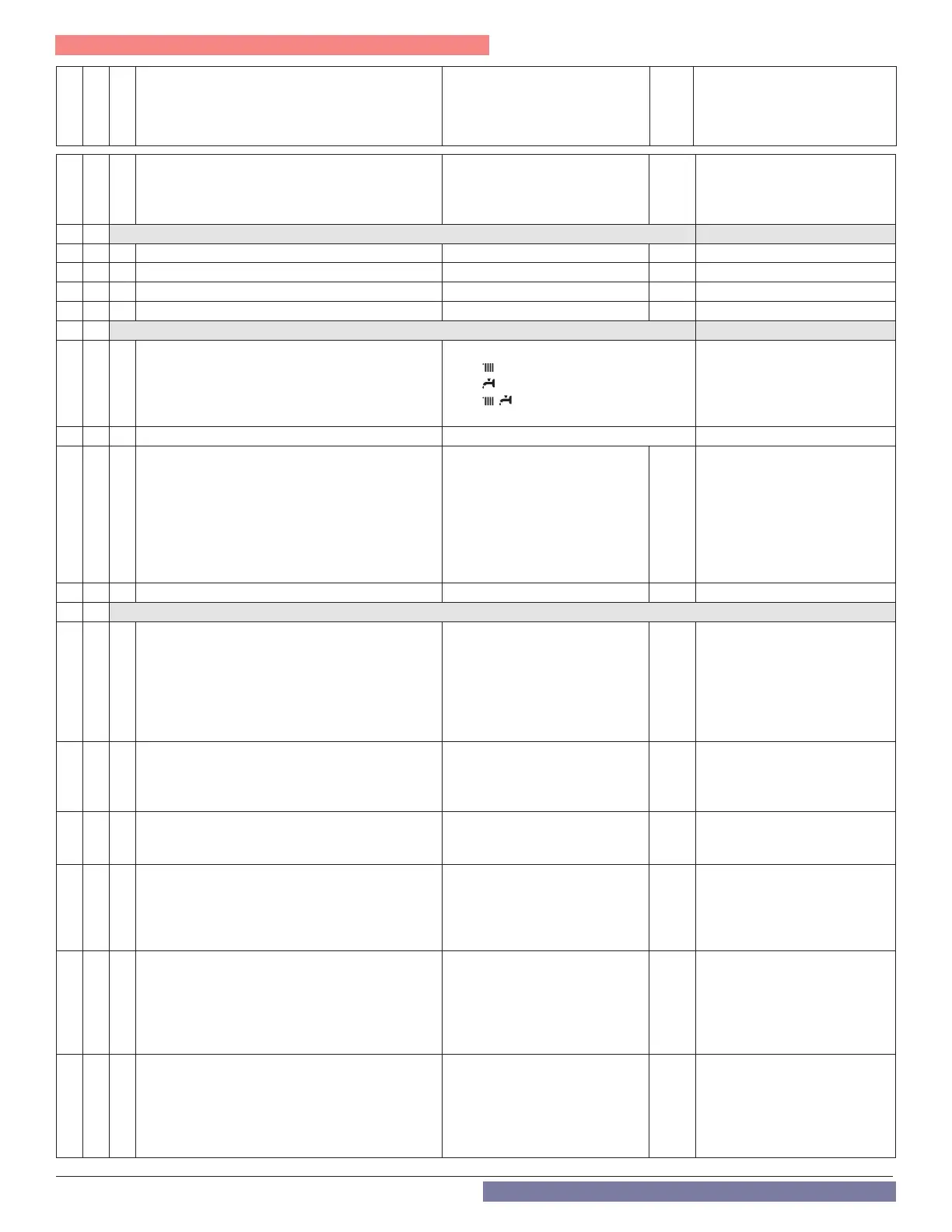
Menu
Sub-Menu
Parameter
Description Value
Default
Setting
2 5 8 Antilegionella frequency 24 - 720 (Hours), or 30 days
30
days
FTVN Non-Combi = Activated
when the boiler is connected to
a tank by an NTC sensor.
(Parameter 228 = 1)
2 6 BOILER MANUAL SETTINGS Only to test components
2 6 0 Manual mode activation 0 = OFF, 1 = ON 0
2 6 1 Boiler pump control 0 = OFF, 1 = ON 0 Set Parameter 260=1
2 6 2 Fan control 0 = OFF, 1 = ON 0 Set Parameter 260=1
2 6 3 3 way valve control 0 = DHW, 1 = Heating 0 Set Parameter 260=1
2 7 TEST & UTILITIES
2 7 0 Test Mode
TEST+ = Max Heating power
TEST+ = Max DHW power
TEST+
= Minimum power.
TEST Mode can also be activated
by pressing the Reset button
for 10 seconds. Test Mode
deactivates after 30 minutes or
by pressing Reset.
2 7 1 Air-purge cycle 0 = OFF, 1 = ON See First Ignition section.
2 7 4 Floor drying cycle
0 = OFF
1 = Functional Heating
2 = Curing Heating
3 = Functional Heating + Curing
Heating
4 = Curing Heating + Functional
Heating
5 = Manual
0
2 7 5 Floor dry Supply setpoint temperature 77 - 140°F 131
2 8 RESET FACTORY SETTINGS
2 8 0
Automatically resets all parameters to the factory
defaults.
WARNING: Always check PCB settings if restoring
factory default settings on a replacement
controller. Replacement controllers have generic
settings that may not be specic to the boiler
model.
Reset: OK = yes, ESC = no
To Reset all parameter settings,
press the OK button.
2 10 0 CH On Dierential Temperature 0 - 36
o
F 11
Determines how much the boiler
outlet temperature can drop
below target before turning the
boiler back on.
2 10 1 DHW Modulation Setpoint 68 - 179
o
F 179
Boiler target temperature during
a DHW demand. Not applicable
for Combi models.
2 10 2 DHW On Dierential Temperature 0 - 36
o
F 0
Determines how much the
DHW storage tank temperature
can drop below target before
initiating a DHW demand. Only
applicable when 2.2.8 = 1.
2 10 3 Emergency Setpoint 68 - 179
o
F 113
Sets Follower boiler
operating temperature when
communication with the Master
is lost, or when the System
Sensor is disconnected. See
Cascade Instruction Manual.
2 10 4 CH/DHW Shifting Priority Timer 0 - 1440 minutes 45
Determines how long a CH or
DHW demand can last before
the priority is switched. First
priority is with DHW. A value of
0 keeps the priority with DHW
indenitely.
Part 9 - Controls



 To Next Page