22
6. RECOMMENDED SETTINGS
6.3. Tape playback and record
Rear panel connections
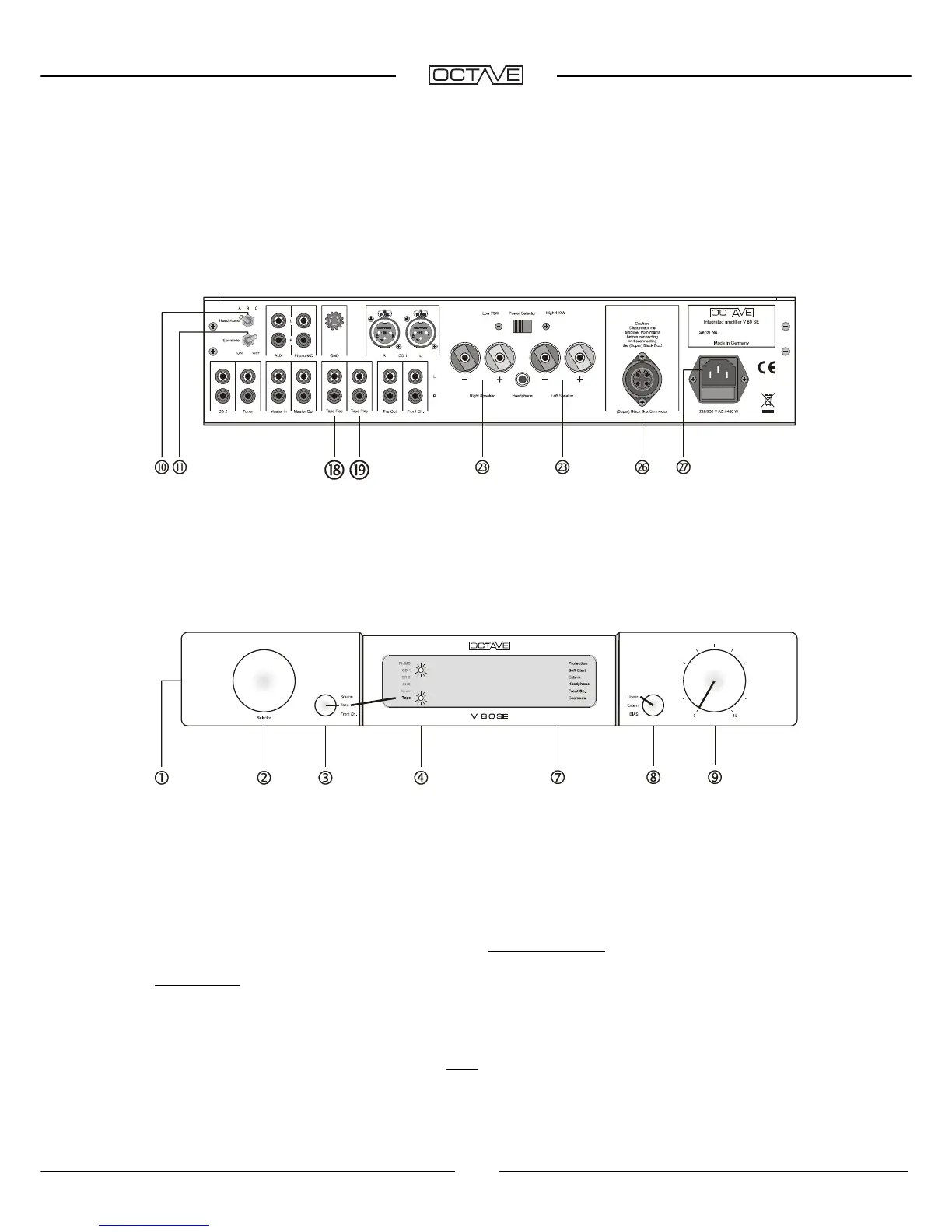
Headphone [10]
switch left = off, Ecomode [11] switch right = off.
Connect the tape recorder output (Line Out) to Tape Play [19]. Connect the tape recorder input
(Line In) to Tape Rec [16] (left channel: white, right channel: red).
Speaker cables and power cable are connected to [23] + [27].
Front panel switch settings
Power switch [1] on "I", mode selector [8] on Linear“, volume control [9] initially on "0"
Tape playback
Secondary selector switch [3] on Tape“. The Tape LED [4] illuminates. Tape playback will take
place with these settings. (The position of the input selector [2] is irrelevant).
Tape record
Turn input selector [2] to the input from which you wish to record. The source selected with the
input selector [2] is always sent to Tape Rec [18]. It does not matter whether the secondary input
selector [3] is in the Source or Tape position.
Please note: The "Front Channel" signal is also available at the Record output [18]. Off-tape
monitoring is not possible in this setting. (See Chapter 6.7.)
Off-tape monitoring/Tape Monitor
The off-tape monitoring facility allows you to listen to the recorded signal in real-time while a
recording is taking place. To do this, you must turn the secondary input selector to Tape [3].
Switching between Source and Tape will not affect the actual recording.


 To Next Page
 Loading...