23
6. RECOMMENDED SETTINGS
6.4. Front Channel replay (multichannel)
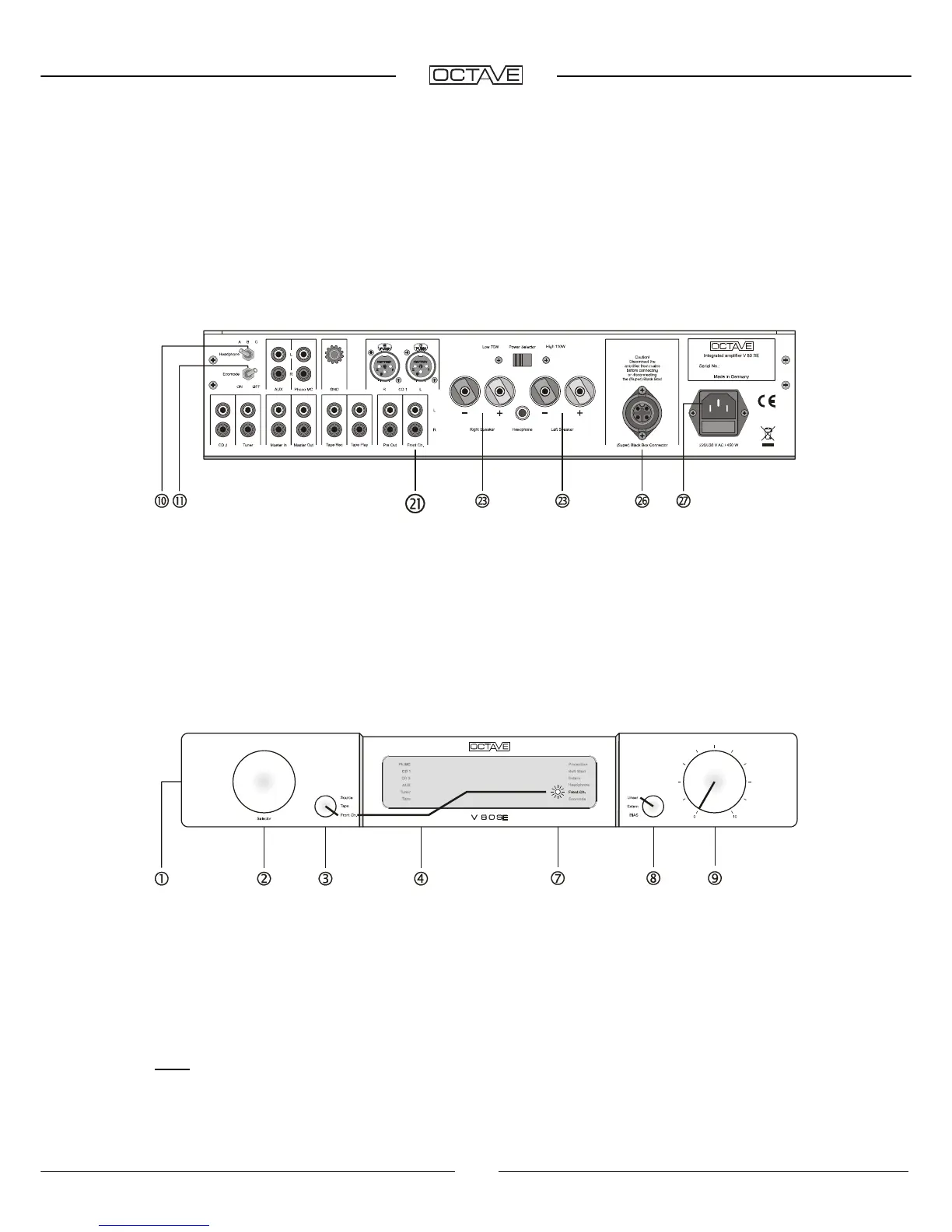
Rear panel connections
Headphone [10]
switch left = off, Ecomode [11] switch right = off. Connect the analogue Front R +
L outputs on your multichannel receiver/DVD player to the Front Channel R + L [21] inputs on your
amplifier. Speaker cables and power cable are connected to [23] + [27].
Front panel switch settings
Power switch [1] on "I", secondary selector [3] on "Front Ch.". The input selector [2] does not
operate and there are no LEDs illuminated in [4]. The Front Ch LED illuminates in [7]. Mode
selector [8] on Linear.
This mode bypasses the V 80 SE's volume control. The volume of a multichannel system is
normally controlled digitally by the receiver/processor preamplifier. Please ensure therefore that
your multichannel unit is switched on and that its volume setting is not too high when you activate
the "Front Channel" function.
Note: Although you can record the multichannel input signal via Tape, the tape monitor function is
not available, as turning the secondary input selector [3] to Tape switches the "Front Ch." off.


 To Next Page
 Loading...