EN-45Ohaus Discovery
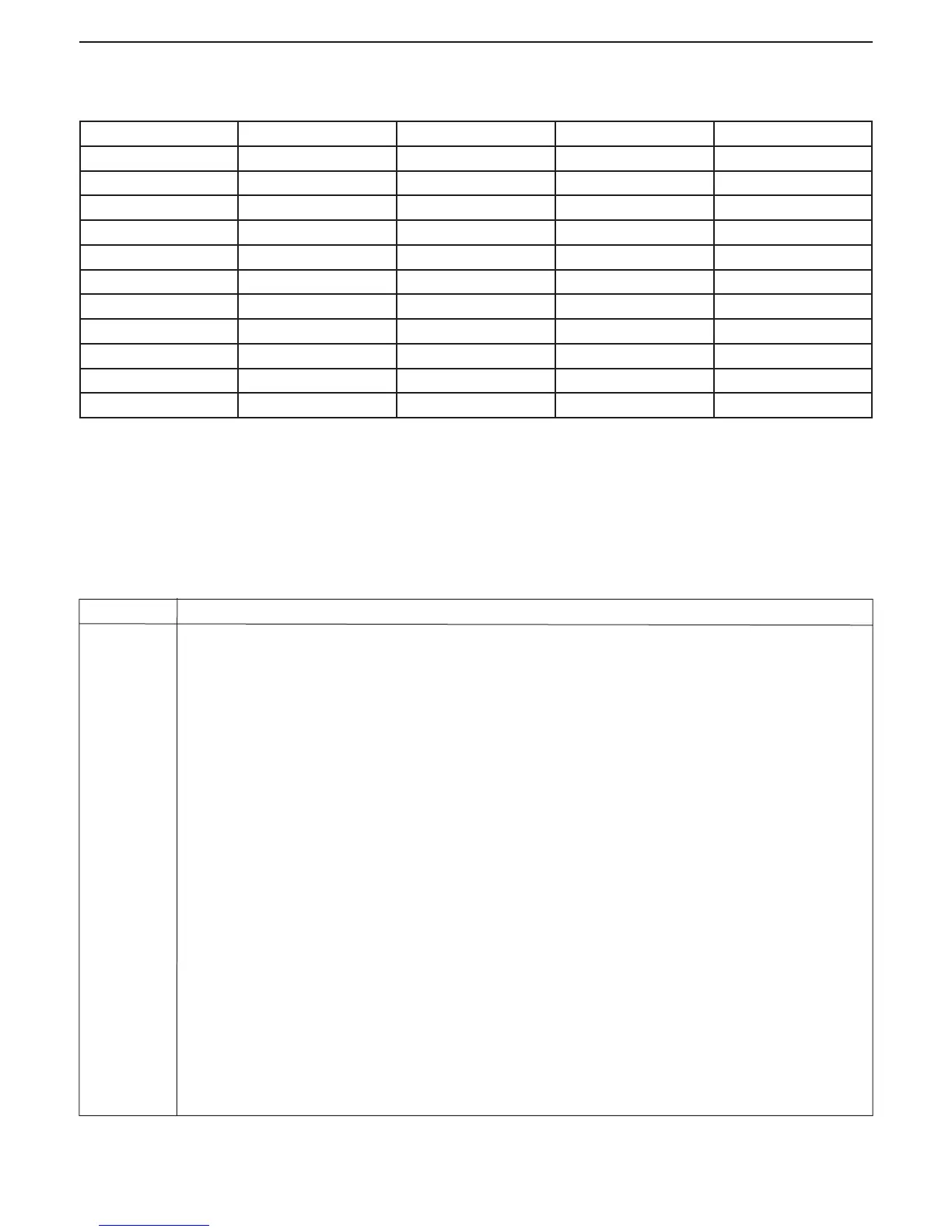
5.3 Capacity x Readability
Unit DV114C DV214C DV314C DV215CD
milligram 110000.0000 x 0.1 210000.0000 x 0.1 310000.0000 x 0.1 81000.000 x 0.01
gram 110 x 0.0001 210 x 0.0001 310 x 0.0001 81.000000 x 0.00001
ounce 3.8801356 x 0.000005 7.4075316 x 0.000005 10.9349276 x 0.000005 2.857191 x 0.0000005
carat 550.000000 x 0.0005 1050 x 0.0005 1550 x 0.0005 405.000000 x 0.00005
pennyweight 70.731639 x 0.0001 135.033129 x 0.0001 199.334619 x 0.0001 52.084207 x 0.00001
ounce troy 3.5365825 x 0.000005 6.7516575 x 0.000005 9.9667325 x 0.000005 2.604211 x 0.0000005
grain 1697.5596 x 0.002 3240.7956 x 0.002 4784.0316 x 0.002 1250.02116 x 0.0002
tael (Hong Kong) 2.9388975 x 0.000005 5.6106225 x 0.000005 8.2823475 x 0.000005 2.1640973 x 0.0000005
tael (Singapore) 2.9101017 x 0.000005 5.5556487 x 0.000005 8.2011957 x 0.000005 2.1428931 x 0.0000005
tael (Taiwan) 2.9333337 x 0.000005 5.6000007 x 0.000005 8.2666677 x 0.000005 2.160000 x 0.0000005
momme 29.333337 x 0.00005 56.000007 x 0.00005 82.666677 x 0.00005 21.600003 x 0.000005
5.4 Communication
The balance is equipped with an RS232 interface. Connecting the balance to a computer enables you to operate the balance from the com-
puter, as well as receive data such as displayed weight.
5.4.1 Commands
Commands listed in the following table will be acknowledged by the balance. The balance will return “ES” for invalid commands.
Command Function
IP Immediate Print of displayed weight (stable or unstable).
P Print displayed weight (stable or unstable).
CP Continuous Print. 0P ends Continous Print.
SP Print displayed stable weight.
SLP Auto Print stable non-zero displayed weight.
SLZP Auto Print stable non-zero weight and stable zero reading.
xP Interval Print x = Print Interval (1-3600 seconds) 0P ends Interval Print.
H Enter Print Header Lines
Z Same as pressing Zero Key
T Same as pressing Tare Key.
xT Establish a preset Tare value in grams. X= preset tare value in grams. To clear tare, enter 0 for x.
PT Prints Tare weight stored in memory.
PM Print current mode (weighing mode).
M Scroll to the next enabled mode.
PU Print current weighing unit.
U Scroll to the next enabled unit.
OFF Turns balance OFF.
ON Turns balance on.
PSN Print Serial Number.
PV Print Version: name, software revision and LFT ON (if LFT is set ON).
x# Set PC reference weight (x) in grams. (Must have an APW stored.)
P# Print PC reference weight.
80104130.indd Sec1:45 2011/11/25 9:08:41





 To Next Page