EN-8 SCOUT
TM
SJX SERIES BALANCES
3.8 Totalize Mode
This mode allows the user to store a series of weight measurements. Totalize mode has been
initiated when the symbol “∑” is displayed and the current unit is displayed.
Notes: Only positive numbers are totalized.
1. Press and hold Mode until [total] (Totalization) is displayed. [CLr.tot] will then be displayed.
2. Press Yes or No key to clear the current totalized data or not. When a weight is added to the
scale the value is displayed.
3. If required, place an empty container on the pan and press Tare. Add the first item, its weight
is displayed.
Press Function to store the weight, the “∑” symbol will flash and the display will show the
total weight.
4. Press Tare (or remove the weight in previous operation) and add the next item. The scale will
display its weight.
Press Function to store its weight. The “∑” symbol will flash and the new total weight will be
displayed.
5. Repeat step 4 for all of the items to be accumulated.
6. To clear the stored total press and hold Mode until [total] is displayed. When [Clr. tot] is
displayed, press Yes.
3.9 Density Mode
This mode allows the user to calculate the specific gravity of a sample when using the density
kit. Density mode has been initiated when “G” and the current unit is displayed.
The sample is weighed in air suspended from the hook and then weighed in water. The formula
is
𝑑𝑟𝑦 𝑤𝑒𝑖𝑔ℎ𝑡
𝑑𝑟𝑦 𝑤𝑒𝑖𝑔ℎ𝑡 − 𝑤𝑒𝑡 𝑤𝑒𝑖𝑔ℎ𝑡
Preparation
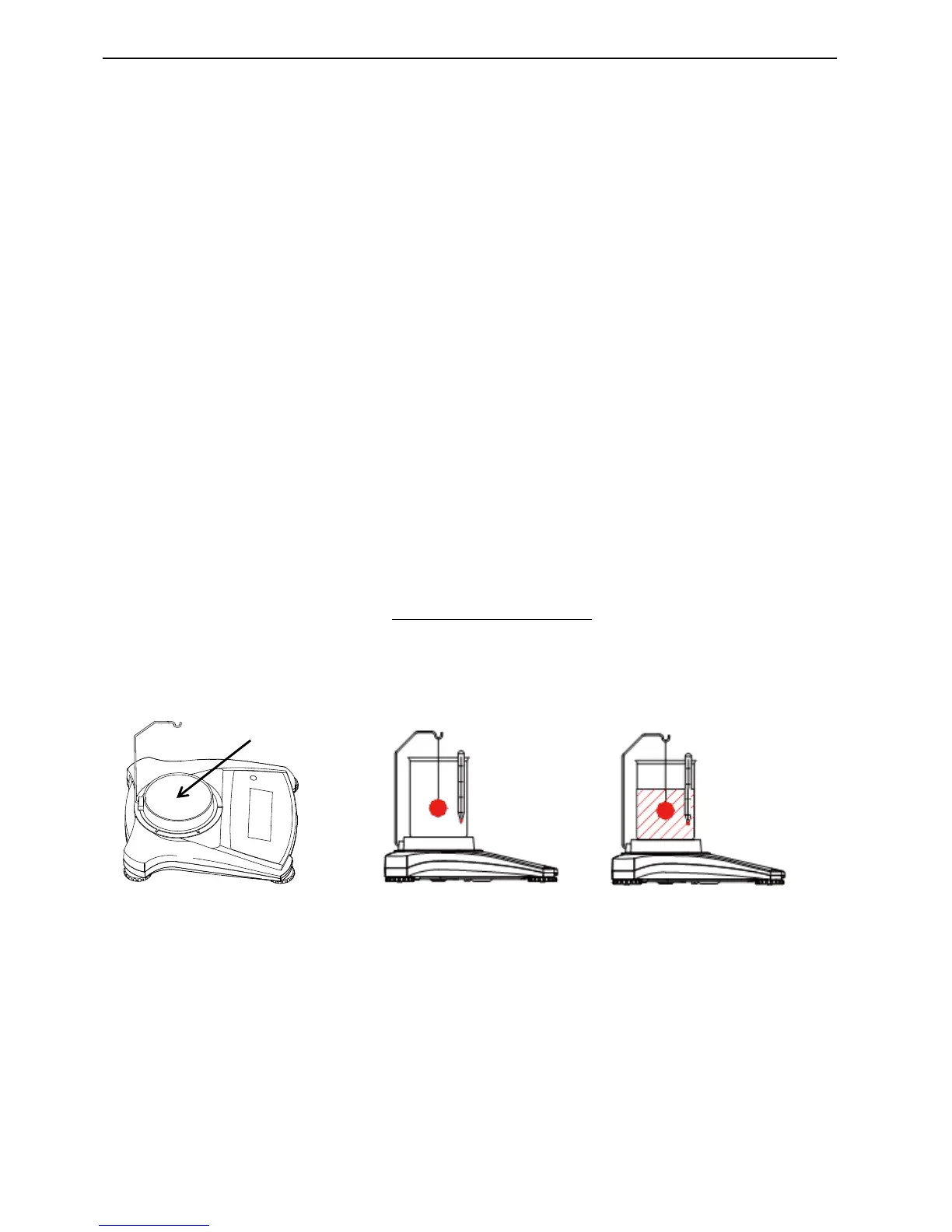
Prepare the balance as shown below. Remove the balance pan, insert the hook and install the
beaker stand (beaker is not supplied). Then press the Zero/On button to turn the balance on.
Figure 3-3. Density Setup
Density setup
1. Press and hold Mode until [SPEC.Gr] is displayed. [Air.wWt] will then be displayed.
2. Place the sample on the hook as described above and press Yes to store the dry weight
value. [wW.wWt] will then be displayed.
3. Suspend the sample in water and press Yes to store the wet weight value. The specific
gravity value is now displayed and “G” is blinking while the unit icon is turned off.
Notes: Specific Gravity has no unit of measure.
For large samples it is recommended to use the weighing below feature instead of the
hook.



 To Next Page