31
Chapter 9
| Settings |
9
Settings
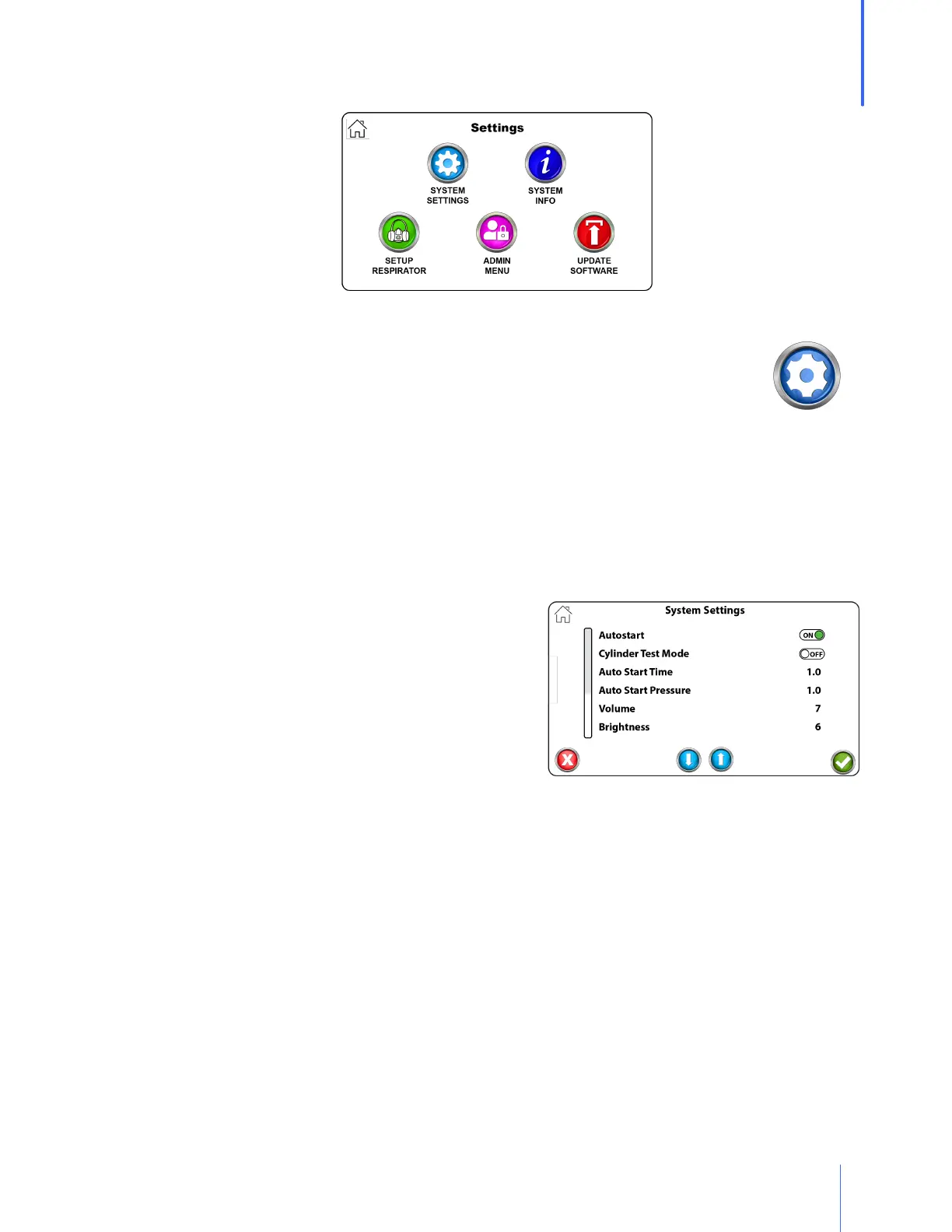
System Settings
Auto Start
o Auto Start is turned on by default.
o When this features is turned on, the QuantiFit2 assesses when the test subject
is ready for the test to begin.
o The test subject takes in a breath and holds it until the circle in the lower right corner turns
green.
o The test automatically begins.
o When this feature is turned off, each test step would initiate as soon as the operator or test
subject touches the check mark on the test screen.
Volume allows the operator to increase or decrease
the volume of the audio indicators that one might
hear when testing or entering test data. The settings
are 0 to 10, where 10 is the loudest.
Brightness allows the operator to increase or
decrease the brightness of the display. The settings
are 1 to 10, where 10 is the brightest.
Auto Print is turned on when the operator desires the test automatically to be printed upon
completion of a fit test.
Number of Prints allows the operator to select the number of prints when printing reports. To
be used when more than one copy is required.
Auto Advance
o When turned on, the auto advance feature will automatically advance to the next step after
a step has passed successfully.
o If the test step fails for any reason, the operator will be given the option to retry the step or
advance to the next step.
o When the auto advance is turned off, the operator must select the arrow button for the
next step, or the retry button when a retry is necessary.


 To Next Page