50
Chapter 18
| Settings | Options
18
Settings
Options
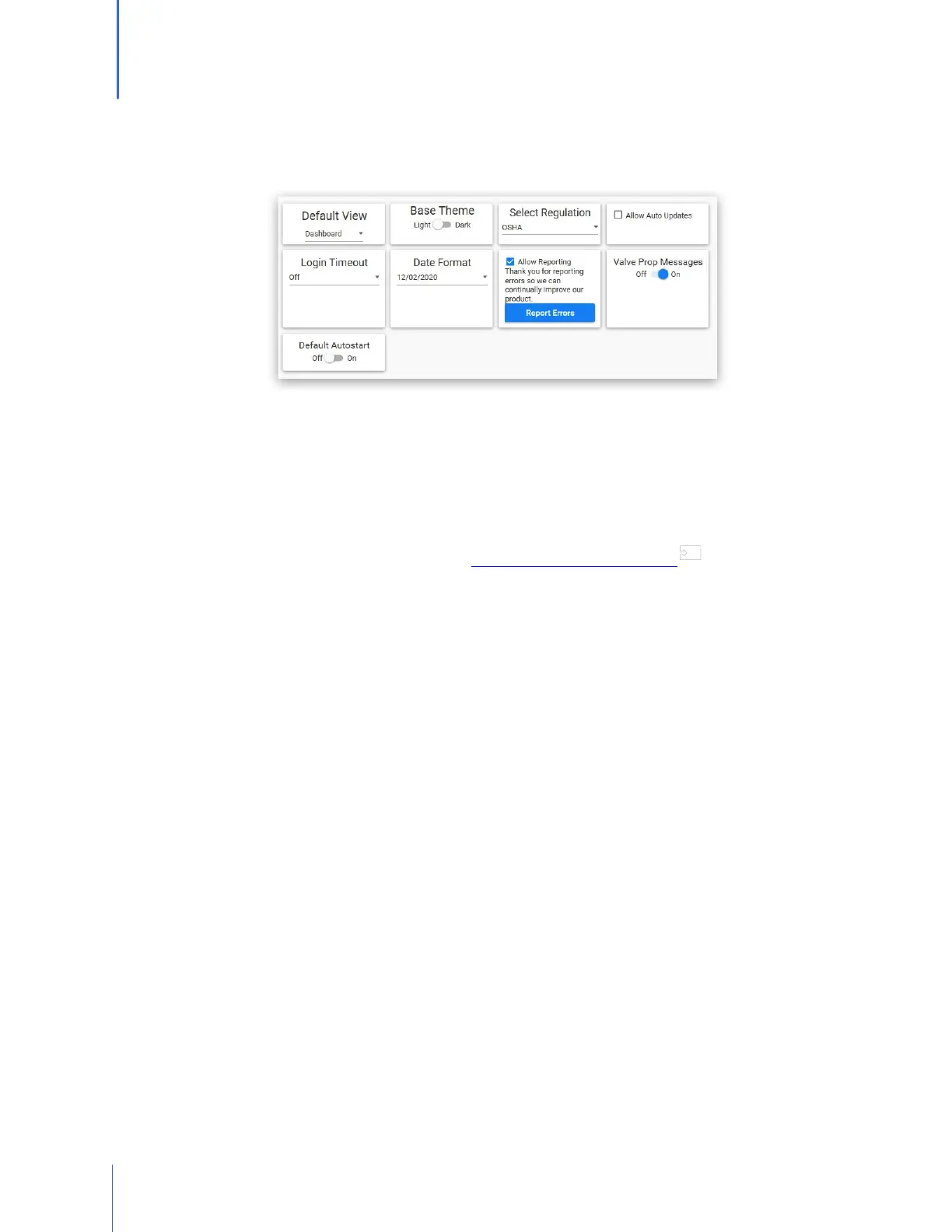
The options section offers flexibility as to how the software operates.
o Default View allows the Administrator to select which main screen should be shown when
the software is launched.
o Base Theme allows the Administrator to change the software view to light mode or dark
mode.
o Select Regulations allows the operator to choose a testing regulation other than the one
that was selected upon initial setup. See 27 Appendix E: Regulations for more
information.
o Allow Auto Updates will cause the software to check for updates each time the software is
opened .
o Login Timeout is defaulted to Off. By selecting a time increment, this will determine how
long the software can remain untouched before it automatically logs the Operator or
Administrator out.
o Date Format allows the Administrator to select the type of date format preferred.
(MM/DD/YYYY, DD/MM/YYYY, YYYY/MM/DD)
o Allow Reporting When this feature is allowed, the software will send errors to OHD. This
will help OHD to continue to refine the software, and it may help with troubleshooting
issues.
o Valve Prop Messages will universally turn the valve prop message on or off regardless of
respirator being used.
71


 To Next Page