42
Chapter 14
| Home Screen | Test Creator
14
Home Screen
Test Creator
To perform a fit test, it must be launched from the Test
Creator. The Test Creator is a simple guide to record
pertinent test information and to initiate the test.
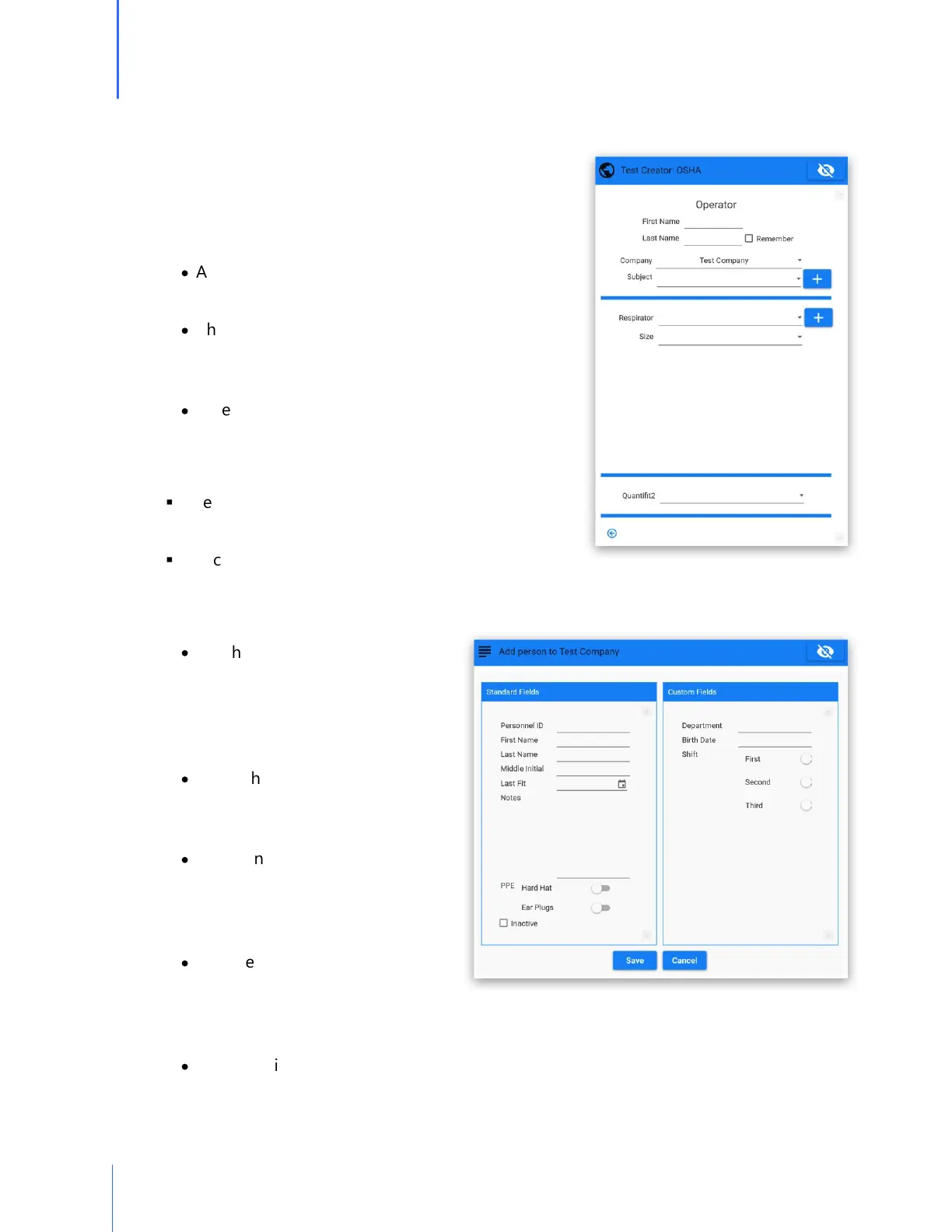
o Operator
·
Add first name and last name to the operator
selection.
·
Check the "Remember" box if the name is to be
remembered throughout the current testing
session.
·
When "Remember" is not checked, an operator's
name would need to be input for each test.
o Company
§
Select the company from which the testing is to be
performed.
§
The company can also be selected in the title bar of
the Home Screen.
o Subject
·
Put the computer cursor in this
field, and begin to type a person's
name (first name, last name). There
is a lookup that matches names
letters are entered.
·
When the correct person appears
in the field, move on to the
respirator selection.
·
A person may also be found by
using the field's drop-down arrow,
and scrolling through the list of
names.
·
If the test subject does not appear
in the list of names, click on the
"+" symbol to add a person. This will bring up the Add Person screen if that screen is
not already opened.
·
When the information has been added and the Save button is clicked, the added name
will appear in the Subject field.


 To Next Page