23
Chapter 5
| People |
5
People
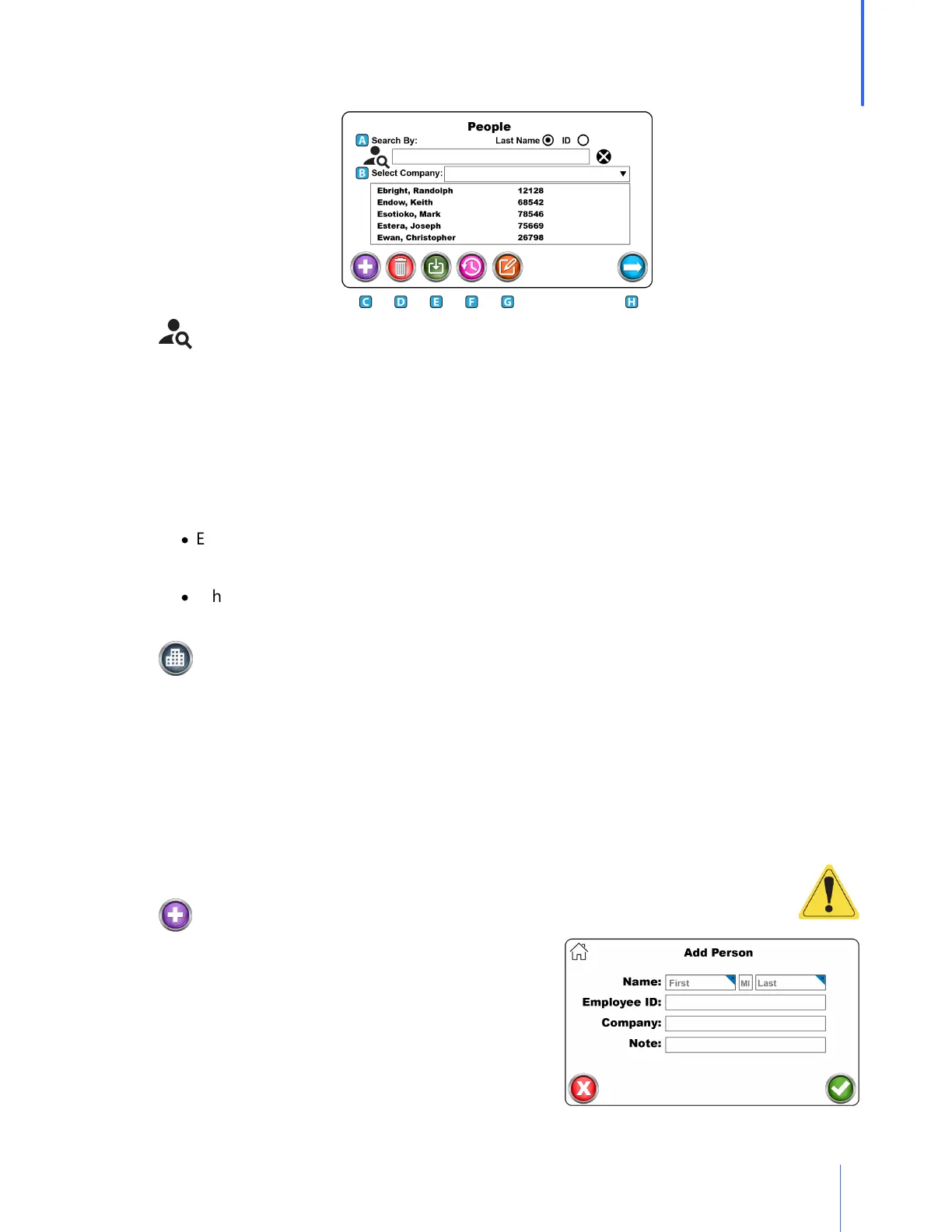
A. Search
o Test subjects may be searched by last name or by their personal ID.
o Click the radio button to be used for the search. The search will be defaulted to Last
Name.
o Press the X at the end of the search bar to reset all search criteria.
o Partial names and numbers may be used in the search. For example:
·
Enter an E in the search, and all those in the database with the last name starting with E
will be displayed.
·
When specifying a company and typing in an E, only those names starting with E and
within the company selection will be shown.
B. Company
o Company is intended to create a division among the test subjects who are entered into
the on-board database.
o To add a company to the QuantiFit2 database, type in a company name when adding a
test subject to the database.
A. The company will be saved automatically along with the test record.
B. CAUTION: When entering the name of a company, it is critical that it exactly matches
the previous entries, or a new company will be created.
C. Add
o The Add button will open a screen that will require
test subject information.
o The fields available are Name, ID, Company, Group
and Notes.



 To Next Page