48
Chapter 17
| Tests |
17
Tests
The testing sequence
o When initiating a test from Logic software:
·
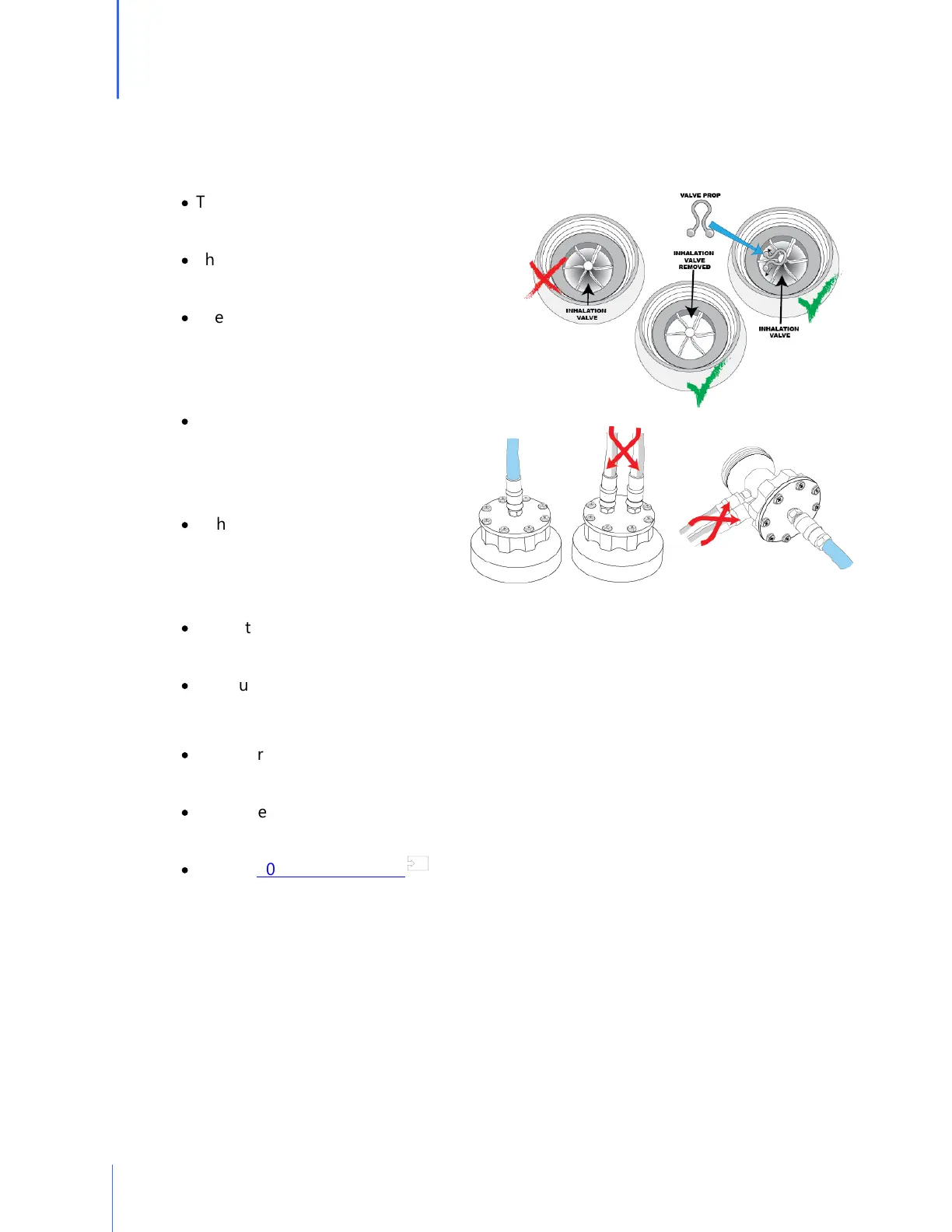
The software will display the inhalation
valve message reminder.
·
Then the software will display the tube
connection instructions.
·
The previous two screens can be
turned off by checking the box
next to "Hide these messages next
time."
·
The test subject will view a
message that says, "Device is in
remote mode. Please wait until the
Operator sets up the test."
·
If the daily verification check has
not been completed for the day,
the QuantiFit2 will prompt the user
to perform this check.
·
When the test is initiated, the test subject will see "Please review this information. If
correct, press the blue arrow to continue." (Name, size respirator, parameter, surrogate)
·
Test subject will then follow on-screen instructions to complete the test.
o If a test step should fail for any reason
·
The operator will be notified on the software test screen, and be given an option to
retry the step or save it (if a fit factor was calculated).
·
There are some troubleshooting suggestions that can be seen by clicking on the
question mark in the upper left of the test screen next to the Delete button.
·
See the 20 Troubleshooting section for more information.
54


 To Next Page