Chapter 5 71
Operation
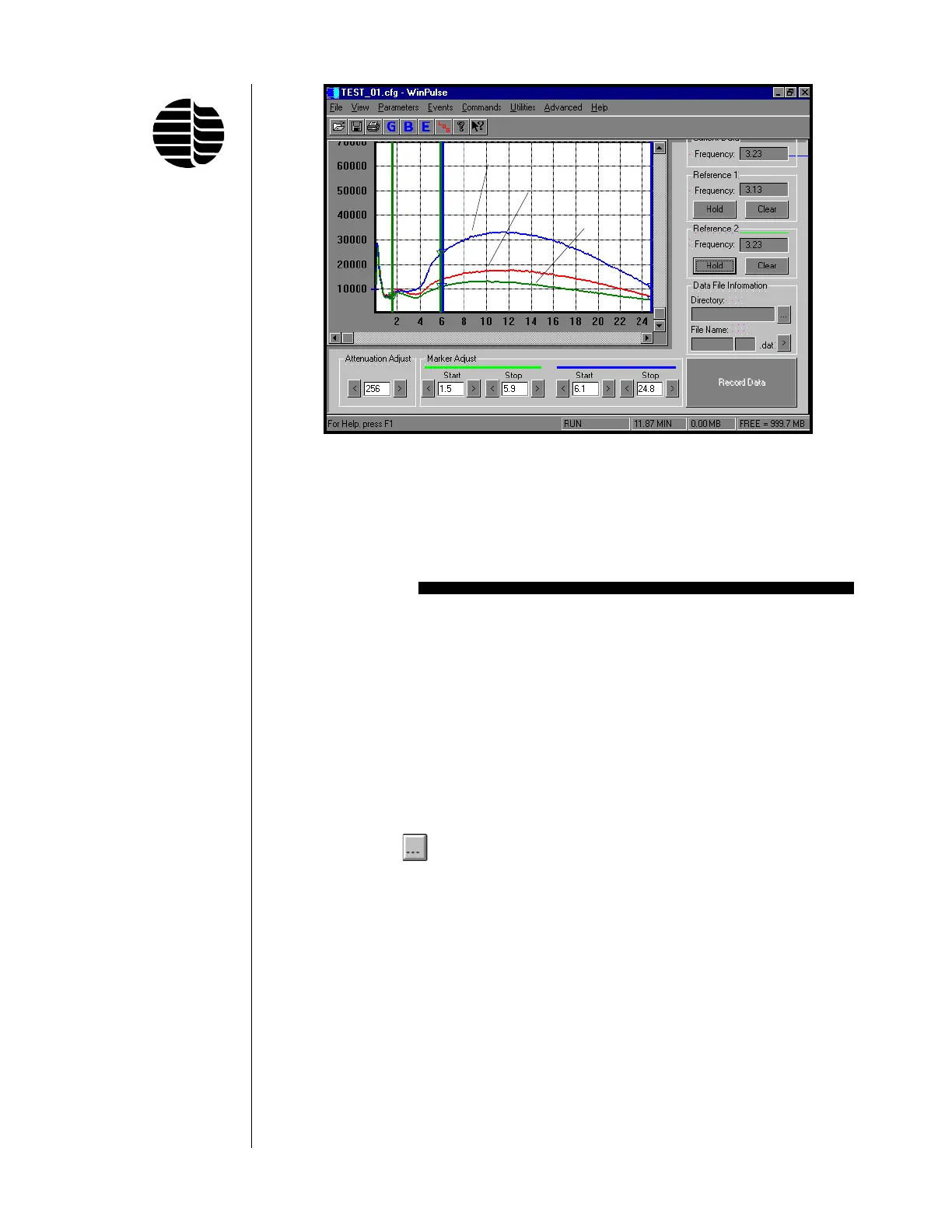
Figure 5.9. WinPulse Sulfur Emissions Associated With Each Peak in the
Test Standard Chromatogram
Thimet
Chorpyrifos
Diazinon
Recording WinPulse Files to be Viewed with
PFPDView
WinPulse data can be recorded in a format that can be viewed and manipulated in
PFPDView. PFPDView is a software option package for the Model 5380 PFPD.
This program can be used to reprocess (post-run) either portions of or an entire
chromatographic run under different PFPD operational parameters without the need
for rerunning the chromatographic analysis.
1. Locate the Data File Information section on the WinPulse main screen. This
section will be used to define the directory and file name for the recorded
WinPulse files.
2. Click on the
button. Select a location and name for the WinPulse files.
The file name may be up to five characters long. Click on Save. The new file
name will now appear in the File Name section of the WinPulse main screen.
The file name will be followed by a three digit extension such as 001. The
extension will increment by one for each additional file that is recorded (e.g.,
002, 003, 004, etc.).
3. To record the data manually (without the remote start cable), click on the
Record button at the beginning of a GC run. To stop recording, click on the
Stop Record button.
4. To record the data using the remote start cable, make sure that the remote start
cable is installed correctly (see “Installing the Model 5380 Detector Control-
ler” in Chapter 4).



 To Next Page