pro920WT User’s Guide> 64
S
EPARATING
QUEUED
PRINT
JOBS
When you share a printer with other users it can be useful to print a
special page between print jobs to help locate each user’s job in a
paper stack at the printer. In Windows this page is called a
“separator page”. On the Mac it is called a “cover page”.
NOTE
Do not confuse Cover Page with “Cover Print”. Cover Print is when
the first page (cover) of a print job is fed from one paper tray, and
the remaining pages of the print job are fed from a different tray.
See “Cover print” on page 66.
W
INDOWS
SEPARATOR
PAGE
The separator page is set from the printer driver’s default properties
window. Access to this is directly from Windows, not from within
your application program. See “Changing the driver defaults” on
page 52.
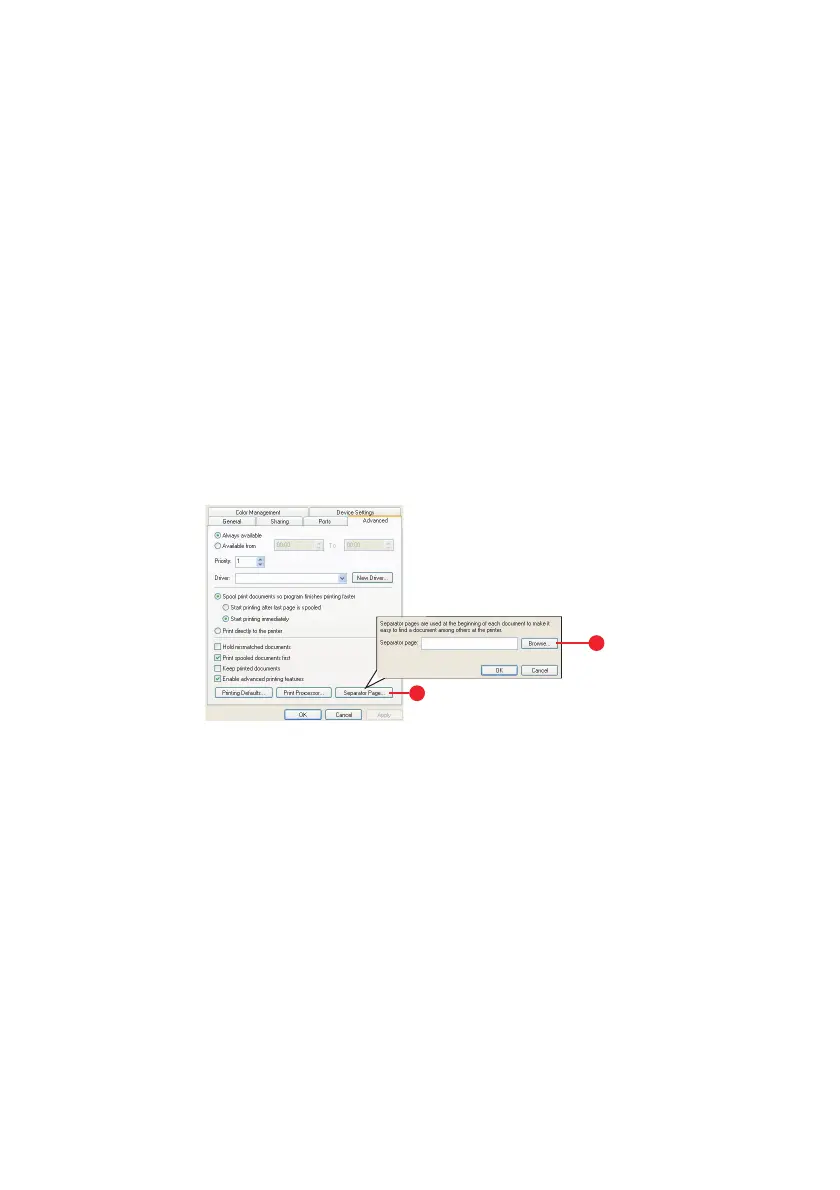
1. In the driver’s Advanced tab click the Separator Page…
button (1).
2. Click Browse (2) and navigate to a file containing an image
of the separator page you wish to use, then click OK.
1
2








 To Next Page