24/02/2020 8 / 24 923650001_09_008.doc
• To make a function test of all luminaires or a specific zone choose “MAKE A FUNCTION
TEST”
• “ZONE IN TEST” shows which zones are on a function or autonomy test
• “POINTS IN TEST” shows which points are on a function or autonomy test
• “TEST LED” this option turns on all indication LEDs to detect any malfunction (of the leds)
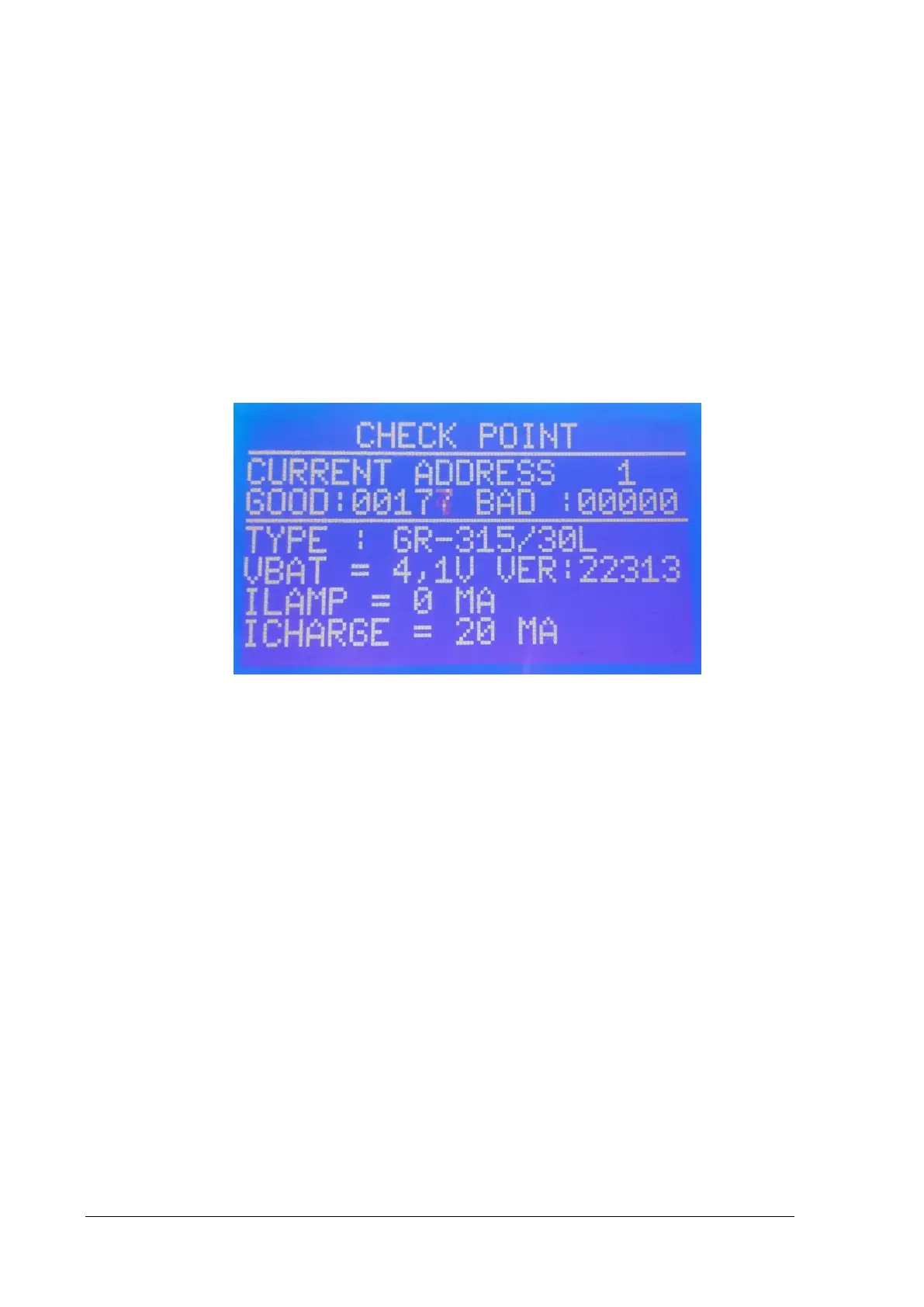
• “CHECK POINT” this option you can check the communication and the data of each point
See the picture below
Figure 2-8
The current address can change from “UP”, “DOWN” keys.
The line below shows the number of the good and bad packet communications.
If the communication with the luminaire is good the specifications of each point is displayed. For
example, in figure 2-5 you can see the type of the luminaire, voltage of the battery ( VBAT), software
version of the luminaire (VER), lamp current (ILAMP) and battery charge current ( ICHARGE).
If you press “RIGHT” the LCD shows possible faults the luminaire, like, “LAMP” (lamp fault), “AC”
(main power absent), “CHARGER” (charger fault), “BAT” (battery fault), “CAP” (autonomy fault), “CUT
OFF” (battery cut off).


 To Next Page