EasyManua.ls Logo

Olympus BHTU - Observation Tube; Interpupillary Distance Adjustment; Diopter Adjustment; Light Path Selector

Olympus BHTU
22 pages
Print Icon
To Next Page IconTo Next Page
To Previous Page IconTo Previous Page
Loading...
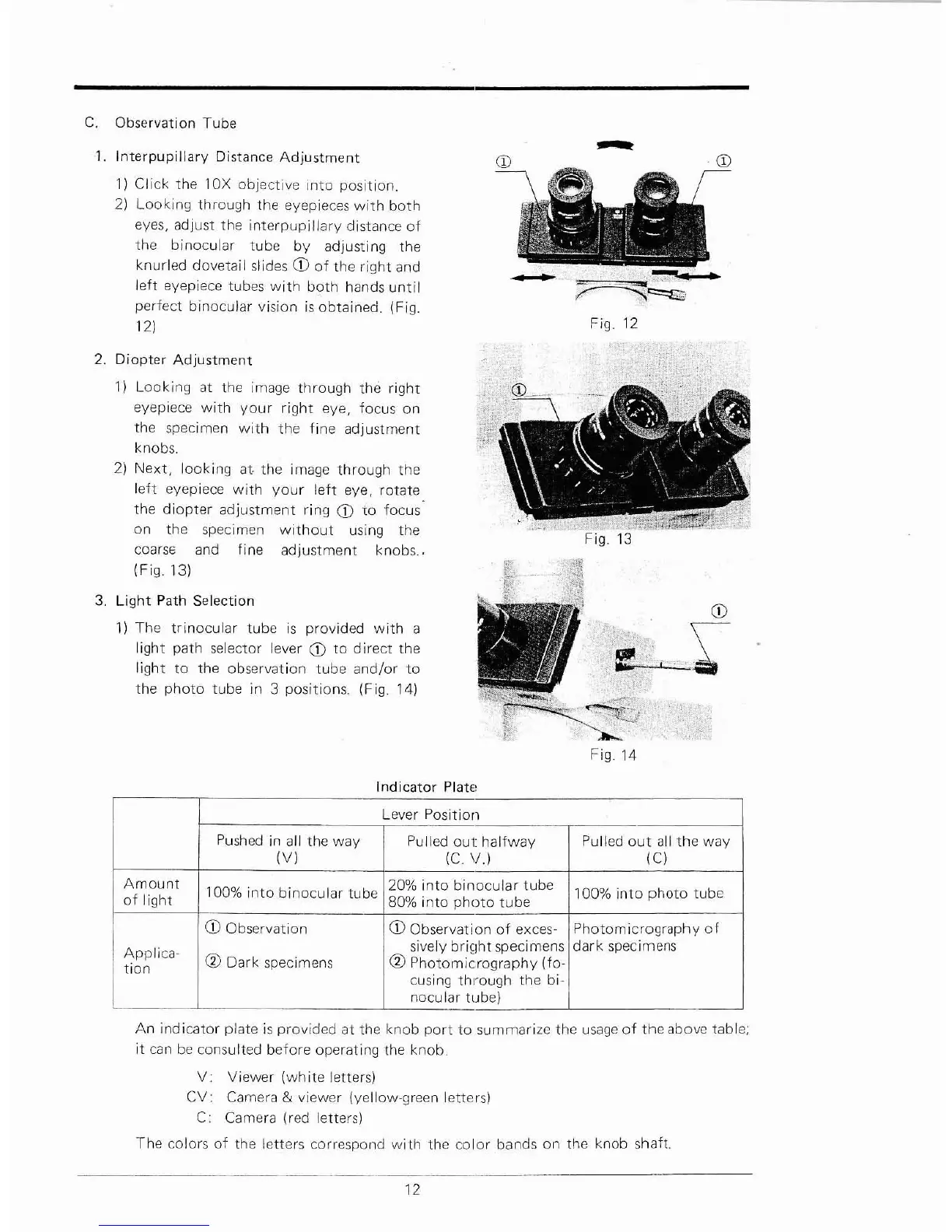
c.
Observation Tube
1.
Interpupillary
Distance
Adjustment
1}
Click
the
lOX
objective
into
position.
2)
Looking
through the eyepieces
with
both
eyes, adjust the
interpupillary
distance
of
the
binocular
tube
by
adjusting the
knurled dovetail slides
CD
of
the
right
and
left
eyepiece tubes
with
b9th
hands
until
perfect
binocular
vision
is
obtained. {Fig.
121
-
Fig. 12
2.
Diopter
Adjustment
1)
Looking
at the image
through
the
right
eyepiece
with
your
right
eye, focus on
the specimen
with
the
fine
adjustment
knobs.
21
Next,
looking
at
the image
through
the
left
eyepiece
with
your
left
eye, rotate
the
diopter
adjustment
ring
CD
to
focus
on the specimen
without
using the
coarSE
and fine
adjustment
knobs..
(Fig.
131
3.
Light
Path Selection
1)
The
trinocular
tube
is
provided
with
a
light
path selector lever
CD
to
direct
the
light
to
the observation
tube
and/or
to
the
photo
tube in 3 positions. (Fig.
141
Indicator
Plate
~J
./11
tii
-
,,~
&,~
:t
\'i~
,
1lIII\,'
~
_f'~"
~
.~
-.:.$
[1
'
Fig. 14
CD
r
Lever Position
Pushed
in
all the
way
Pulled out:
halfway
Pulled
out
all
the
way
(VI
(C.
11.1
(C)
Amount
100%
into
binocular
tube
20%
into
binocular
tube
100%
into
photo
tube
of
light
80%
into
photo
tube
CD
Observation
CD
Observation
of
exces-
Photom icrography
of
Applica·
sively
bri~lht
specimens
dark
specimens
CV
Dark
specimens
~
Photomicrography
(fo·
tion
cusing
through
the bi-
nocular
tube)
An
indicator
plate
is
provided at the knob
port
to
summarize the
usage
of
the
above table;
it
can
be
consulted before operating the
knob
V:
Viewer
(white
letters)
CV:
Camera & viewer (yellow-green letters)
C: Camera (red letters)
The
colors
of
the letters correspond wi
th
the
color
bands
on
the knob shaft.
12

Related product manuals