5
61
1
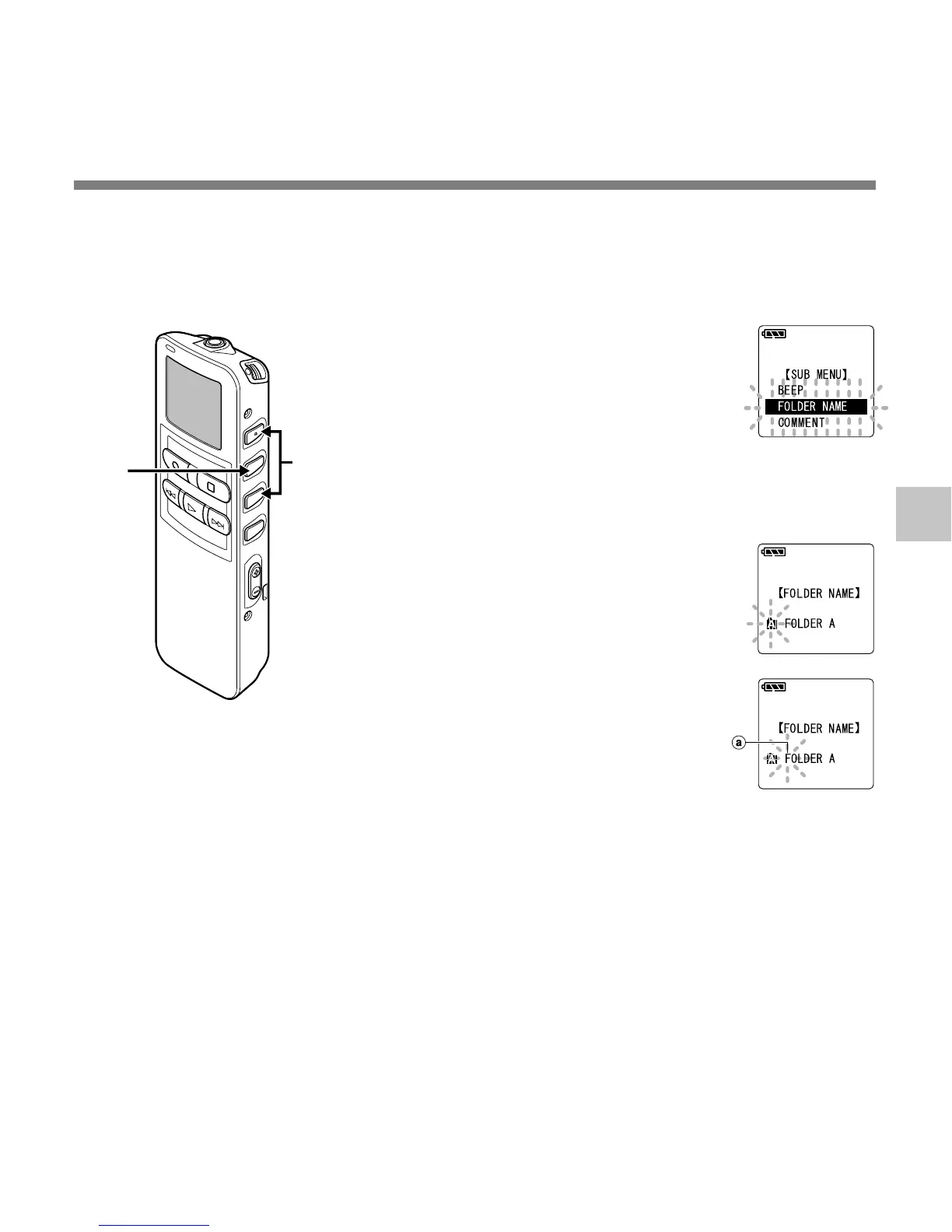
Press the 3 or 2 button in the
sub menu screen, and select
the “FOLDER NAME”.
See ☞ P.17 and 19 regarding the sub
menu.
2
Press the MENU/SET button.
The folder name setup process
begins.
3
Press the 3 or 2 button to
choose the folder you want to
name.
4
Press the MENU/SET button to
accept the chosen folder.
a Current character being entered (a
space is highlighted and blinks.)
5
Press the 3 or 2 button to
choose characters.
The recorder assigns the following
buttons to inputting procedures.
1,3
2,4
Assigning Folder Names (FOLDER NAME)
Assigning Folder Names (FOLDER NAME)
The 5 folders on the recorder (Folder A to Folder E) can be easily renamed. The folder
name is limited to 12 characters each. Frequently used names such as “dictation (DICT.)”,
“meeting (MEETING)”and “(SCHEDULE)” are pre-set in a template.



 To Next Page