41
4
2,4
1,3,5
6
Continuous Playback (ALL PLAY)
This function allows you to listen to all your recordings of one folder in one go without any stop
between the files.
Continuous Playback (ALL PLAY)
1
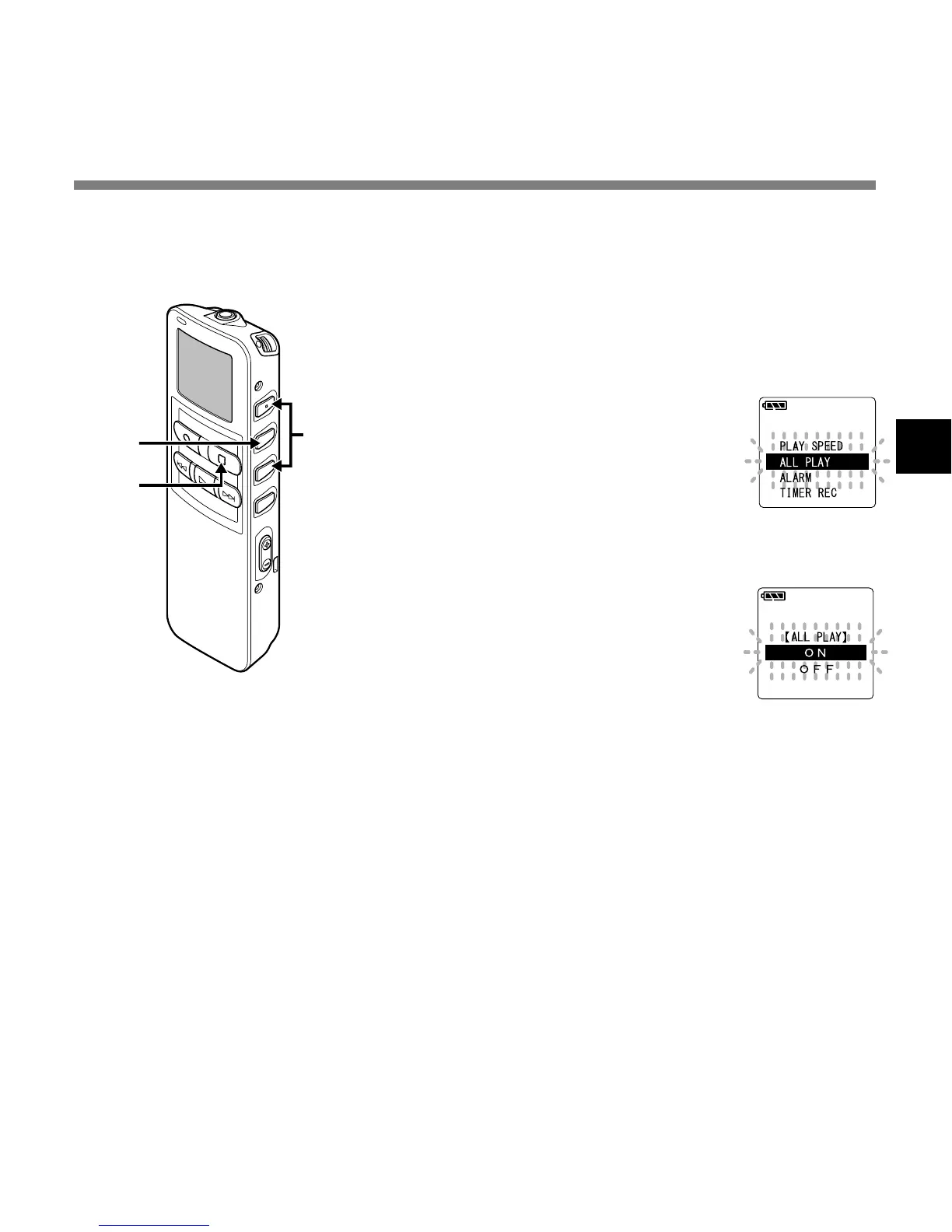
Press and hold the MENU/SET
button for 1 second or longer.
The main menu opens (☞ P.16,18).
2
Press the 3 or 2 button to
choose “ALL PLAY”.
3
Press the MENU/SET button.
The continuous playback setup
process begins.
4
Press the 3 or 2 button to
choose between “ON” and
“OFF”.
ON: Continuous playback.
OFF: Returns to playback with stop
between single files.
5
Press the MENU/SET button
to complete the setup screen.
6
Press the STOP button to close
the main menu.
....................................................................................................................................................
Note
After playback of last file in the folder, “END” appears on the screen and playback stops automatically.



 To Next Page