18
EN
Playback/Erasing
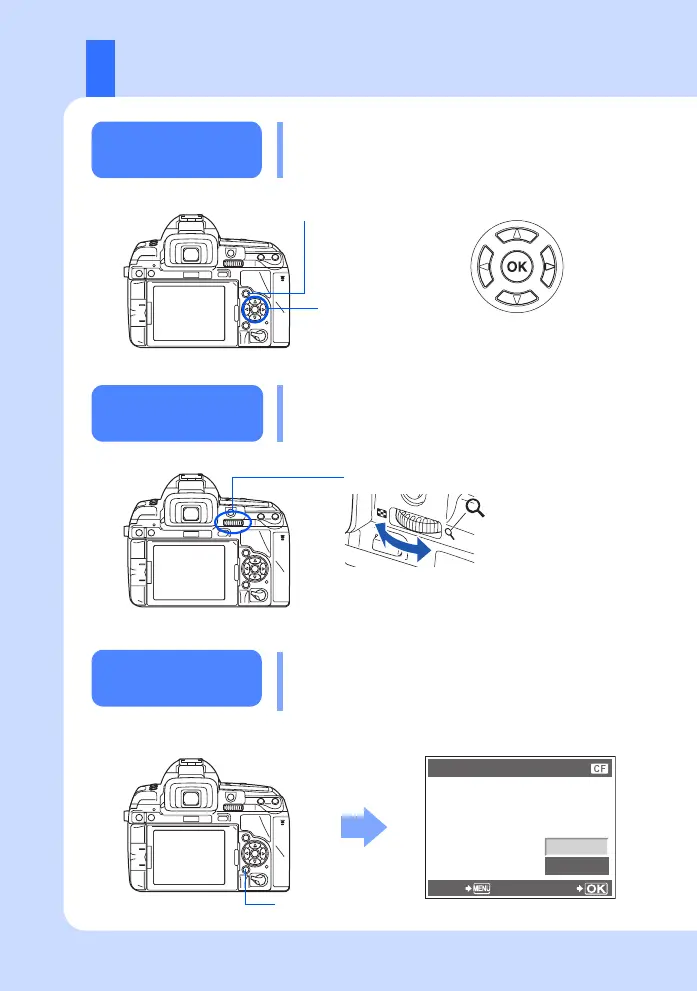
Displays the
previous
frame
Displays the
next frame
q button
Each time you turn the main dial towards U, the
image is incrementally enlarged from 2× to 14×.
Arrow pad
Main dial
ERASE
YES
NO
BACK SET
D button
Playing back
images
Pressing the q button displays the last picture
taken.
Close-up
playback
Erasing images
Play back the image you want to erase and press
the D button.
Use ac to select [YES] and press the i
button to erase.
Use k to forward the frames.
s0033_e_00_0_unified.book 18 ページ 2010年11月16日 火曜日 午後5時24分



 To Next Page