68
EN
4
Record mode, white balance, and picture mode
WB compensation
This function lets you make fine changes to the auto WB, preset WB settings and the one-
touch WB.
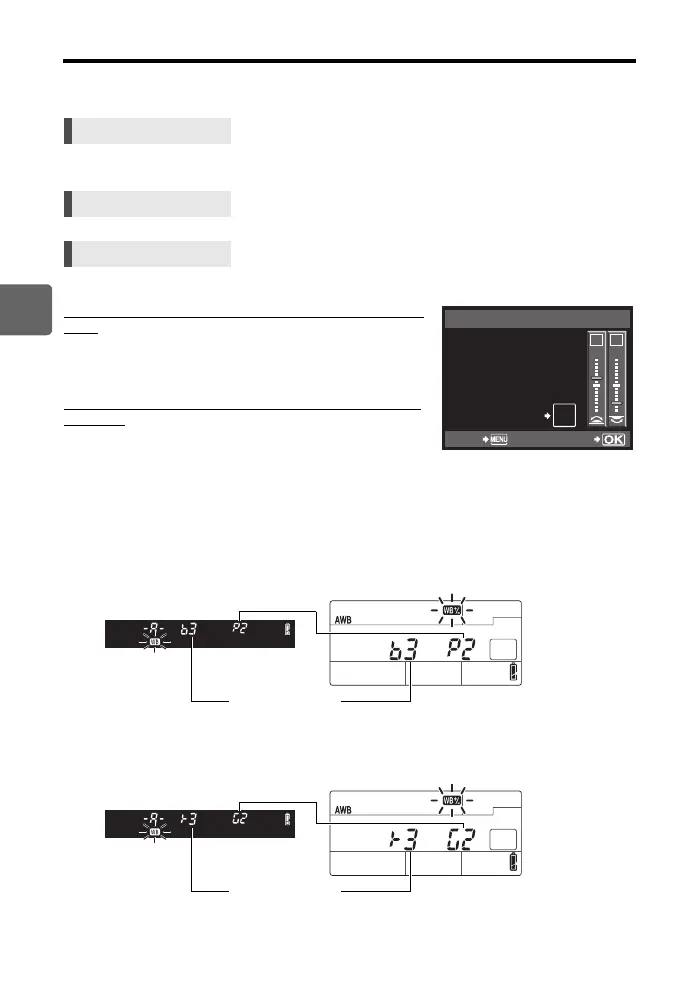
• Use the sub dial to set in the A direction or the main dial to set in the G direction.
• Select the white balance to adjust and press d.
Adjusting the white balance in the A direction (Amber-
Blue)
Depending on the original WB conditions, the image will
become more amber when adjusted toward +, and bluer
when adjusted toward –.
Adjusting the white balance in the G direction (Green-
Magenta)
Depending on the original WB conditions, the image will
become greener when adjusted toward +, and magenta
when adjusted toward –.
• The white balance can be adjusted in 7 increments in
each direction.
Setting display
e.g. 1) When the A direction and G direction are each adjusted toward –
e.g. 2) When the A direction and G direction are each adjusted toward +
Direct button WB + Fk: adjust in A direction/
j: adjust in G direction
Super control panel ip: [>]
Menu MENU[c][X][WB]
Viewfinder Control panel
Viewfinder Control panel
AUTO
>
SET
G
–
5
A
+
2
WB PREVIEW
AEL
AFL
BACK
Direct buttons setting screen
Adjust toward A: -3
Adjust toward G: -2
Adjust toward A: +3
Adjust toward G: +2
s0033_e_00_0_unified.book 68 ページ 2010年11月16日 火曜日 午後5時24分



 To Next Page