51
EN
2
Exposure
Display after setting
To automatically set the optimal ISO in M mode:
j Normally, the AUTO setting is not available in M mode, but you can set it for use in all shooting
modes. g“ISO-AUTO” (P. 112)
The camera automatically takes pictures at a different ISO sensitivity with the shutter speed
and aperture value fixed. 3 images with different exposures are recorded in the order of the
set ISO sensitivity (optimum exposure when set to [AUTO]), exposure in the – direction, and
exposure in the + direction.
Compensation value: 0.3, 0.7 or 1.0
• The compensation value is set in 1/3 EV increments regardless of the ISO step setting.
Number of frames: 3
x Notes
• Bracketing is performed regardless of the upper limit set with [ISO-AUTO SET].
• This function cannot be used when the picture mode is set to an art filter.
This overlays multiple frames and saves it as a single image. The image is saved with the
record mode set at the time the image is saved.
You can overlay an image while taking a picture or overlay a recorded image in playback
mode.
MULTIPLE EXPOSURE
In shooting mode, up to 4 frames of pictures taken can be overlaid and saved as a single
image. You can also select a stored RAW image and shoot multiple exposures to create an
overlay image.
[FRAME] : Select from [2F], [3F], or [4F] for the number of pictures to take.
[AUTO GAIN] : When set to [ON], the brightness of each frame is set to “1/the number of
picture taken” and the images are overlaid. When set to [OFF], the images
are overlaid with the original brightness of each frame.
[OVERLAY] : When set to [ON], a RAW image recorded on a card can be overlaid with
multiple exposures and stored as a separate image. The number of
pictures taken is one less than the frames set in [FRAME].
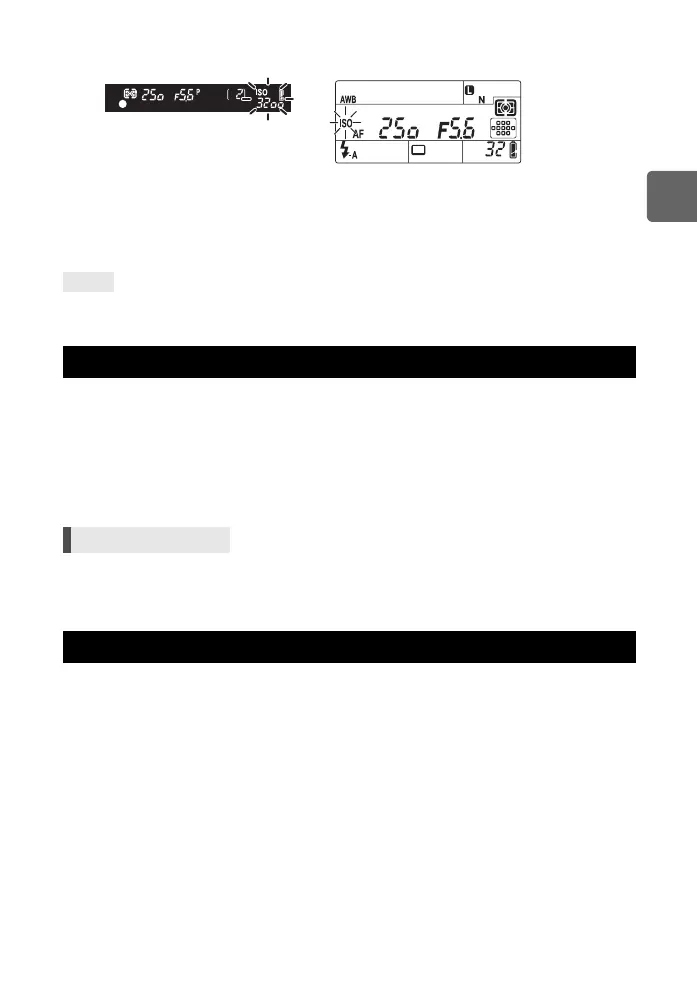
Viewfinder Control panel
When set to [AUTO], ISO-A and the
ISO value determined by the camera
are displayed. For all other settings,
ISO and the set value are displayed.
When set to 3200 or a higher value,
ISO blinks.
When set to a setting other than
AUTO, ISO is displayed. When set to
3200 or a higher value, ISO blinks.
TIPS
ISO bracketing
Menu MENU[X][BRACKETING][ISO BKT]
Multiple exposure
s0033_e_00_0_unified.book 51 ページ 2010年11月16日 火曜日 午後5時24分



 To Next Page