95
EN
7
Playback functions
Up to 4 frames of RAW images taken with the camera can be overlaid and saved as a
separate image. The image is saved with the record mode set at the time the image is saved.
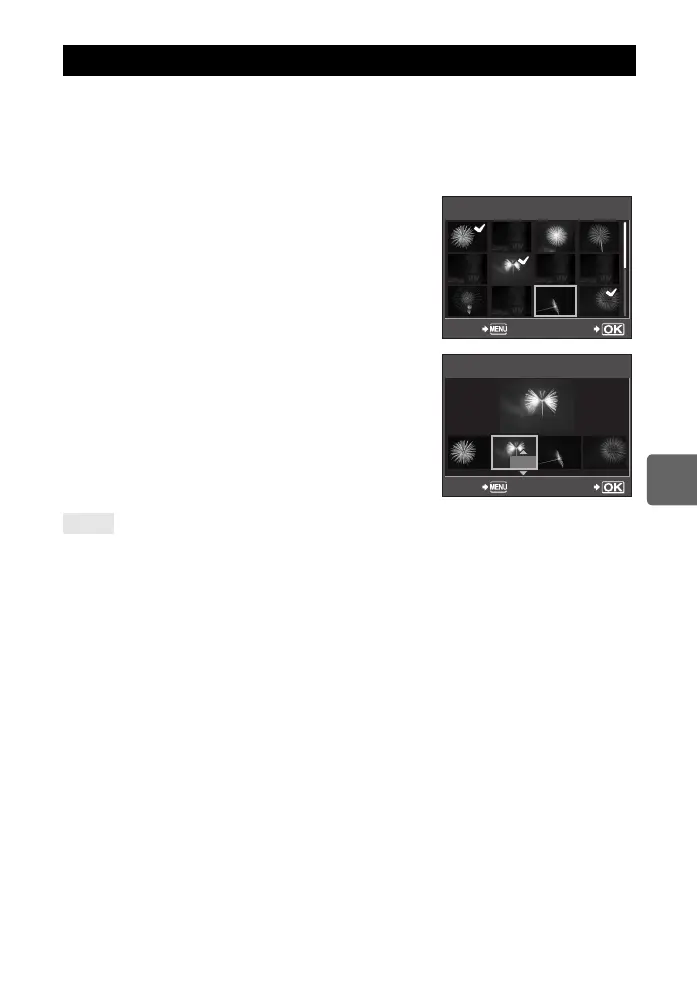
1 MENU[q][EDIT][IMAGE OVERLAY]
• Selection is also possible during playback by pressing the i button.
2 Select the number of frames to overlay and press the i button.
3 Use p to select a frame and press the i button.
• Repeatedly select images only for the number of frames
selected in Step 2.
• To cancel your selection, press the i button again.
4 Use bd to select an image, then use ac to
select the gain for each image. Press the i
button.
• Select from 0.1 to 2.0.
• The displayed image changes as the gain is adjusted.
5 Use ac to select [YES], then press the i
button.
To overlay 5 or more frames:
j To overlay 5 or more frames, save the overlay image as a RAW file and use [IMAGE OVERLAY]
repeatedly.
x Notes
• When the record mode is set to [RAW], the overlay image is saved as [YN+RAW].
• When the picture mode is set to [] to [], the overlay image is saved with
[jNATURAL].
Image overlay
TIPS
IMAGE OVERLAY
RAW
RAW
RAW
RAW
RAW
RAW
RAW
BACK SET
x
0.3
x
0.1
x
0.1
x
0.3
IMAGE OVERLAY
BACK SET
s0033_e_00_0_unified.book 95 ページ 2010年11月16日 火曜日 午後5時24分



 To Next Page