75
EN
5
Flash shooting
Manual flash
This allows the built-in flash to output a fixed amount of light. To shoot with manual flash, set
the f-number on the lens based on the distance to the subject.
ISO sensitivity
Setting method
Setting display
Ratio of amount of light GN: Guide number
ISO 200 (Equivalent to ISO 100)
FULL (1/1) 18 (13)
1/4 9 (6.5)
1/16 4.5 (3.3)
1/64 2.3 (1.6)
ISO value 100 200 400 800 1600 3200 6400
ISO sensitivity 1.0 1.4 2.0 2.8 4.0 5.6 8.0
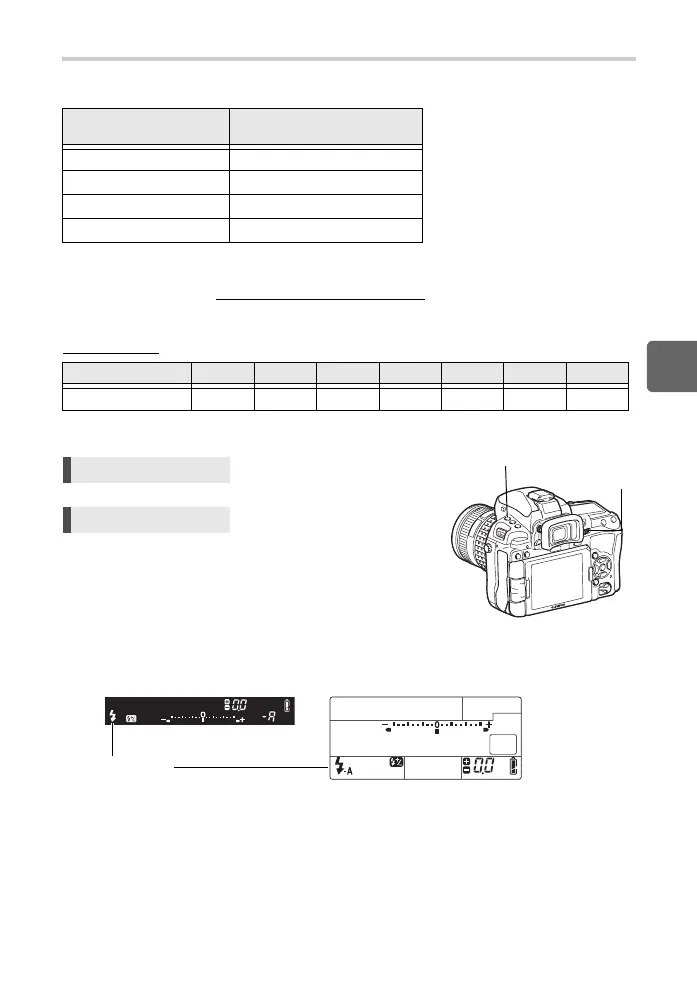
Direct button # + j
Super control panel ip: [FLASH MODE]
Viewfinder Control panel
• For details on displaying the settings, refer to “Flash modes that can be set by
shooting mode” (gP. 142).
Calculate the f-number on the lens using the following formula.
Aperture (f-number) =
GN × ISO sensitivity
Distance to the subject (m)
# button
j
Flash mode
s0033_e_00_0_unified.book 75 ページ 2010年11月16日 火曜日 午後5時24分



 To Next Page