EN 18
EN
3. Inserting the Batteries
Usable batteries (sold separately)
Always use one of the following battery combinations:
AA alkaline batteries/AA NiMH batteries/AA lithium batteries/
AA oxyride batteries/AA NiCd batteries
• Manganese batteries are not to be used.
Inserting the batteries
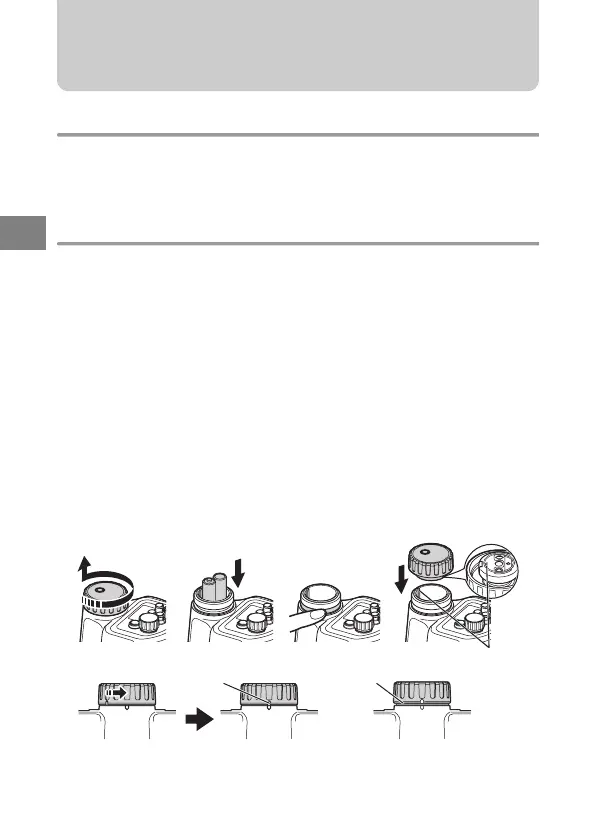
1 Carefully rotate the battery cap counterclockwise to remove it.
2 Install the batteries in the correct manner paying especial attention to match
the (+) and (-) marks.
3 Make sure to check that there is no foreign matter, rubbish etc. not only on
the O-ring but also on the contact surface (battery cap side).
4 Thinly apply the specified silicone O-ring grease to the O-ring.
5 Match the O mark on the battery cap (back side) with the O mark on the
flash and while pushing the battery cap, turn gently in a clockwise direction
until it can’t turn anymore.
• While putting the cap back on take special care so that the O-ring
does not project from the groove.
6
After replacing the battery cap tightly, turn it back slightly in a counterclockwise
direction and align the marks.
• After aligning the marks, make sure no O-ring can be seen.
+
-
O Mark
Alignment marks
O-ring
Correct
(The O-ring can’t be seen)
Incorrect
(The O-ring can be seen)
12 45
6
r2090_e_00.book Page 18 Thursday, May 1, 2008 6:29 PM


 To Next Page