shootingmode(p.17).
1
Press the button.
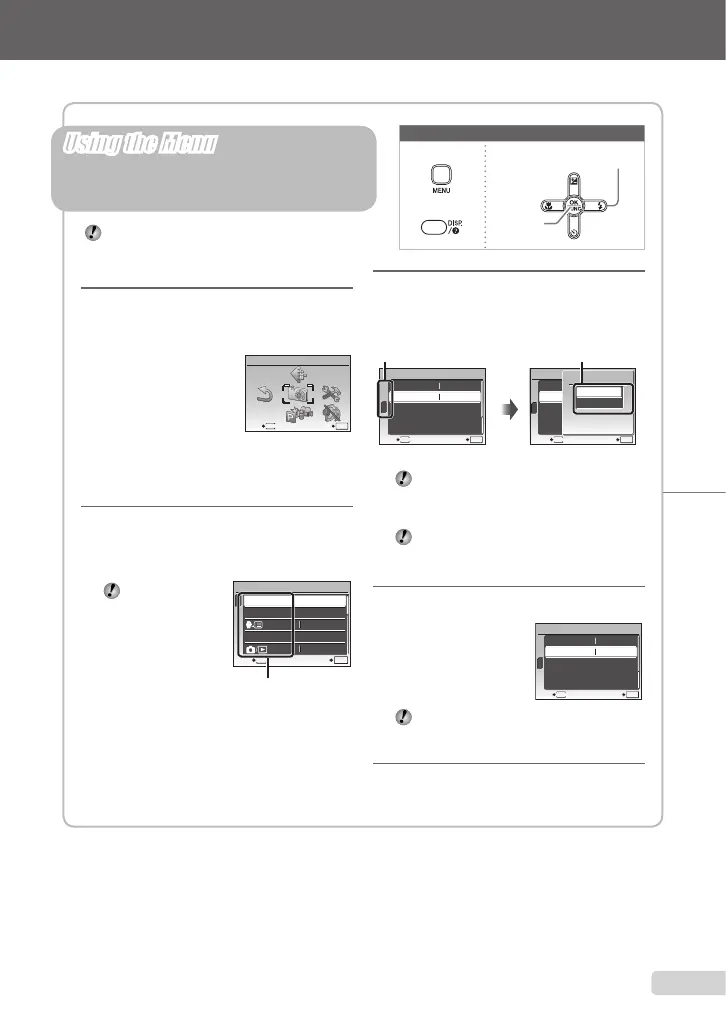
Thisexampledescribeshowtosetthe[POWER
SAVE].
CAMERA MENU
MENU
EXIT SET
OK
Shootingmodetop
menu
2
Use abcd to select the
desired menu, and press the
o button.
Pressingand
holdingtheE
buttondisplays
anexplanation
(menuguide)ofthe
selectedoption.
BACKUP
NO
1
2
3
SETUP
SET
OK
ENGLISH
PIXEL MAPPING
MEMORY FORMAT
MENU
EXIT
Submenu1
●
Please read “Menu Settings” (p. 24 to 33) while referring to this page.
button
Arrowpad
obutton
Buttonsinuse
3
Use ab to select the desired
submenu 1, and press the
o button.
1
2
3
SETUP
MENU
EXIT SET
OK
POWER SAVE OFF
NTSCVIDEO OUT
1
2
3
SETUP
MENU
SET
OK
BACK
POWER SAVE OFF
NTSCVIDEO OUT
POWER SAVE
OFF
ON
Pagetab Submenu2
Toquicklymovetothedesiredsubmenu,
pressctohighlightthepagetab,and
thenuseab tomovethepagetab.
Pressd toreturntothesubmenu1.
Somemenusincludesubmenusthat
appearbypressingtheobutton.
4
Use ab to select the submenu
2, and press the
o button.
Onceasettingismade,
thedisplayreturnstothe
previousscreen.
Theremaybeadditionaloperations.
“MenuSettings”(p.24to33)
5
Press the button to
complete the setting.
●
Three Types of Setting Operations
Ebutton
Using the Menu
Variouscamerasettingscanbeaccessedthrough
themenus,includingfunctionsusedduringshooting
andplaybackandthedate/timeandscreendisplay.
Theremaybeunavailablemenusdepending
ontheotherrelatedsettingsortheselected
1
2
3
SETUP
MENU
EXIT SET
OK
POWER SAVE ON
NTSCVIDEO OUT
3
EN









 To Next Page