EasyManua.ls Logo

OM POWER OM2501A - Page 18

OM POWER OM2501A
56 pages
Print Icon
To Next Page IconTo Next Page
To Previous Page IconTo Previous Page
Loading...
18
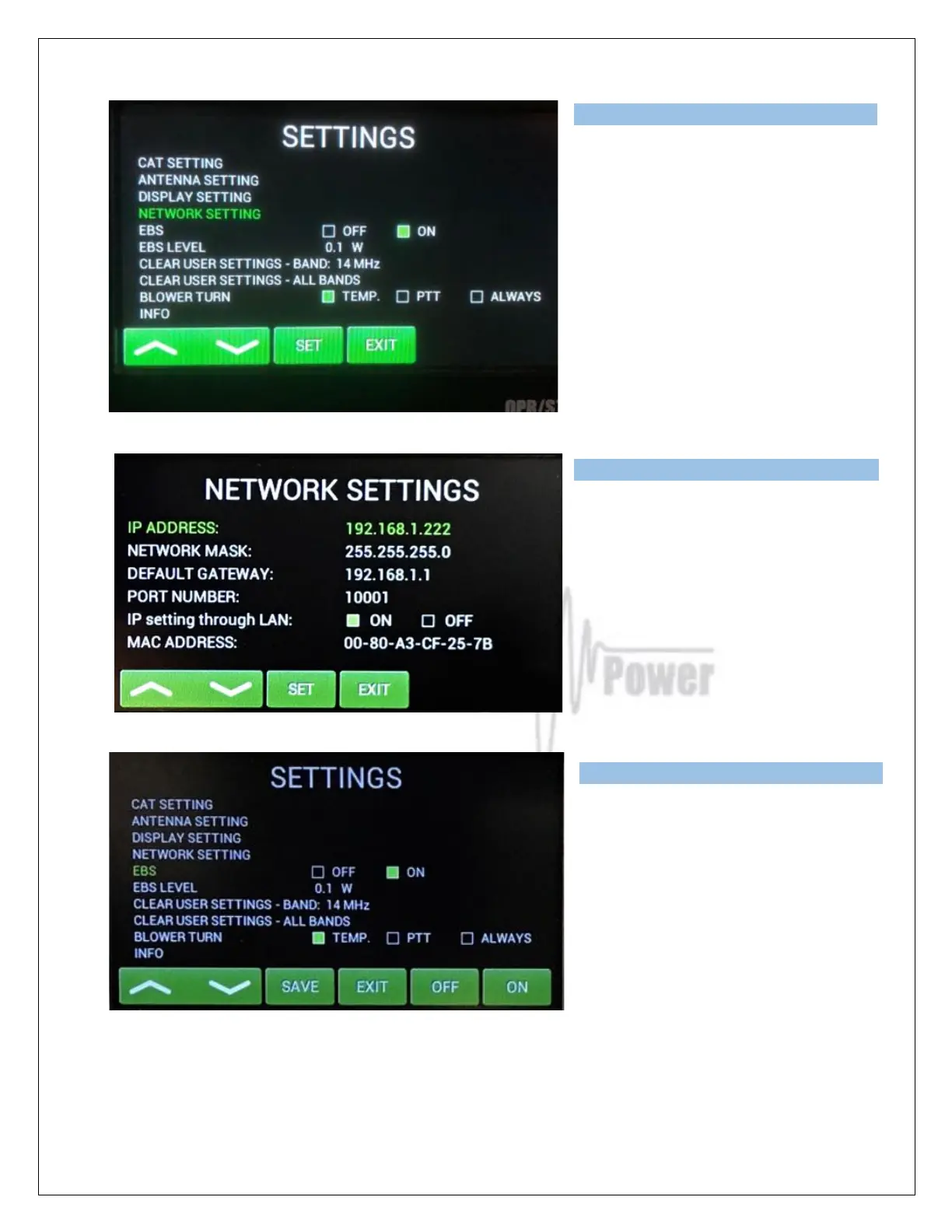
Press NETWORK SETTING and then
press ENTER.
Here the user has the option to set IP
Address, Network mask, Default
gateway, Port number.
User can enable or disable IP
parameter setting via LAN connection.
Next lines are for EBS (Electronic Bias
Setting) ON/OFF and for EBS level
selection.
We recommend EBS ON. See next
comment for more details.

Type of supported TCVR and
working
frequency are visible on the display.
AUTO LED is ON.
Type of supported TCVR and
working
frequency are visible on the display.
AUTO LED is ON.
Type of supported TCVR and
working
frequency are visible on the display.
AUTO LED is ON.

Related product manuals