To Next Page
R
Robin MathisSep 12, 2025
What does BUS Option Com Err (flashing) mean on Omron Inverter?
- JJonathan TaylorSep 12, 2025
If your Omron Inverter displays BUS Option Com Err (flashing), check the connections and all user-side software configurations.

What does BUS Option Com Err (flashing) mean on Omron Inverter?
If your Omron Inverter displays BUS Option Com Err (flashing), check the connections and all user-side software configurations.
What causes OV DC Bus Overvolt on Omron CIMR-L7Z4011 and how to fix it?
If you are experiencing an OV DC Bus Overvolt error with your Omron Inverter, consider these solutions: Increase the deceleration time or connect a braking option. Check the power supply and decrease the voltage to meet the inverter’s specifications. Also, inspect the braking chopper/resistor.
How to troubleshoot GF Ground Fault in Omron CIMR-L7Z4011 Inverter?
To troubleshoot a GF Ground Fault in your Omron Inverter, try these steps: Remove the motor and run the Inverter without the motor. Check the motor for a phase to ground short. Verify the output current with a clampmeter to verify the DCCT reading. Also, check the control sequence for wrong motor contactor signals.
What does CPF02 - CPF 04 mean on Omron CIMR-L7Z4011 Inverter?
If your Omron Inverter displays CPF02 - CPF 04, perform an initialization to factory defaults. Cycle the Inverter power supply. Replace the Inverter.
What to do if Omron Inverter displays End - 1 V/f Over Setting?
If your Omron Inverter displays End - 1 V/f Over Setting, check and correct the motor settings. If the motor and the machine are connected, disconnect the motor from the machine.
What does SE1 Sequence Error 1 mean on Omron Inverter?
If your Omron Inverter displays SE1 Sequence Error 1, check the output contactor.
What does OS Motor Over speed Det mean on Omron CIMR-L7Z4011 Inverter?
If your Omron Inverter displays OS Motor Over speed Det, adjust the ASR settings in the C5 parameter group. Check the reference circuit and reference gain. Also, check the settings in F1-08 and F1-09.
What causes PGO PG Open (PG Disconnec- tion) on Omron Inverter?
If you're experiencing PGO PG Open (PG Disconnec- tion) on your Omron Inverter, fix the broken/disconnected wiring. Supply power to the PG properly. Check the sequence and if the brake is opened when the inverter starts to increase the speed.
What does SE2 Sequence Error 2 mean on Omron CIMR-L7Z4011?
If your Omron Inverter displays SE2 Sequence Error 2, check the output contactor.
How to resolve DEV Speed Deviation error on Omron CIMR-L7Z4011 Inverter?
To resolve a DEV Speed Deviation error on your Omron Inverter, reduce the load. Lengthen the acceleration time and deceleration time. Check the mechanical system. Also, check the settings of F1-10 and F1-11 and verify the sequence and if the brake is opened when the inverter starts to increase the speed.
Detailed safety precautions and instructions for installation and operation.
Measures to ensure conformity with EMC Directive requirements for proper installation.
Procedures for unpacking and physically installing the inverter unit.
Guidelines for connecting power supply, motor, and control circuits for safe operation.
Explanation of the digital operator display, indicators, and operational keys.
Step-by-step guide for initial power-up, wiring checks, and basic configuration.
Selecting the appropriate motor control mode based on motor type and encoder use.
Choosing the correct autotuning mode based on control mode and motor characteristics.
Details on different autotuning modes for motor parameter setup.
Lists common alarms and faults encountered during autotuning and their causes.
Detailed procedures for autotuning induction and permanent magnet motors, including encoder setup.
Configuring direction commands and selecting the source for speed reference.
Setting up speed selection using digital inputs and defining priority rules.
Setting acceleration/deceleration times and S-curve profiles for smooth operation.
Details on the standard braking sequence, including DC injection and delay times.
Enabling and tuning feed forward control to improve dynamic response and reduce overshoot.
Lists and explains fault/alarm codes, their meanings, and corrective actions.
Identifies parameter setting conflicts and how to resolve them.
Details faults encountered during autotuning and their solutions.
Settings for language selection, parameter access level, and initialization.
Selection of motor control mode and carrier frequency settings.
Configuration of multi-speed references and speed priority settings.
Parameters defining the V/f curve for motor speed control.
Inputting critical motor parameters for optimal inverter performance.
Configuration of encoder type, resolution, and rotation direction.
Configuration of digital inputs and outputs for control signals.
Settings for motor thermal protection and overload detection.
Enabling and configuring feed forward control for improved response.
Parameters for monitoring inverter and motor operating status.
Logged data for past faults to aid in diagnosis and troubleshooting.
Assigning specific functions to digital input terminals.
Assigning specific functions to digital output terminals.
 General
| Model | CIMR-L7Z4011 |
|---|---|
| Type | Inverter |
| Rated Output Current | 11 A |
| Frequency | 50/60 Hz |
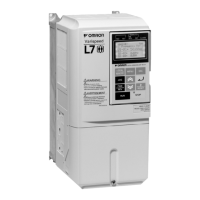
| Series | L7 |
| Output Frequency | 0 to 400 Hz |
| Protection Features | Overcurrent, Overvoltage, Undervoltage, Overheating, Short Circuit |
| Operating Temperature | -10 to 50°C |
| Storage Temperature | -20°C to +65°C |
| Humidity | 95% RH or less (non-condensing) |