4 Troubleshooting and Maintenance
4-4
CJ-series PROFIBUS Slave Unit Operation Manual for NJ-series CPU Unit (W510)
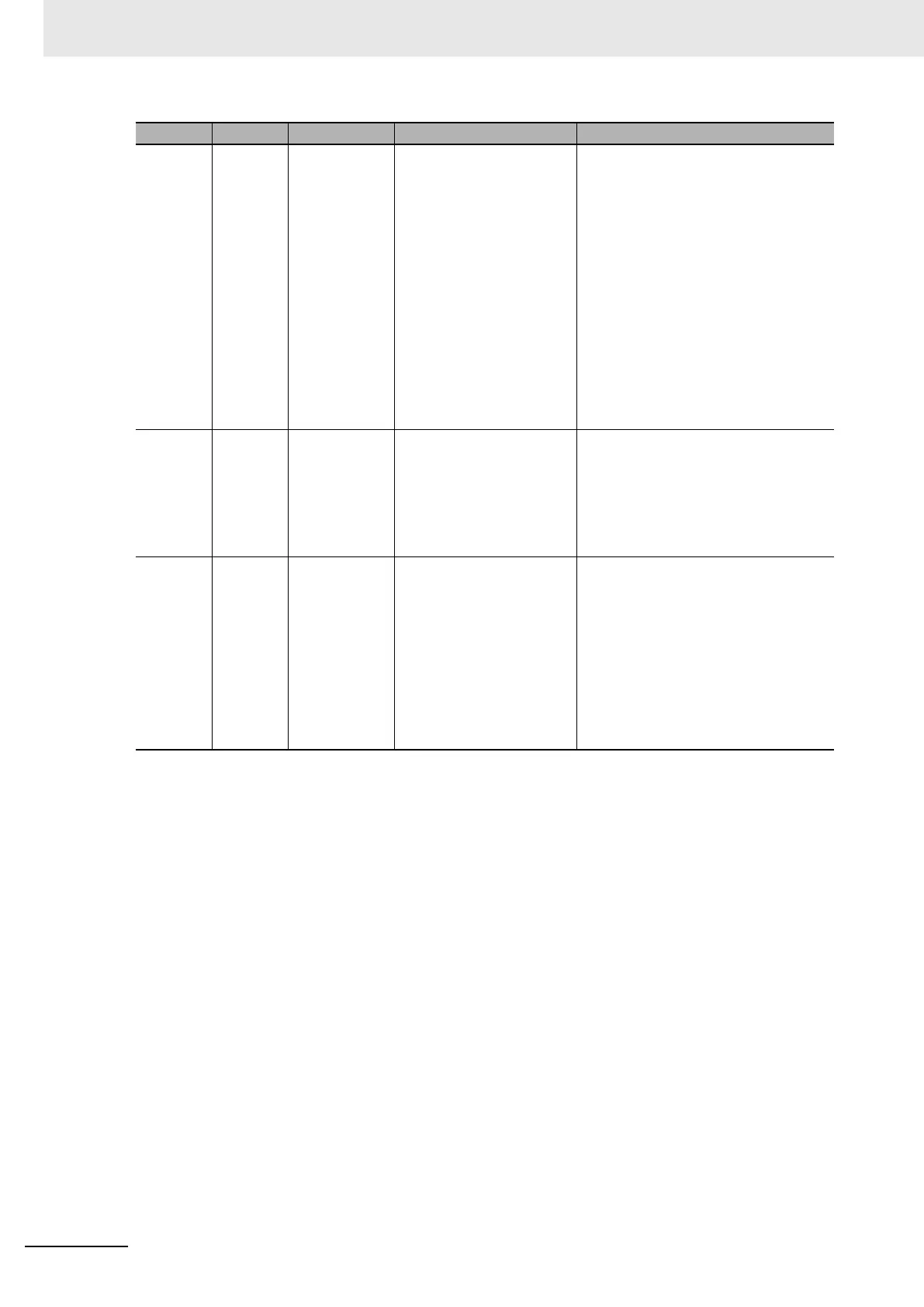
OFF ON PROFIBUS
communication
error
• *_StartCommCmd is FALSE
• The PROFIBUS configura-
tion is not correct.
• The PROFIBUS wiring is not
correct.
• The PROFIBUS Master Unit
is malfunctioning.
• The Slave Unit is defective.
• Change the *_StartCommCmd to TRUE.
• Verify that the correct GSD-file is used in
the master. Also check the Slave Unit’s
station address is matching the Master
Unit’s configuration. Look for station dupli-
cation address occurrences.
• Check for errors in the start/end address
and area settings in the Master. Examine
the status of variables *_StartAdrInErr,
*_EndAdrInErr, *_StartAdrOutErr, and
*_EndAdrOutErr for more information.
• Check the transmission lines for proper
connection and correct wiring according to
the recommended procedures (see 2-3
Network Installation).
• Replace the Master Unit.
• Replace the Slave Unit.
OFF Flashing Parameter/Con-
figuration Error
• Invalid configuration in PRO-
FIBUS Master Unit.
• The Slave Unit is defective.
• Check *_ParamErr variable details in 3-6-2
Status Flags (*_SlvSta).
• Verify the configuration and parameter
data of the Slave Unit.
• Verify the configuration of the Master Unit.
• Check the baud rate.
• Replace the Slave Unit.
ON --- No I/O Data
Exchanged
• Another mounted Unit has
overlapping memory areas.
• Slave in Sync or Freeze
mode.
• Watchdog is off.
• Slave Unit is defective
• Check the status of the bits in *_SlvSta.
• Check other Unit for incorrect mapping of
data.
• Check the mode commanded from the
Master Unit.
• Check the transmission lines for proper
connection and correct wiring according to
the recommended procedures (see 2-3
Network Installation).
• Enable the watchdog.
• Replace the Slave Unit.
COMM BF Error Probable Cause Remedy












 To Next Page