4-11
4 Troubleshooting and Maintenance
CJ-series PROFIBUS Slave Unit Operation Manual for NJ-series CPU Unit (W510)
4-4 Maintenance and Replacement
4
4-4-3 Replacing Faulty Units
The PROFIBUS Slave Unit is a Network device. If the Unit is damaged, it will effect the entire Network,
so always ensure repairs are undertaken immediately. It is recommended to have a spare PROFIBUS
Slave Unit on hand so that repairs may be conducted quickly.
Observe the following precautions when replacing the Unit.
• Always turn OFF the power before replacing the Unit.
• Ensure that the new Unit is not faulty.
• If a poor connection is suspected of causing the malfunction, clean the connectors using a clean,
soft cloth and industrial-grade alcohol. Remove any lint or threads left from the cloth, and remount
the Unit.
• If returning a faulty Unit for repair, always attach a detailed fault report to the Unit and return it to
the nearest OMRON dealer.
In order to prevent faulty operation be sure to turn off the power to all master and slave devices
before replacing the Unit.
When replacing the Unit, do not reconnect it to the Network before carrying out the procedures
listed below.
After replacing a PROFIBUS Slave Unit (before applying power) set the Machine number to the same
number as the previous Unit.
The PROFIBUS network allows to connect and disconnect devices while in operation.
Connecting and Disconnecting Devices
Connecting/disconnecting any device in a PROFIBUS network is liable to result in a temporary
increase of the communication cycle time. An existing slave device can only be replaced by the
same type of device with the same configuration. Any change to this configuration is likely to require
a new configuration. Changing a device with a different device (type and/or configuration) will have a
significant influence on the performance on the PROFIBUS network.
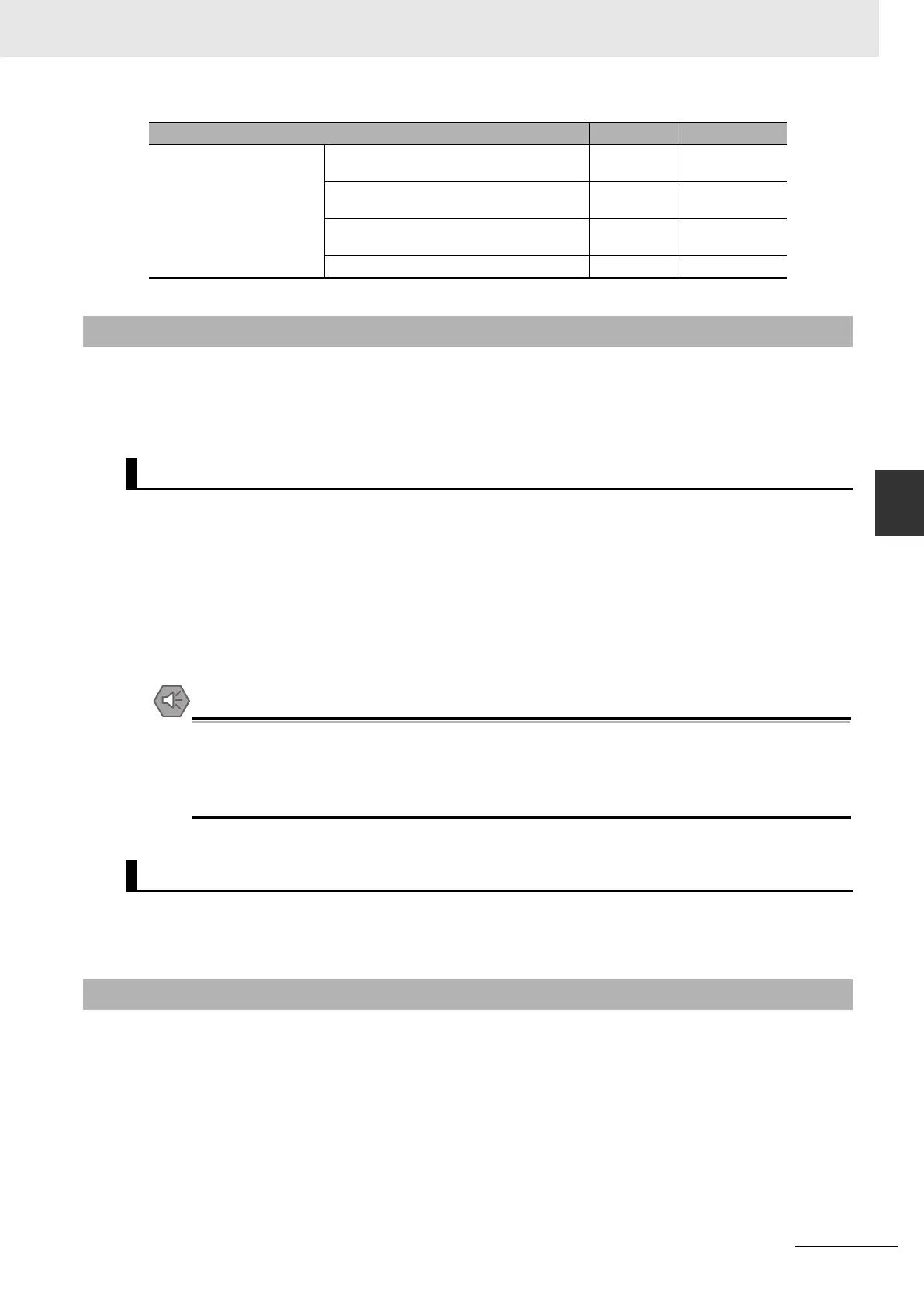
Installation Are the units installed securely? No looseness Phillips head
screwdriver
Are the communications connectors fully
inserted?
No looseness Phillips head
screwdriver
Are the external wiring screws tight? No looseness Phillips head
screwdriver
Are the connecting cables undamaged? No damage Check visually
4-4-3 Replacing Faulty Units
Precautions
Settings After Replacing PROFIBUS Slave Units
4-4-4 Addition/Replacement of Units on the PROFIBUS Network
Item Standard Equipment












 To Next Page