4-3
4 Troubleshooting and Maintenance
CJ-series PROFIBUS Slave Unit Operation Manual for NJ-series CPU Unit (W510)
4-1 Error Indicators
4
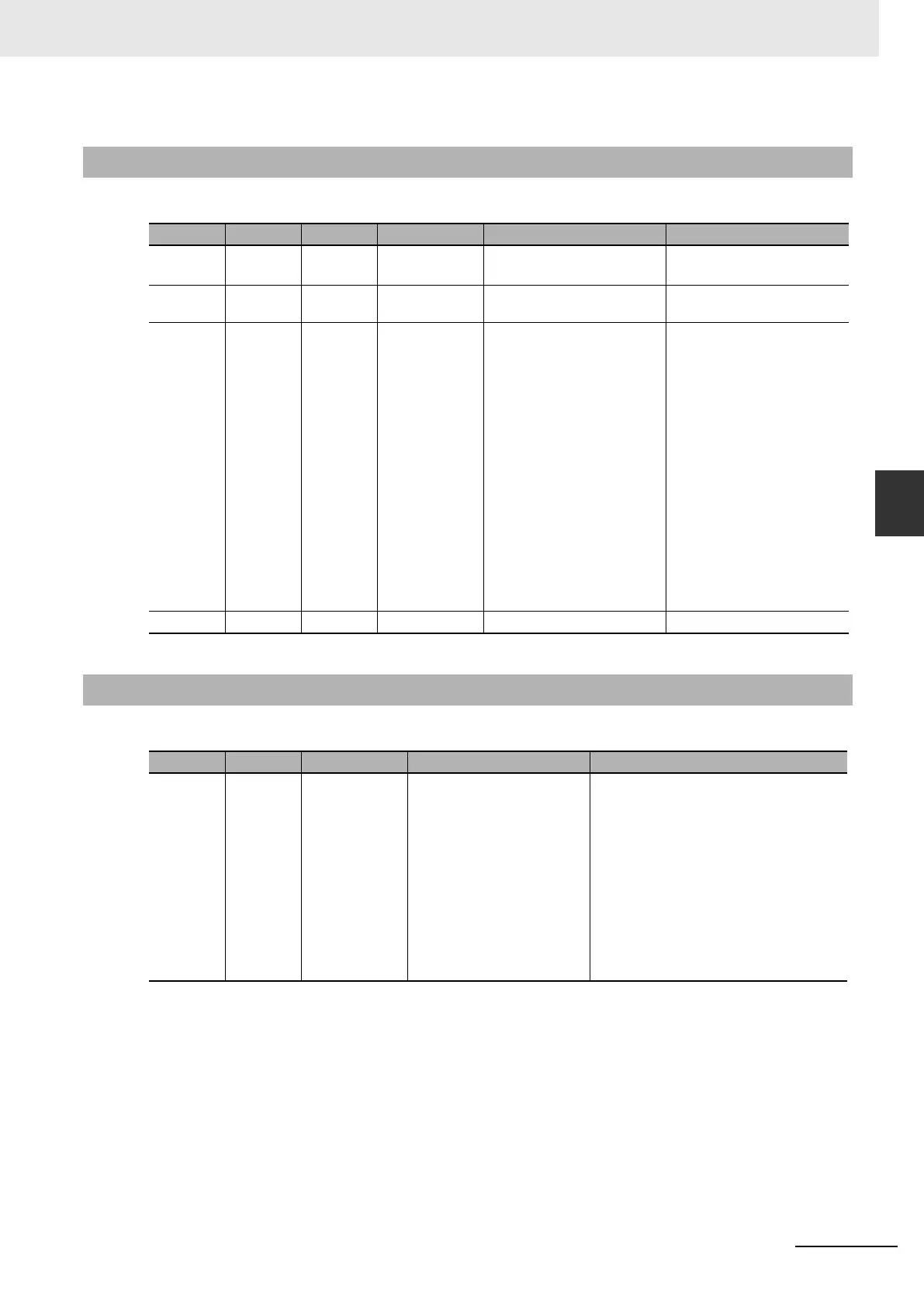
4-1-2 Errors During Initial Processing
4-1-2 Errors During Initial Processing
RUN ERC ERH Error Probable Cause Remedy
OFFOFFOFF--- • The CPU power is off
• The Unit is defective
• Apply power to the CPU
• Replace the Unit
OFF OFF ON CPU Error • An error was detected in the
CPU
• Resolve the error in the CPU
and restart the system.
OFF OFF Flashing --- • The unit is configured cor-
rectly. The CPU is in pro-
gram mode likely because it
has been configured to oper-
ate upon error based on the
settings of *_SlvInFatlCont
and *_SlvInFatlExit. The Unit
will transmit diagnostics to
the PROFIBUS Master for
more information.
• The unit is configured cor-
rectly. The CPU has an error
and the Unit has been pro-
grammed to stop (Action
Fatal Error in Configuration
is set to Stop). The Unit will
transmit diagnostics to the
PROFIBUS Master.
• Check the status of
*_SlvInFatlCont and
*_SlvInFatlExit.
• Check the operating mode of
the CPU.
• Check the diagnostics sent
to the Master Unit for more
information.
OFF ON OFF Unit Error • The Unit is defective • Replace the Unit
4-1-3 Errors During Normal Operation
COMM BF Error Probable Cause Remedy
OFF OFF Not Exchanging
I/O data with
CPU
• The Unit is not mounted to
the CPU system properly.
• The Master Unit or transmis-
sion line have failed.
• The watchdog of the slave
has switched the outputs of
the slave to the fail-safe
mode.
• I/O refresh has been dis-
abled.
• The Slave is defective.
• CPU is not in RUN mode.
• Check the mounting of the system is cor-
rect.
• Check the transmission line for proper
connection and correct wiring according to
recommended procedures (see 2-3 Net-
work Installation).
• Disable the watchdog for troubleshooting
measures.
• Check the CPU settings.
• Replace the Unit.












 To Next Page