3 Data Exchange with the CPU Unit
3-24
CJ-series PROFIBUS Slave Unit Operation Manual for NJ-series CPU Unit (W510)
Precautions for Correct UsePrecautions for Correct Use
Before using the Slave output data in the CPU program, the user is to make sure the Unit Status
Flags in Variable *_SlvSta indicate that:
• PROFIBUS data exchange is active,
• there are no configuration errors,
• and that the correct data format is selected. Otherwise the Slave Output words may contain
invalid data.
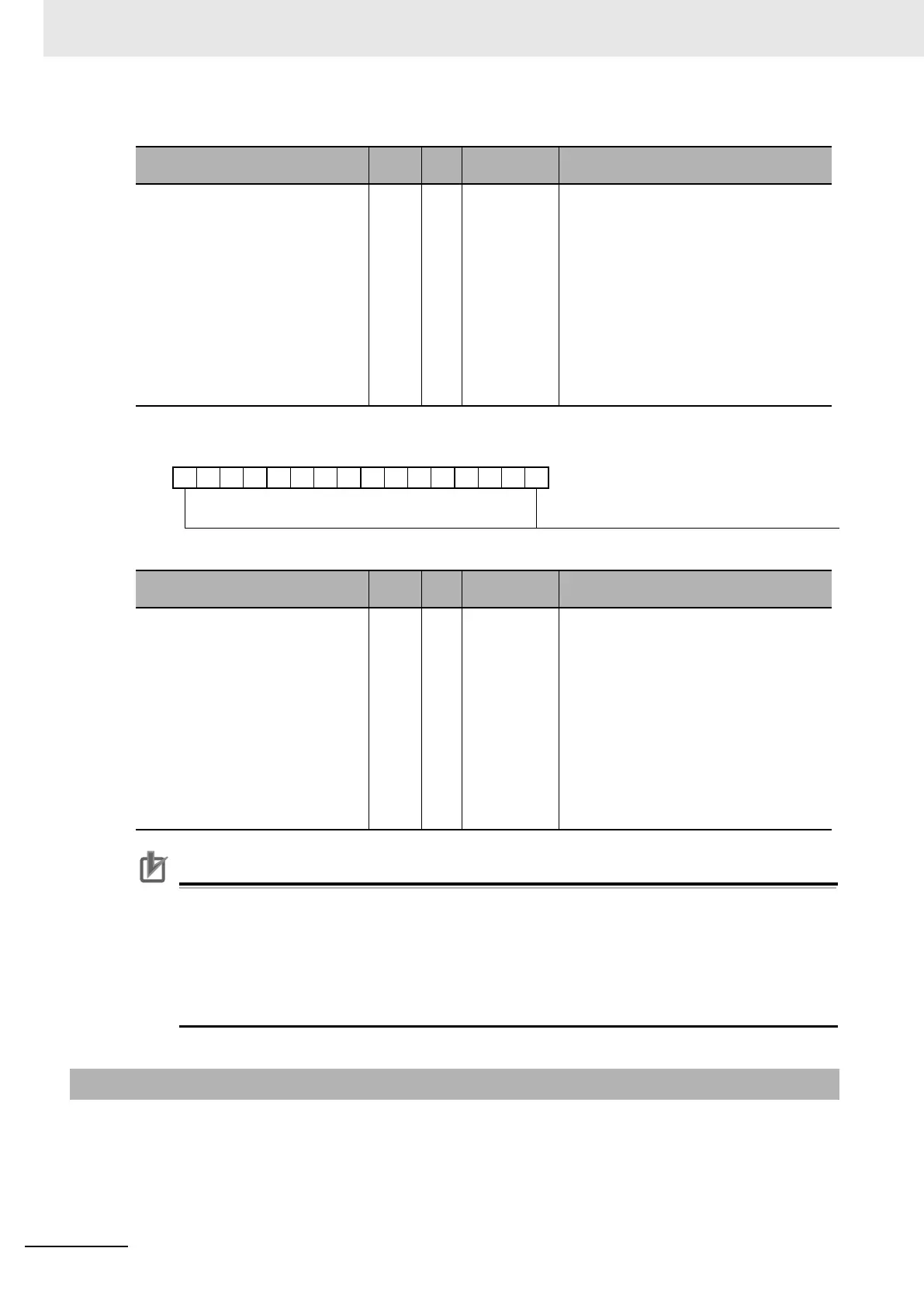
The CJ1W-PRT21 unit indicates configuration information and operational behavior settings for slave
input data from the Slave CPU to the master (Dm+5, Dm+6 and Dm+7).
Name of Device Variable for CJ-
series Unit
Type R/W Description Function
*_SlvOutStartAdr UINT R Output start
address
Output start address (data from Master to Slave
CPU)
Indicates the start address in the area indicated
in *_SlavOutSta, to which the PROFIBUS out-
put data, received from the master, will be writ-
ten. The value is provided by the PROFIBUS
master's Set_Prm telegram, and indicated in
*_SlvOutStartAdr after both the Set_Prm and
Chk_Cfg telegrams have been accepted.
The indication is only valid in case the output
area code is unequal to 00.
The start address is indicated as a value in the
range 0-32767.
1514131211109876543210
*_SlvOutSta
*_SlvOutDatLen
Name of Device Variable for CJ-
series Unit
Type R/W Description Function
*_SlvOutDatLen UINT R Output data
length
Output data length (data from Master to Slave
CPU).
The value indicates the size of the area to
which the PROFIBUS output data, received
from the master, will be written. The value is
provided by the PROFIBUS master's Chk_Cfg
telegram, and indicated in *_SlvOutSta after
both the Set_Prm and Chk_Cfg telegrams have
been accepted.
The indication is only valid in case the output
area code is unequal to 00.
The length (in words) is indicated as a value in
the range 0 to 100.
3-7-3 Slave Input Settings (*_SlvInSta)












 To Next Page