3-25
3 Data Exchange with the CPU Unit
CJ-series PROFIBUS Slave Unit Operation Manual for NJ-series CPU Unit (W510)
3-7 Device Variables for CJ-series Unit (Configuration)
3
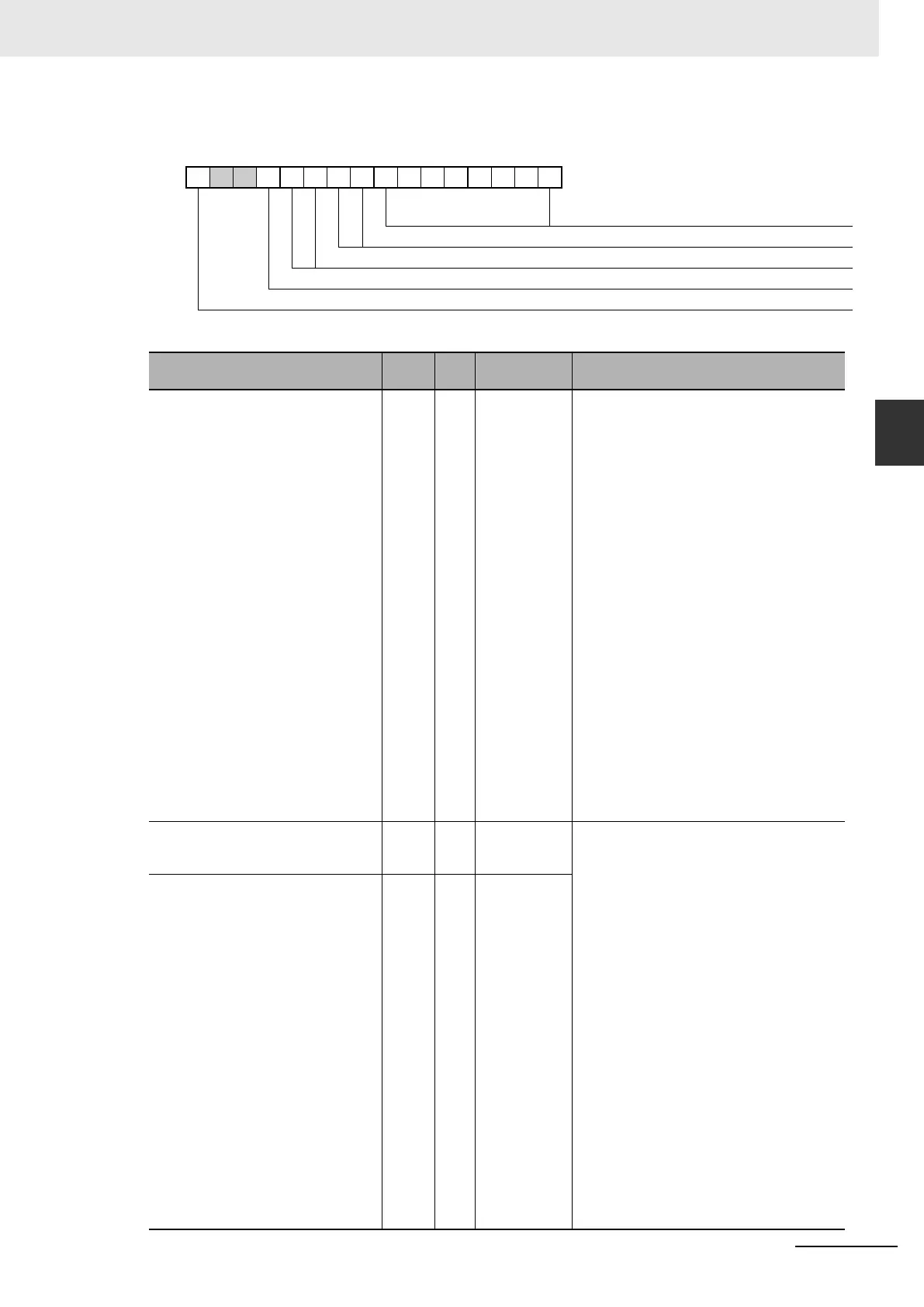
3-7-3 Slave Input Settings (*_SlvInSta)
1514131211109876543210
*_SlvInSta
*_SlvInAreaCode
*_SlvInProgCont/*_SlvInProgExit
*_SlvInFatlCont/*_SlvInFatlExit
*_SlvInIntelMd
*_SlvInclPLCSta
Name of Device Variable for CJ-
series Unit
Type R/W Description Function
*_SlvInAreaCode USINT R Input area
code
Input area code (data from Slave CPU to Mas-
ter). Indicates the area to which the unit will
write PROFIBUS input data to be sent to its
master.
00: No assignment made
01: CIO area (CIOxxxx)
03: DM area (Dxxxxx)
04: Work area (Wxxx)
05: Holding area (Hxxx)
08: EM bank 0 (E0-xxxxx)
09: EM bank 1 (E1-xxxxx)
10: EM bank 2 (E2-xxxxx)
11: EM bank 3 (E3-xxxxx)
12: EM bank 4 (E4-xxxxx)
13: EM bank 5 (E5-xxxxx)
14: EM bank 6 (E6-xxxxx)
15: EM bank 7 (E7-xxxxx)
16: EM bank 8 (E8-xxxxx)
17: EM bank 9 (E9-xxxxx)
18: EM bank A (EA-xxxxx)
19: EM bank B (EB-xxxxx)
20: EM bank C (EC-xxxxx)
*_SlvInProgCont BOOL R Continue in
PROGRAM
mode
Indicates how the slave will behave on PROFI-
BUS in case the host CPU is in PROGRAM
mode (as opposed to RUN mode).
*Examine condition of both *_SlvInProgCont
and *_SlvInProgExit for slave behavior shown
below.
*_SlvInProgCont: FALSE
*_SlvInProgExit: FALSE
• Slave has not been configured by a master
(n.a.).
*_SlvInProgCont: TRUE
*_SlvInProgExit: FALSE
• Continue data exchange, and provide diag-
nostics to the master.
*_SlvInProgCont: FALSE
*_SlvInProgExit: TRUE
• Exit data exchange, and provide diagnostics
to the master. In this case the Slave will send
static diagnostics messages to the master.
*_SlvInProgExit BOOL R Exit in PRO-
GRAM mode












 To Next Page