27
4.4.5 File Management
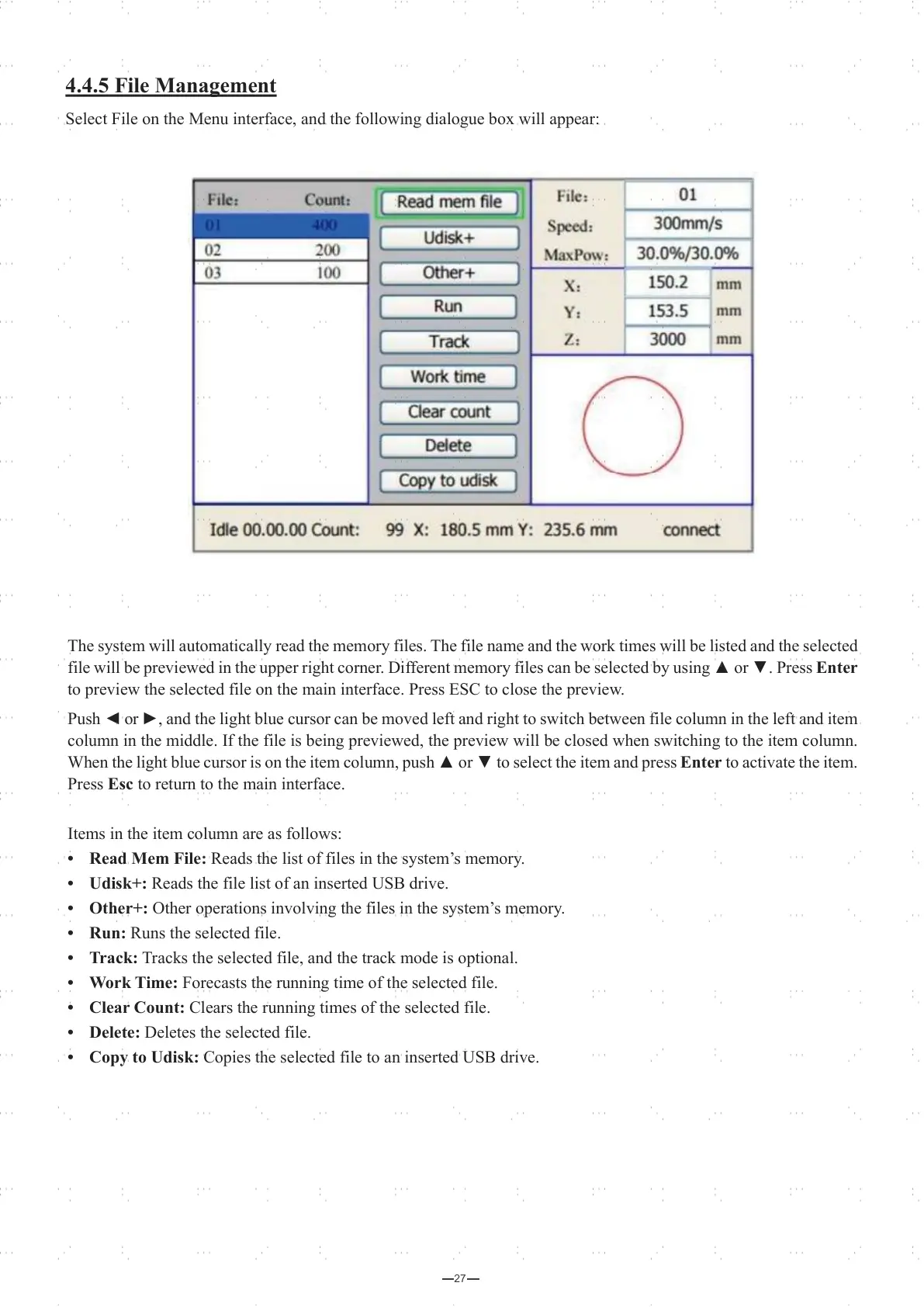
Select File on the Menu interface, and the following dialogue box will appear:
The system will automatically read the memory files. The file name and the work times will be listed and the selected
file will be previewed in the upper right corner. Different memory files can be selected by using ▲ or ▼. Press Enter
to preview the selected file on the main interface. Press ESC to close the preview.
Push ◄ or ►, and the light blue cursor can be moved left and right to switch between file column in the left and item
column in the middle. If the file is being previewed, the preview will be closed when switching to the item column.
When the light blue cursor is on the item column, push ▲ or ▼ to select the item and press Enter to activate the item.
Press Esc to return to the main interface.
Items in the item column are as follows:
• Read Mem File: Reads the list of files in the system’s memory.
• Udisk+: Reads the file list of an inserted USB drive.
• Other+: Other operations involving the files in the system’s memory.
• Run: Runs the selected file.
• Track: Tracks the selected file, and the track mode is optional.
• Work Time: Forecasts the running time of the selected file.
• Clear Count: Clears the running times of the selected file.
• Delete: Deletes the selected file.
• Copy to Udisk: Copies the selected file to an inserted USB drive.



 To Next Page