29
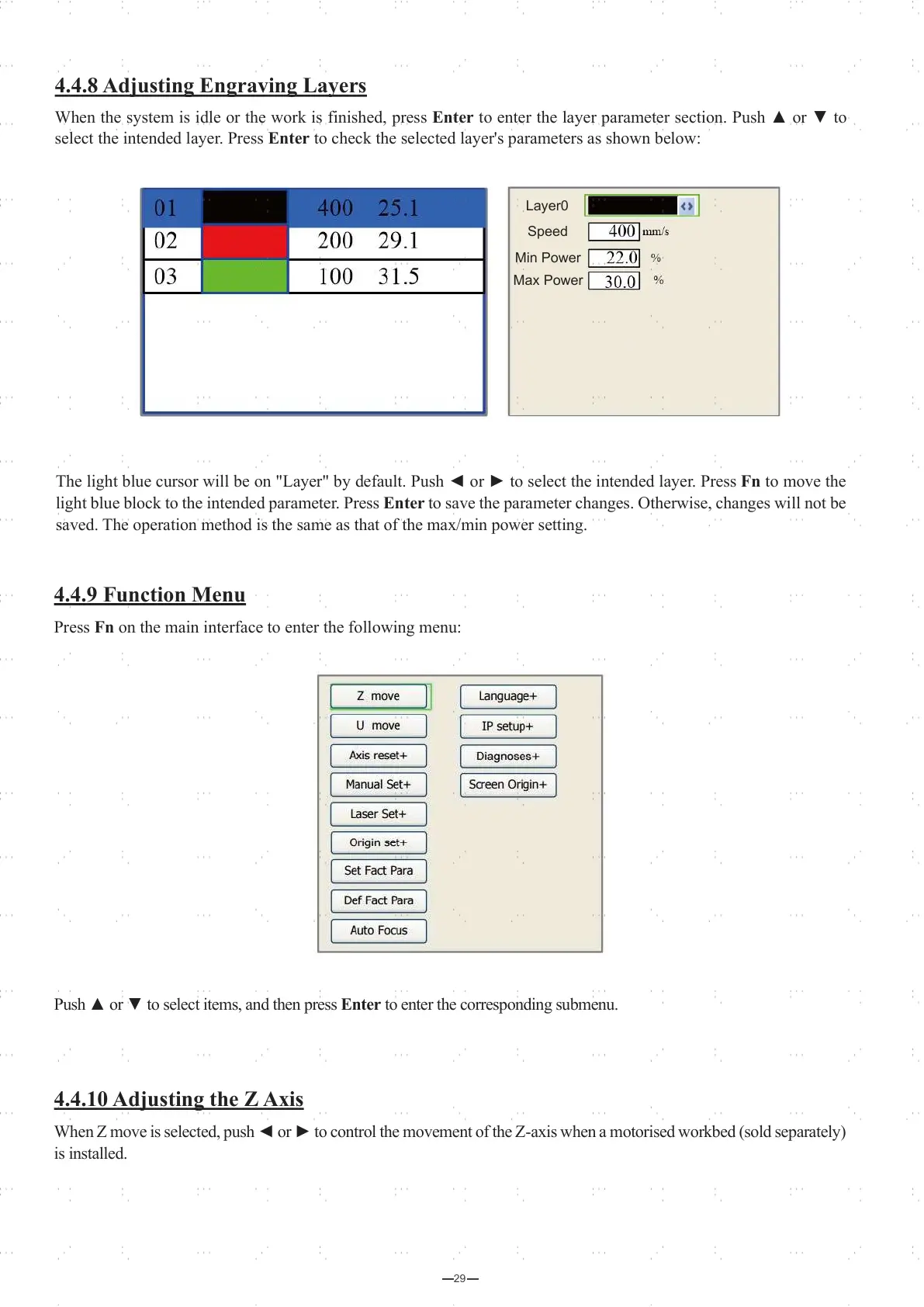
The light blue cursor will be on "Layer" by default. Push ◄ or ► to select the intended layer. Press Fn to move the
light blue block to the intended parameter. Press Enter to save the parameter changes. Otherwise, changes will not be
saved. The operation method is the same as that of the max/min power setting.
Layer0
Speed
Min Power
Max Power
Press FN to change parameters
Press Enter to confirm setting
Layer0
Speed
Min Power
Max Power
4.4.8 Adjusting Engraving Layers
When the system is idle or the work is finished, press Enter to enter the layer parameter section. Push ▲ or ▼ to
select the intended layer. Press Enter to check the selected layer's parameters as shown below:
4.4.9 Function Menu
Press Fn on the main interface to enter the following menu:
4.4.10 Adjusting the Z Axis
When Z move is selected, push ◄ or ► to control the movement of the Z-axis when a motorised workbed (sold separately)
is installed.
Push ▲ or ▼ to select items, and then press Enter to enter the corresponding submenu.



 To Next Page