To ensure your Onenity CNC machine lasts for many years it is important that regular
maintenance be performed. For step-by-step instructional videos please visit our Youtube
page at: https://www.youtube.com/onenitycnc. Note: It is highly recommended that you
view our maintenance video prior to performing maintenance on your Onenity CNC.
Maintenance
Note: Before performing maintenance work on your Onenity CNC machine please ensure
that the Router/Spindle and the mains are disconnected. All maintenance works must only be
performed by someone with knowledge and experience with the Onenity CNC. Improper
maintenance may result in damage to your machine and void your warranty.
After every carve/project:
Vacuum up all dust and chips. Maintenance of rails should be performed every 50-100 use
hours depending on material cut. If the machine is not moving or cutting correctly, mainte-
nance should be performed.
After every 2-3 hours of operation:
Vacuum up all dust and chips. Use compressed air to blow o dust and debris from the Rails
and Ball screws.
Every 1-4 weeks (Duration will depend on use, heavily used machines should perform this
maintenance step regularly):
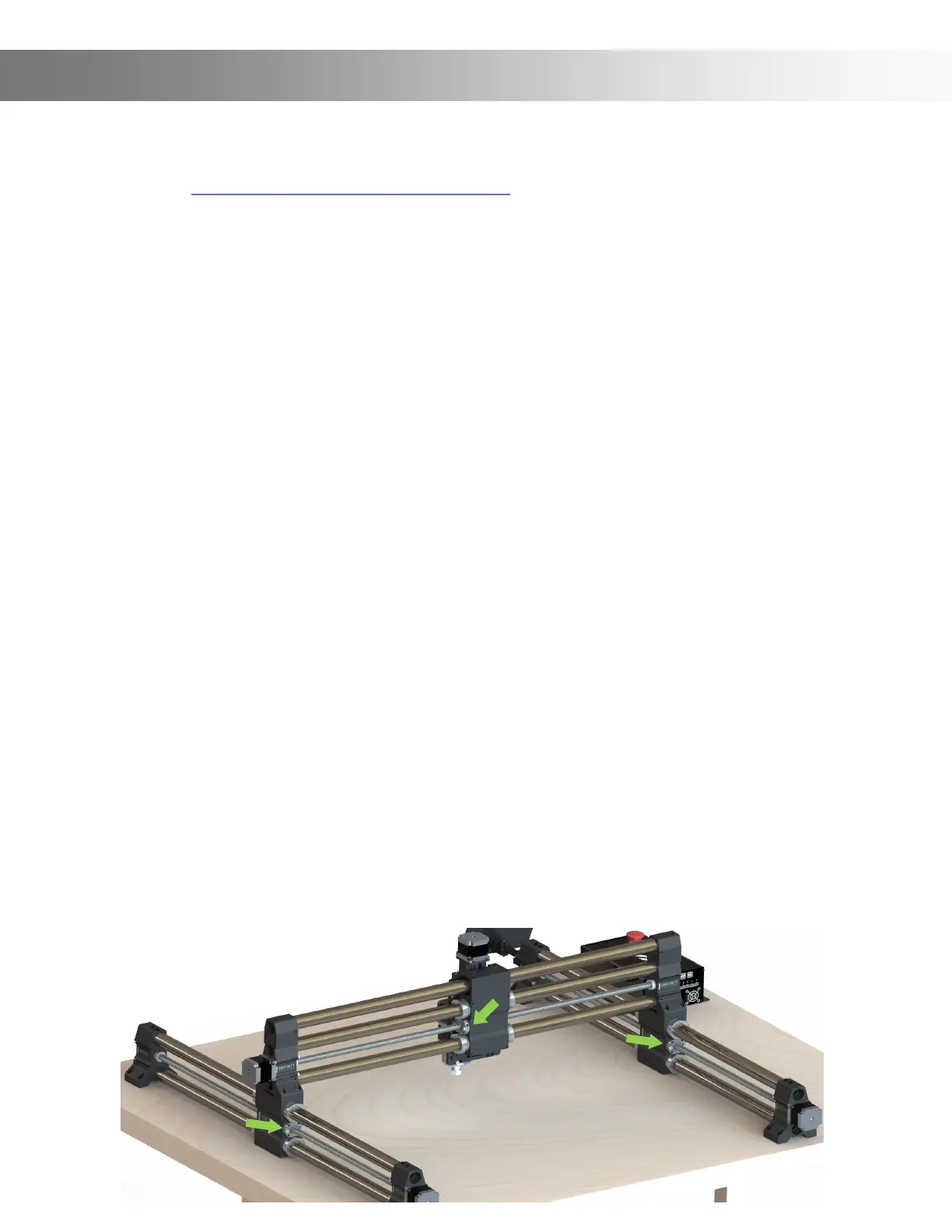
Apply 3 in one oil into the oil ports of the Ball Screws (Green Arrows). Jog the machine to it’s
X,Y and Z limits while applying oil to the oil ports in a few dierent locations. Wipe o any
excess oil using a lint free cloth. Note: Cover your waste board with cloths or paper towels as
the oil may drip.
Please note: All parts of the machine and controller can be purchased individually as spare
parts. Replaceable parts are the motor wires, motor couplers, ball nut and ball screw, and bolt
hardware.
Please contact us directly at info@onenitycnc.com or call us a 1 888 717 4242 to get replace-
ment parts. Please keep your machine data at hand when ordering spare parts.
Required tools to repair or replace items would be metric 1, 1.5, 2 ,2.5, 3, 3.5, 4, 4.5, and 5 mm
Allen keys, adjustable wrench, screwdriver and power drill, and a microber cloth.


 To Next Page