There are multiple ways to load a program into
your Onenity MASSO CNC controller. One is
via WIFI and the other is via USB. The following
steps cover both.
Step 1: Load your program onto the USB drive
you plan on using.
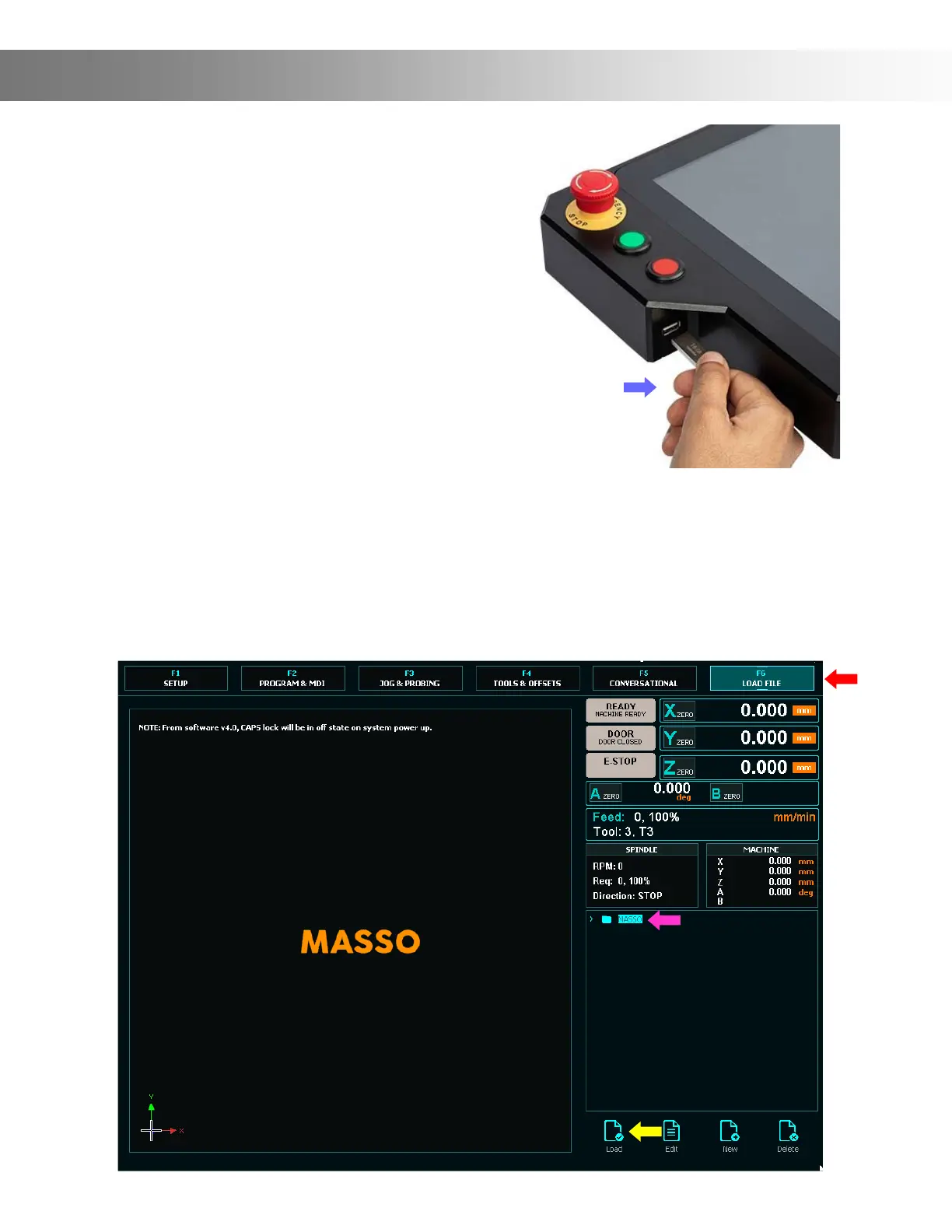
Step 2. Plug your USB stick the USB slot in the
side of the controller. (Blue Arrow)
Important: a USB ash drive MUST be
plugged in at all times, as it’s the only storage
the Onenity Masso has.
Loading A Program
Step 3: Click on the F6 Tab (Red Arrow) The F6 screen is where you will select les from your
USB Flash drive and load them on the Onenity MASSO..
Step 4: Double click the le you wish to load or select the le (Pink Arrow) and press
the Load key (Yellow Arrow) Note: Once the le is loaded it will draw the toolpaths onto the
screen for you to view.


 To Next Page