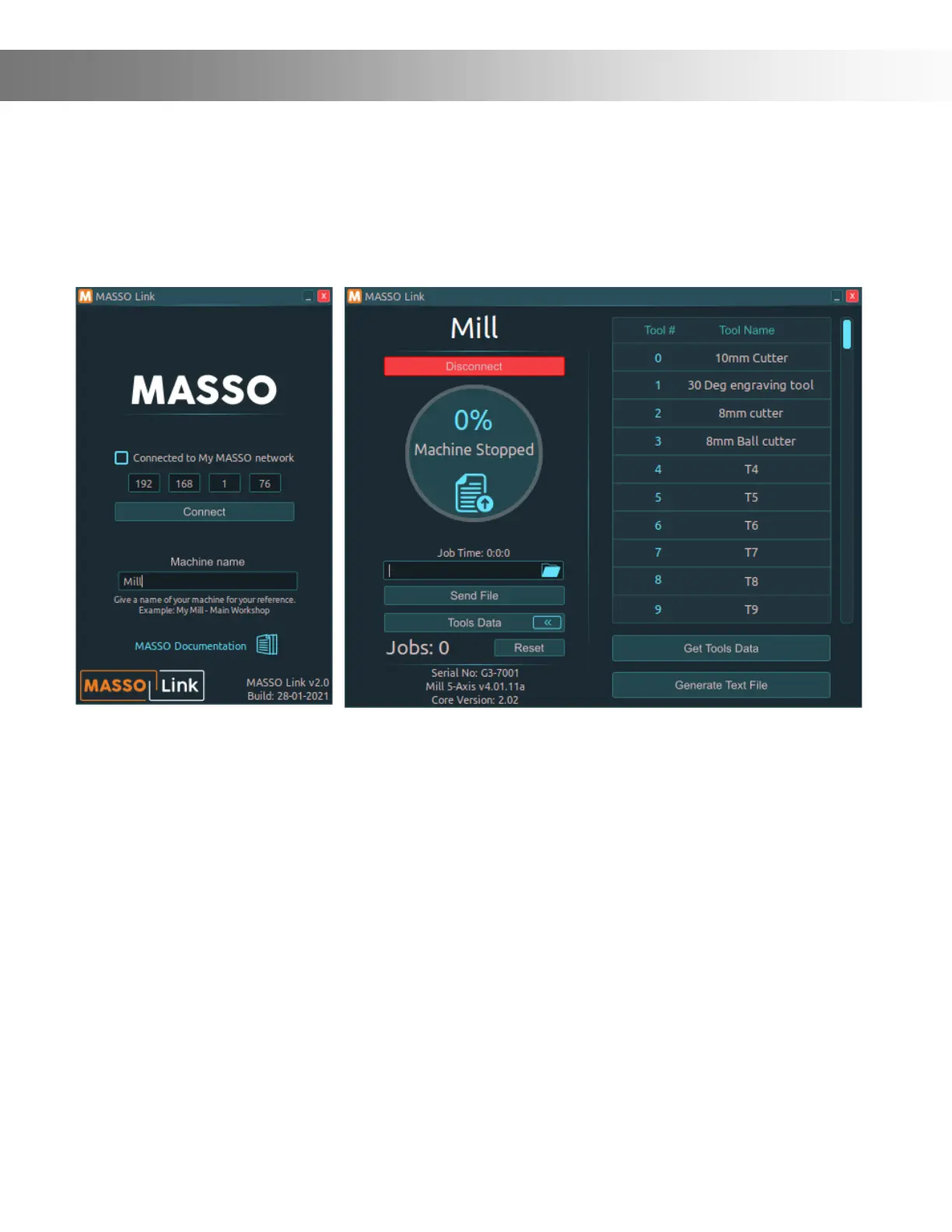
Onenity MASSO comes with Wi-Fi hardware and software to easily connect your Onenity
MASSO controller to a Wi-Fi network.
With the MASSO Link software, users can easily view the real-time status of your MASSO control-
ler remotely, transfer gcode les to MASSO from your PC, get tool data from MASSO's memory
and generate tools list document that can be used with CAM software.
Wi-Fi Connectivity
Creating your own Wi-Fi network
If a Wi-Fi network is not available, MASSO can be used to create a Wi-Fi network and a PC can be
connected directly to MASSO via this Wi-Fi network. This feature is called My MASSO Network.
Tick the Make "My MASSO Network", enter a network name (SSID) that you would like to call
this network, and enter the security key. Click the Enable button.
At this stage, the Wi-Fi network will show up on your PC in the Wi-Fi networks list and you can
connect to this network and use the MASSO Link software.
Once connected, gcode les with .txt, .nc, .cnc, .tap, .eia extensions can be dragged and dropped
on to the MASSO Link software window.
A folder name can be given and all the les sent to MASSO will be saved on the USB pen drive in
this folder, else keeping this blank will save the les on the root folder of the USB pen drive.
Click Send File to send the le to MASSO.


 To Next Page