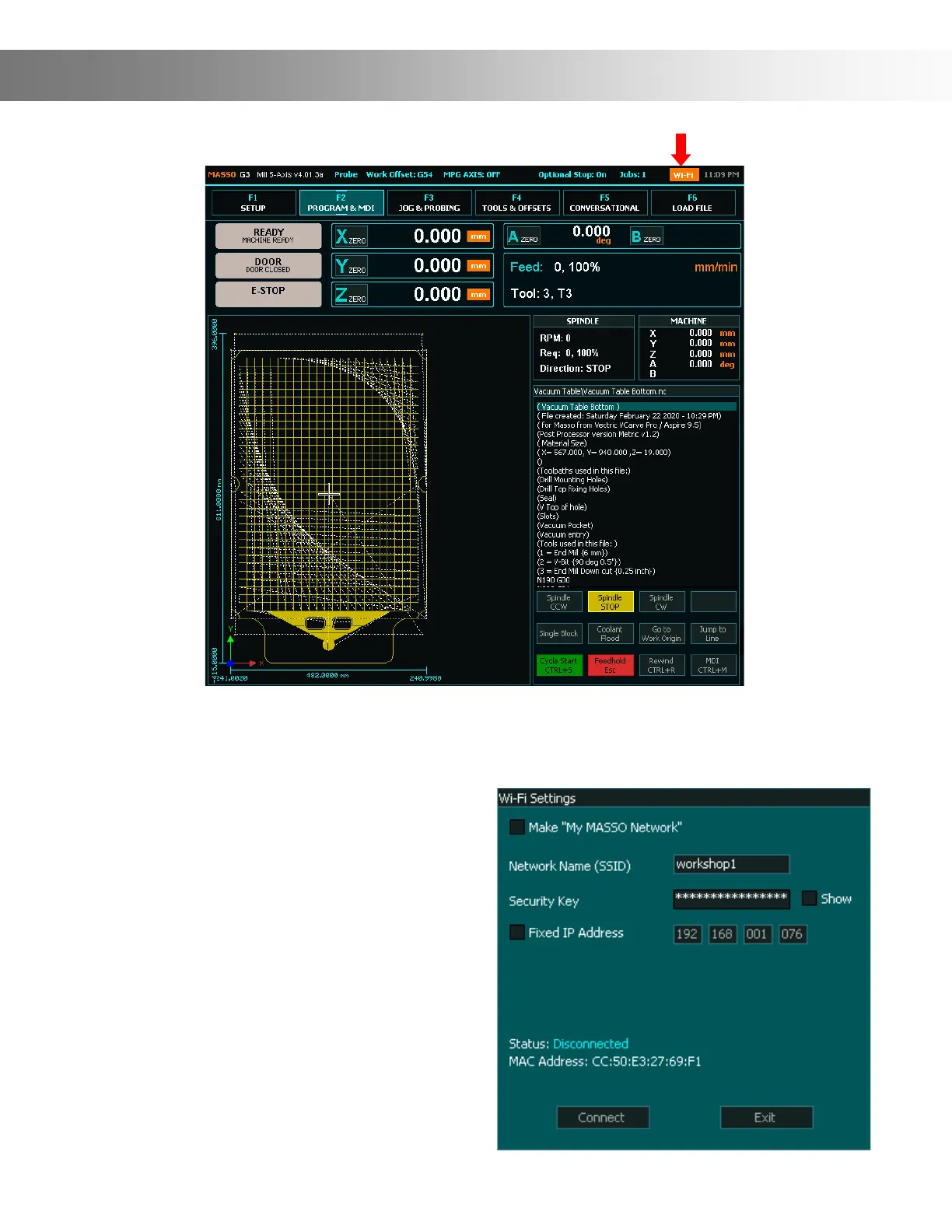
On the F2 - Program & MDI screen, click the Wi-Fi icon (Red Arrow)
Wi-Fi Connectivity
INFORMATION: MASSO Wi-Fi module supports
2.4GHz frequency (IEEE 802.11 b/g/n).
INFORMATION: It's a good idea to use
the Fixed IP Address option as every time you
connect to your Wi-Fi network, the IP address
might be changed by the router. As the IP ad-
dress is required by MASSO Link software, the
new IP address needs to be updated on the PC
to be able to connect to the MASSO. Using
the Fixed IP Address solves this issue.
INFORMATION: The maximum length of SSID
is 30 characters and 60 characters for the securi-
ty key.
Enter the name (SSID) and security key of the Wi-Fi network that you would like to connect to.
If you would like to use dynamic IP as provided by your Wi-Fi network then leave the Fixed IP
Address un-ticked and click the Connect button. Once connected the IP address provided by
your Wi-Fi network is displayed.


 To Next Page