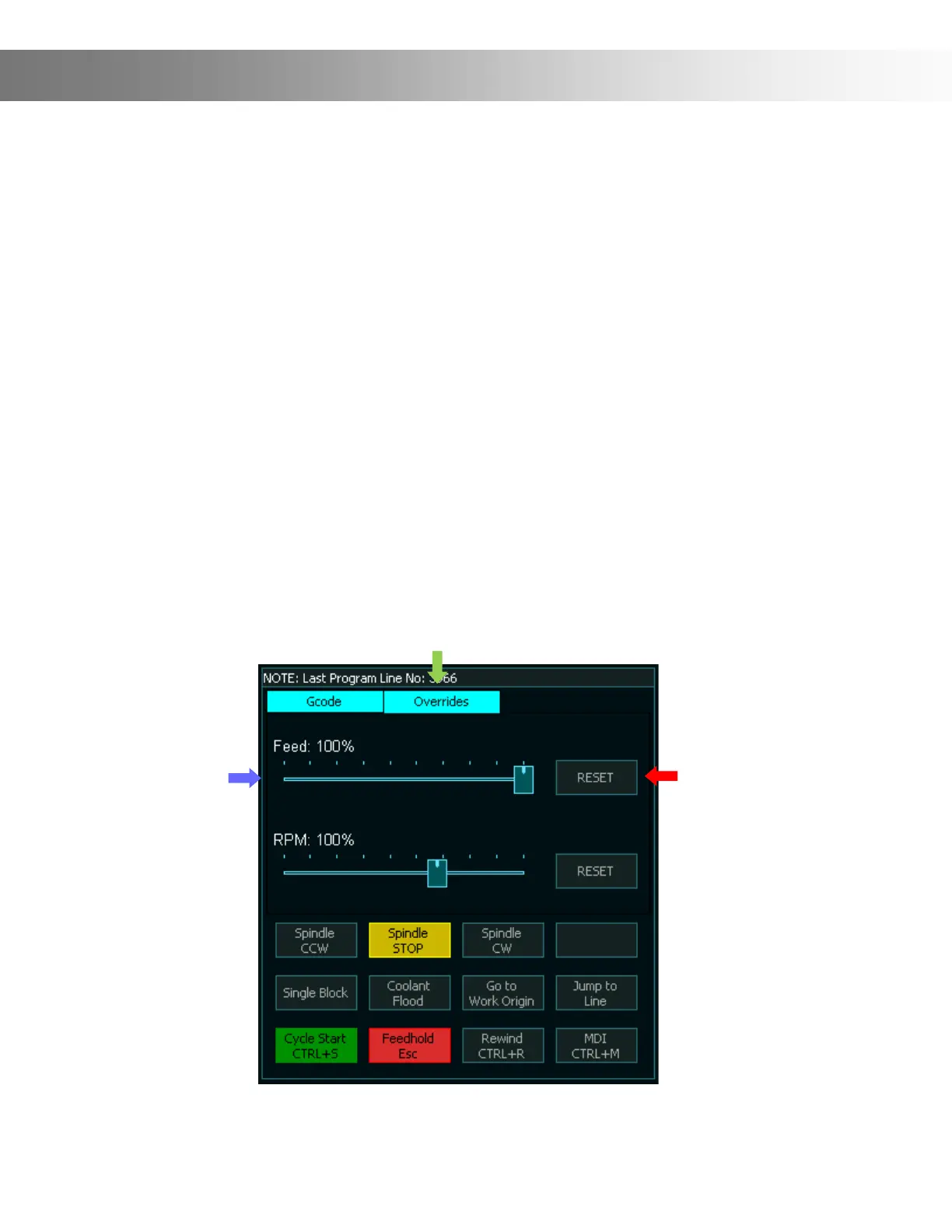
Feed Rate Override
Feed rate override function allows the feed rate to be changed during machining. The range is
from 20% to 100% of the specied feedrate and the current feedrate percentage is shown on
the screen.
Information: This feature is available on the F2 & F3 Screens.
To Override the Feed Rate rst tap on the Override Button (Green Arrow). Next, slide the Feed
slider (Blue Arrow) until you reach the desired Feed Rate. Moving the slider will adjust the feed
rate in real time while you are machining.
The Reset button will reset Feed to 100% (Red Arrow)
Information: Feed rate override ranges from 20% to 100% of the specied Feed rate. Feed
rate override cannot exceed 100%
Important: What if you want to go over 100%? It is currently recommended by Masso to set
your gcode higher than expected, then start the program with a lowered feed rate over ride
(ie. 50%), then increase as needed.


 To Next Page