97
Zone 2
In addition to your main listening room, you can also enjoy playback in the other room, or as we call Zone 2. And, you
can select a different source for each room.
There are two ways you can connect Zone 2 speakers:
1. Connect them directly to the AV receiver/AV ampli-
fier.
2. Connect them to an amp in Zone 2.
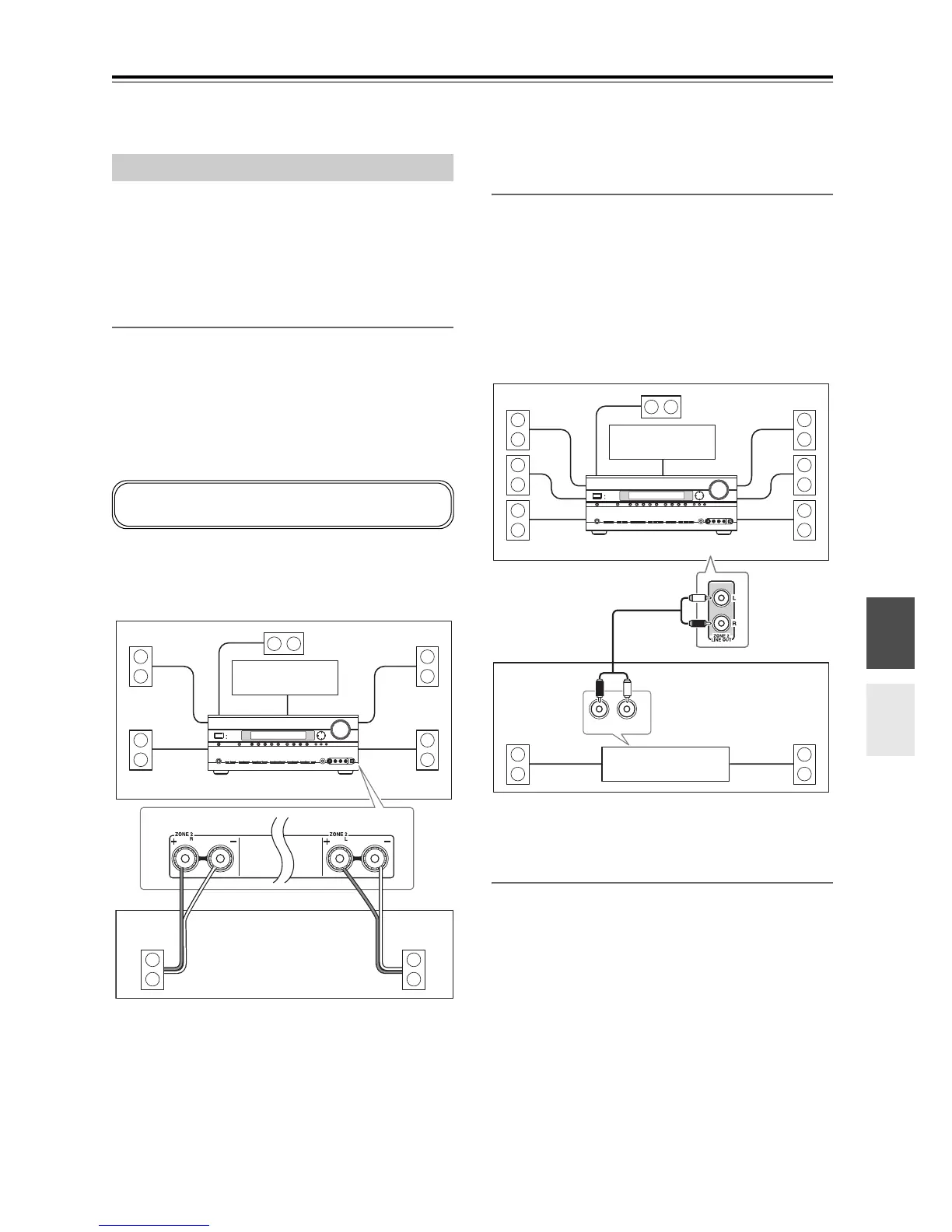
Connecting Your Zone 2 Speakers Directly
to the AV receiver/AV amplifier
This setup allows 5.1-channel playback in your main
room and 2-channel stereo playback in Zone 2, with a
different source in each room. This is called Powered
Zone 2, as the Zone 2 speakers are powered by the AV
receiver/AV amplifier. Note that when Powered Zone 2
is turned off, you can enjoy 7.1-channel playback in your
main room.
Hookup
• Connect your Zone 2 speakers to the AV receiver/AV
amplifier’s ZONE 2 L/R speaker terminals.
Notes:
• With this setup, the Zone 2 volume is controlled by the
AV receiver/AV amplifier.
• Powered Zone2 cannot be used if “Speakers Type” is
set to “Bi-Amp” (see page 45).
Connecting Your Zone 2 Speakers to an
Amp in Zone 2
This setup allows 7.1-channel playback in your main lis-
tening room and 2-channel stereo playback in Zone 2,
with a different source in each room.
Hookup
• Use an RCA audio cable to connect the AV receiver/
AV amplifier’s ZONE 2 LINE OUT L/R jacks to an
analog audio input on your Zone 2 amp.
• Connect your Zone 2 speakers to the speaker terminals
on your Zone 2 amp.
Note:
The Zone 2 volume must be set on the Zone 2 amp.
Zone 2 12V Trigger
When Zone 2 is turned on, the output from the 12V
TRIGGER OUT ZONE 2 goes high (+12 volts, 100 mil-
liamperes max). Connecting this jack to a 12-volt trigger
input on a component in Zone 2 will make that compo-
nent turn on or off as and when Zone 2 is turned on or off
on the AV receiver/AV amplifier.
Connecting Zone 2
To use this setup, you must set the “Powered Zone2”
setting to “Act” (see page 98).
LR
Main room
Zone 2
TV
AV receiver/AV amplifier
R
L
IN
Main room
TV
Zone 2
AV receiver/AV amplifier
Receiver/
integrated amp



 To Next Page