29
Caution:
If an MD recorder is connected to the TAPE jack on the TX-SR700/
700E/600/600E, switch the Input Selector from TAPE to MD (see
page 46).
To connect components using the
terminal, simply connect a
remote control cable from this
terminal to the terminal of the
other component. An remote control cable with a 1/8-inch (3.5-
mm) miniature two-conductor plug comes with every cassette tape
deck, compact disc player, MD recorder, and DVD player that has an
terminal.
• When performing operations with -connected components
using the
system, do not use the remote zone (Zone 2) (TX-
SR700/700E only).
• For remote control operation, the audio connection cables must
also be connected.
• If a component has two
terminals, you can use either one to
connect to the TX-SR700/700E/600/600E. The other one can be
used to daisy chain with another component.
• With Onkyo DVD players, you can enter the pre-program code
so that you can operate the DVD player directly with the remote
controller without connecting the
terminals (see page 67).
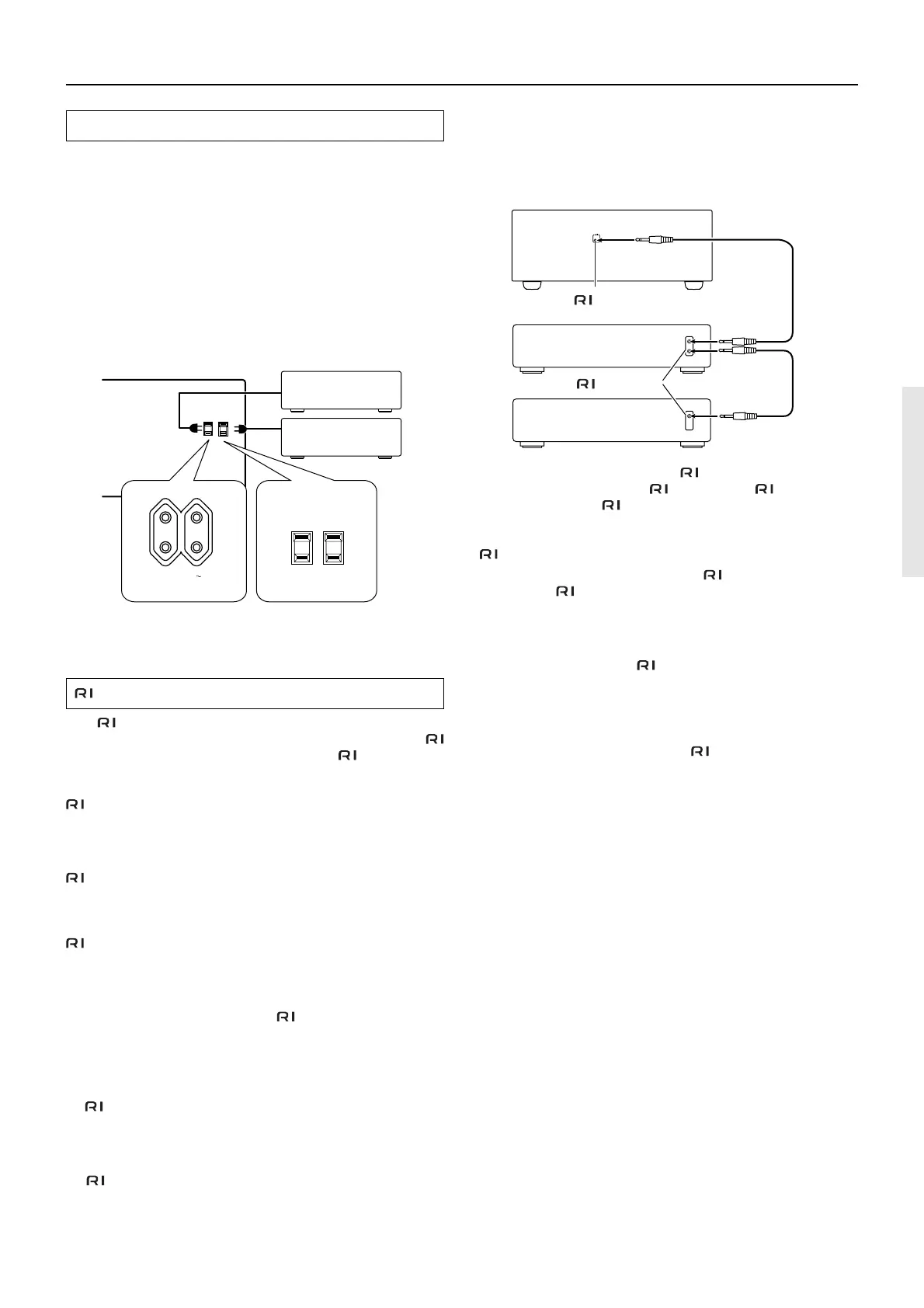
Connections (TX-SR700/700E/600/600E)
AC OUTLETS
The TX-SR700/700E/600/600E is equipped with AC mains outlets
for connecting the power cords from other devices so that their
power is supplied through the TX-SR700/700E/600/600E. By doing
this, you can leave the connected device turned on and have the
STANDBY/ON button on the TX-SR700/700E/600/600E turn on
and off the device together with the TX-SR700/700E/600/600E.
The shape, number, and total capacity of the AC outlets may
differ depending on the area of purchase.
Caution:
Make sure that the total capacity of the components connected to the
TX-SR700/700E/600/600E does not exceed the capacity that is
printed on the rear panel (e.g., TOTAL 120W).
REMOTE CONTROL
The terminal on the TX-SR700/700E/600/600E is for
connecting other Onkyo components equipped with the same
terminal. When a component is connected to the terminal, it can
be operated by the remote controller supplied with the TX-SR700/
700E/600/600E. In addition, when you connect a component to the
terminal, you can also perform the system operations given
below.
Power on/ready function
When the TX-SR700/700E/600/600E is in the standby state, if an
-connected component is turned on, the TX-SR700/700E/600/
600E also turns on and the input source selected at the TX-SR700/
700E/600/600E automatically switches to that component.
Be aware that this function will not work if the power cord for the
-connected component is connected to the AC OUTLET on the
TX-SR700/700E/600/600E, or if the TX-SR700/700E/600/600E has
already been turned on.
Direct change function
When the play button is pressed at an -connected component, the
input source selected at the TX-SR700/700E/600/600E automatically
changes to that component.
Power off function
When the TX-SR700/700E/600/600E is placed in the standby state,
all
-connected components are also automatically put into the
standby state.
Also, if you press the ON button on the TX-SR700/700E/600/600E
remote controller while the TX-SR700/700E/600/600E is turned on,
all
-connected components (DVD players, CD players, MD
recorders, tuners, etc.) are also turned on.
AC OUTLETS
SWITCHED
TOTAL 100W MAX.
AC 230-240
V
50
Hz
AC OUTLETS
AC 120
V 60
Hz SWITCHED
TOTAL 120
W 1
A
MAX.
European and some
Asian models
USA and Canadian
models
Ex: Onkyo CD player
TX-SR700/700E/
600/600E
connector
Ex: Onkyo cassette tape
deck
connector
REMOTE
CONTROL



 To Next Page