User Manual v.2.2
OD5+ Serie
OPAL – Your AutoID System Integrator
opal-holding.com
- 23 -
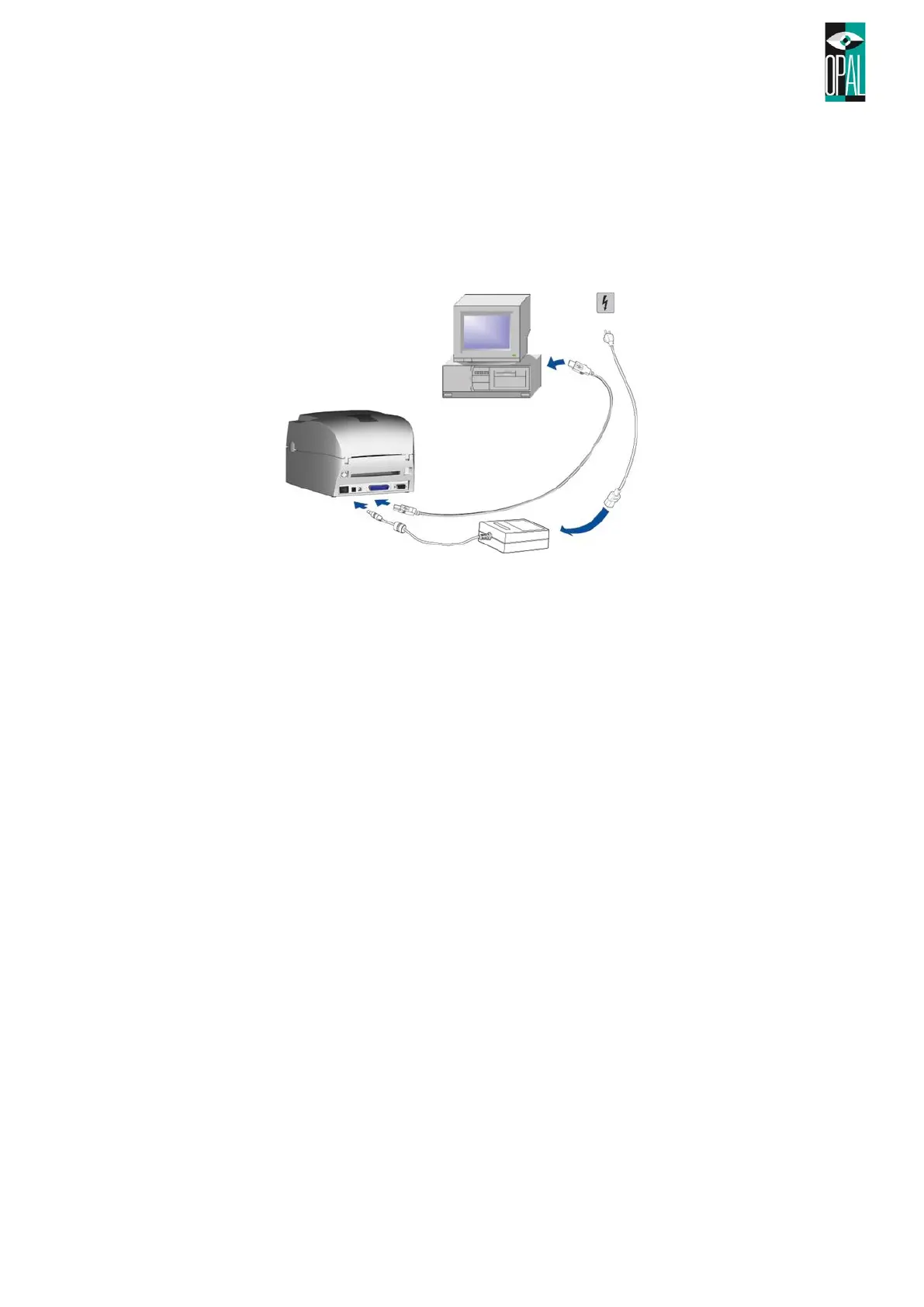
3.2 Direct Connection to PC/Notebook
1. Please make sure the printer is powered off.
2. Take the power cable, plug the cable switch to the power socket, and then connect the other end of
the cable to the printer power socket.
3. Connect the cable to the USB/parallel port on the printer and on the PC.
4. Power on the PC and the printer and the printer’s LED light will shine.
Notes:
Serial Interface
• If you work with the printer over the serial interface, be sure that no other software, driver or
device use the same COM Interface too.
Default Setting oft he serial interface are.
Baud Rate: 9600
Parity: none
Data Bits: 8
Stop Bits: 1
Flow Control: XON/XOFF
USB Interface
• If you want to use the USB interface, then please install first the driver on your PC.
• On the OD5+ and OD5+300 printers the USB port is disabled by default and the LAN port is
enabled. With the command „^usb [CR]“ you can set the USB port active. “^lan [CR]“ command
activates the ethernet port.



 To Next Page