EasyManua.ls Logo

Opal OD5+ Series - 2 Printer Installation; Ribbon Installation

Default Icon
31 pages
Print Icon
To Next Page IconTo Next Page
To Previous Page IconTo Previous Page
Loading...
User Manual v.2.2
OD5+ Serie
OPAL Your AutoID System Integrator
opal-holding.com
- 9 -
2. Printer Installation
This printer model has the following print modes:
- Thermal Transfer: When printing, ribbon must be installed to transfer the print contents onto
the media.
- Direct Thermal: When printing, no ribbon is necessary; it only requires direct thermal media.
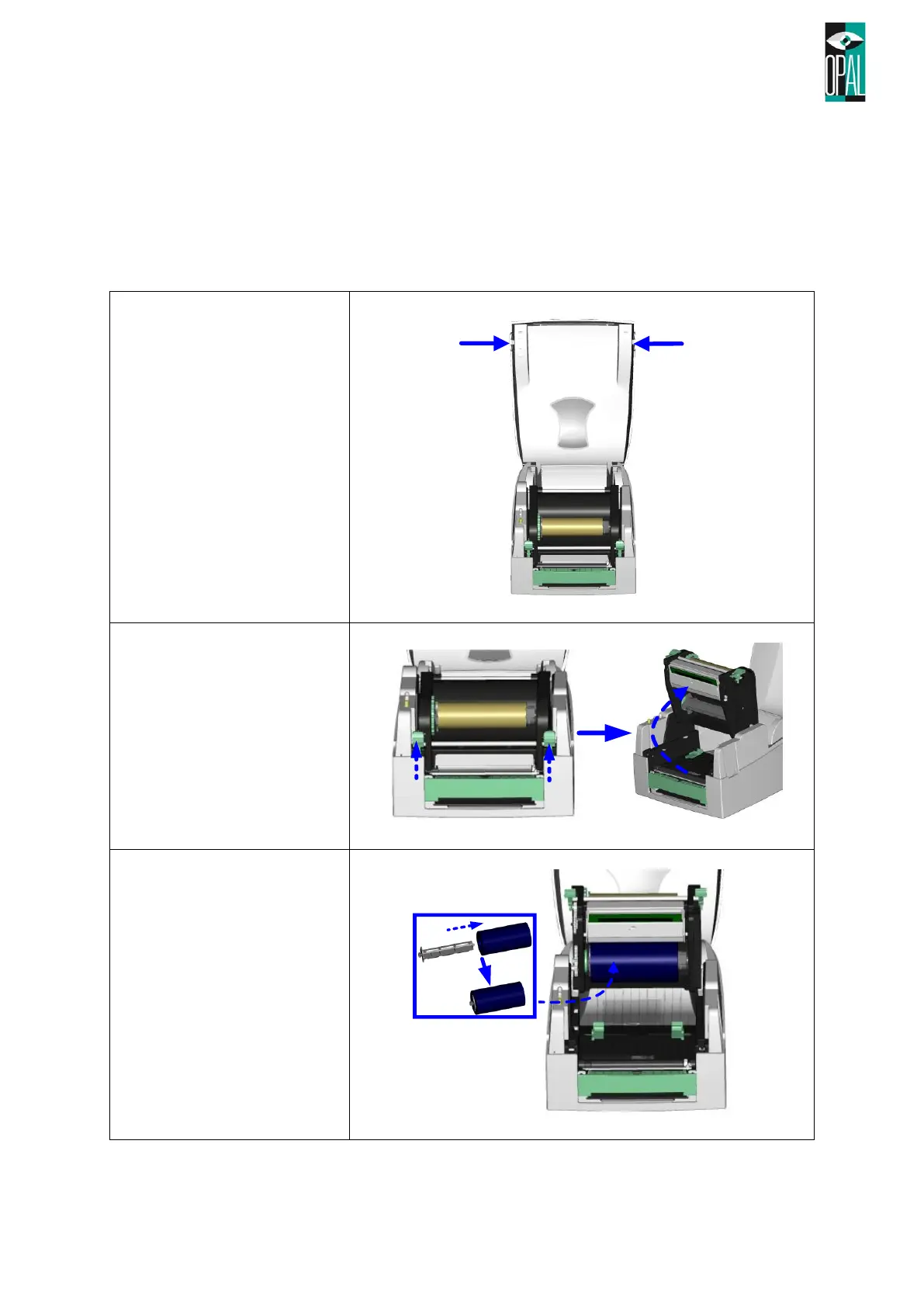
2.1 Ribbon Installation
1. Place the printer on
a horizontal surface,
and open the top
cover by pressing
the Cover Open
Buttons on both
sides.
2. Loosen and then lift
the printing
mechanism by
pressing the locking
tenons.
3. Place a new ribbon
roll onto the ribbon
supply shaft.