24
24
6.3
6.3
6.3
6.3Upgarde
Upgarde
Upgarde
UpgardeBy
By
By
ByRS232
RS232
RS232
RS232
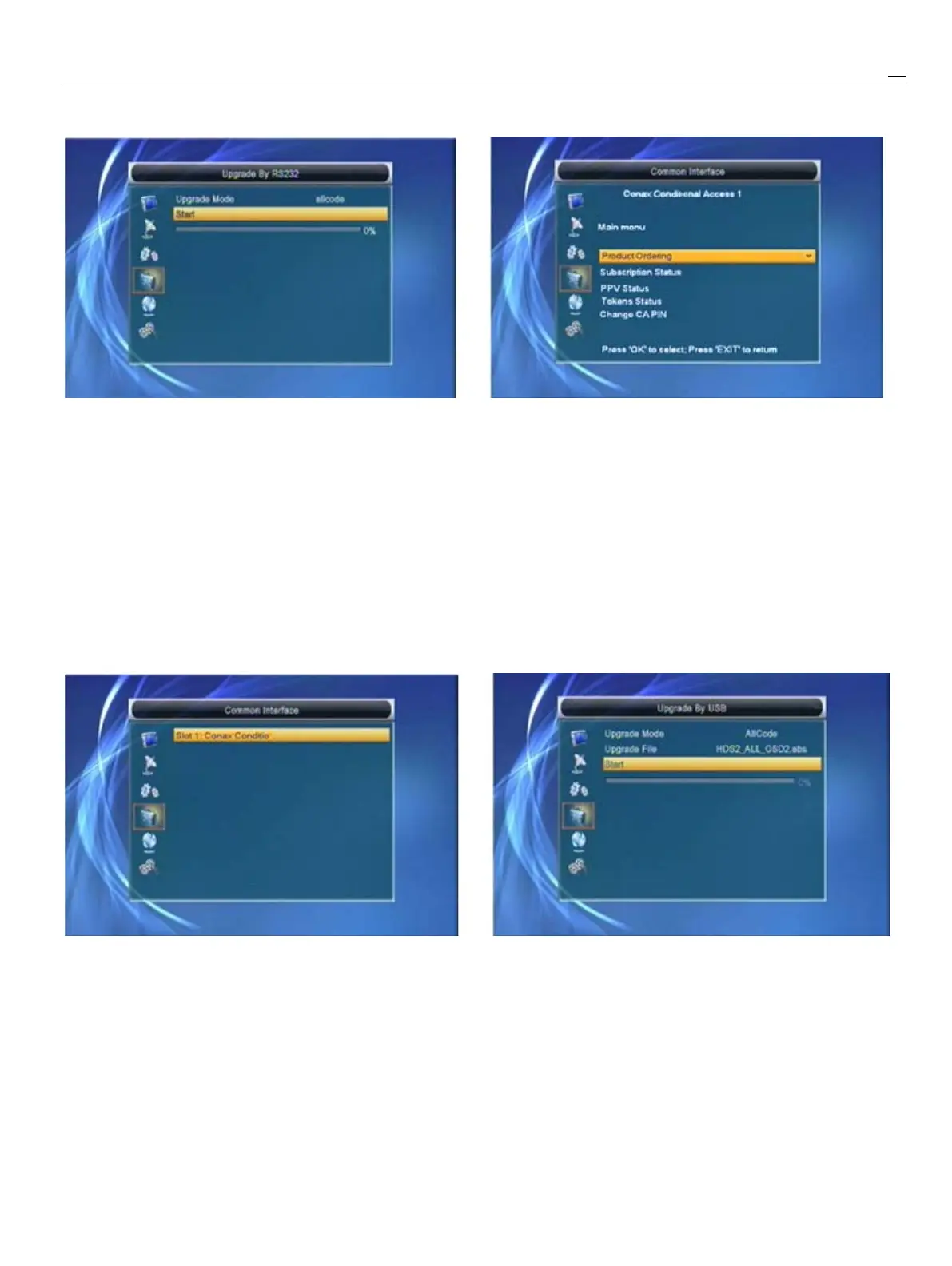
1
Weofferthefunctionsforuserstoconnectonereceiver
3
IntheCAMcardinformationmenu,youcan
(Master)totheotherreceivers(Slave)viaserialinterface.selecteachitembypressing[Up/Down]Keyand
2
ConnectmasterreceivertoslavereceiverviaserialpressOKtoenter.Thisinformationmenuformat
interface.Enter“UpgradeByRS232”menureceiverandstringisaccordingtoCIcarditself.So,
andpress[Left/Right]keystoswitchupgrademode.differentcardmaybehasdeferentmenuofit.
Upgrademodesinclude:allcode
/
maincode/radioback4EnterChangeCAPINcanchangethepincode
/
defaultdb
/
userdboftheCAcardinthisCAMcard.
3
Turnonslavereceiveranditneedn’
t
operateanysetting.
4
Movehighlightto“Start”onmasterreeciverand
press[OK]keytostartupgrade.
5
Press[Exit]keytosavetheparametersanddrawBack.
6.
6.
6.
6.5
5
5
5Upgrade
Upgrade
Upgrade
Upgradeby
by
by
byUSB
USB
USB
USB
6.
6.
6.
6.4
4
4
4Common
Common
Common
CommonInterface
Interface
Interface
InterfaceOpenUpgradeByUSBmenuaccordingtoMenu
1
PressOKKeywhenhighlighton“CommonInterface”->Tools->UpgradeByUSB.
willentertheCAMcardinformationMenuselectlikebelow:
2
Press[Up/Down]Keytoselectslot1PressOKkeyUpgradeModehasonly1option:AllCode,itmeans
againtoenterthiscardinformationmenulikebelow:thatyoucanonlyupgradewholefiletoyourSTB’sflash.
Pleaserenameyournewfwfilenametobetheformat
“all*.abs”,*meansanyothersstringisacceptable,
buttheinitial3lettersmustbe“all”andtheextension
namemustbe“.abs”
.
ThenPressOKkeytostart
upgradebyUSB.


 To Next Page