GSM/3G User Manual
24 | 82
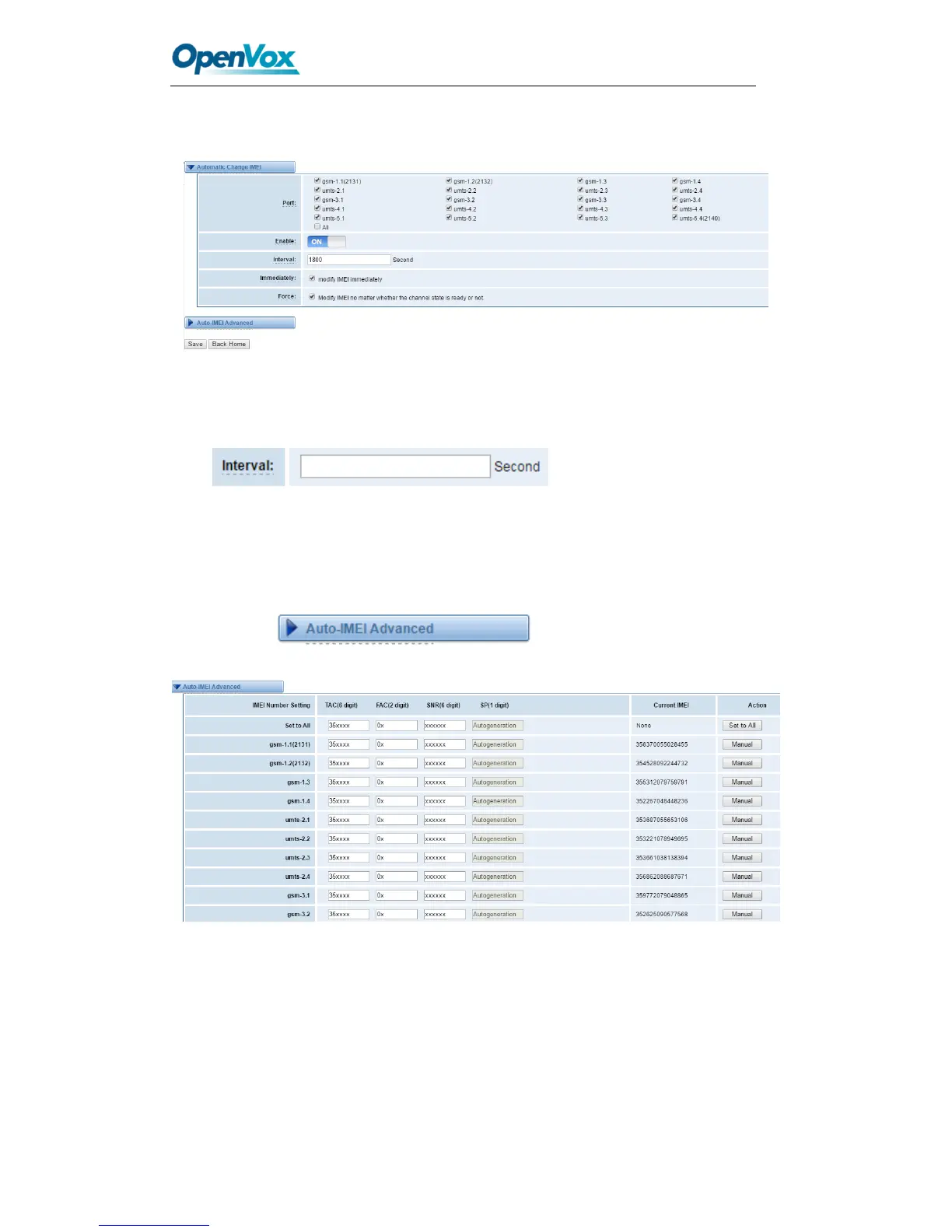
Then you will see the following picture. Don’t forget to switch “Enable” to “ON”, or you
can’t change your IMEI numbers.
Figure 3-8 IMEI Modification
Also you can choose to modify one or more certain ports or all ports. You can set
automatic modification interval by filling in the time you
want.
If you choose “Immediately”, then the ports you have chosen will modify IMEI numbers
at once. On the contray, system will keep time from now until the time of next
modification. And If you choose “Force”, System will hang up all your current calls, then
modify IMEI.
You can press to do some settings. We offer you
two ways to modify your IMEI. You can choose Autogeneration or Manual.
Figure 3-9 Advanced Settings
As you can see, you can set any number you wan for every port. “X” means any digits
from 0 to 9.
You just need to fill in “Set to All ”, then press “Set to All”, you can see the interface as
above. Don’t forget to press “Save”. Then “Current IMEI” will change. That means
Autogeneration. If you want to set a certain number as your IMEI, you can press
“Manual”. Then you will be required to input a new IMEI.



 To Next Page