INSTALLATION
7
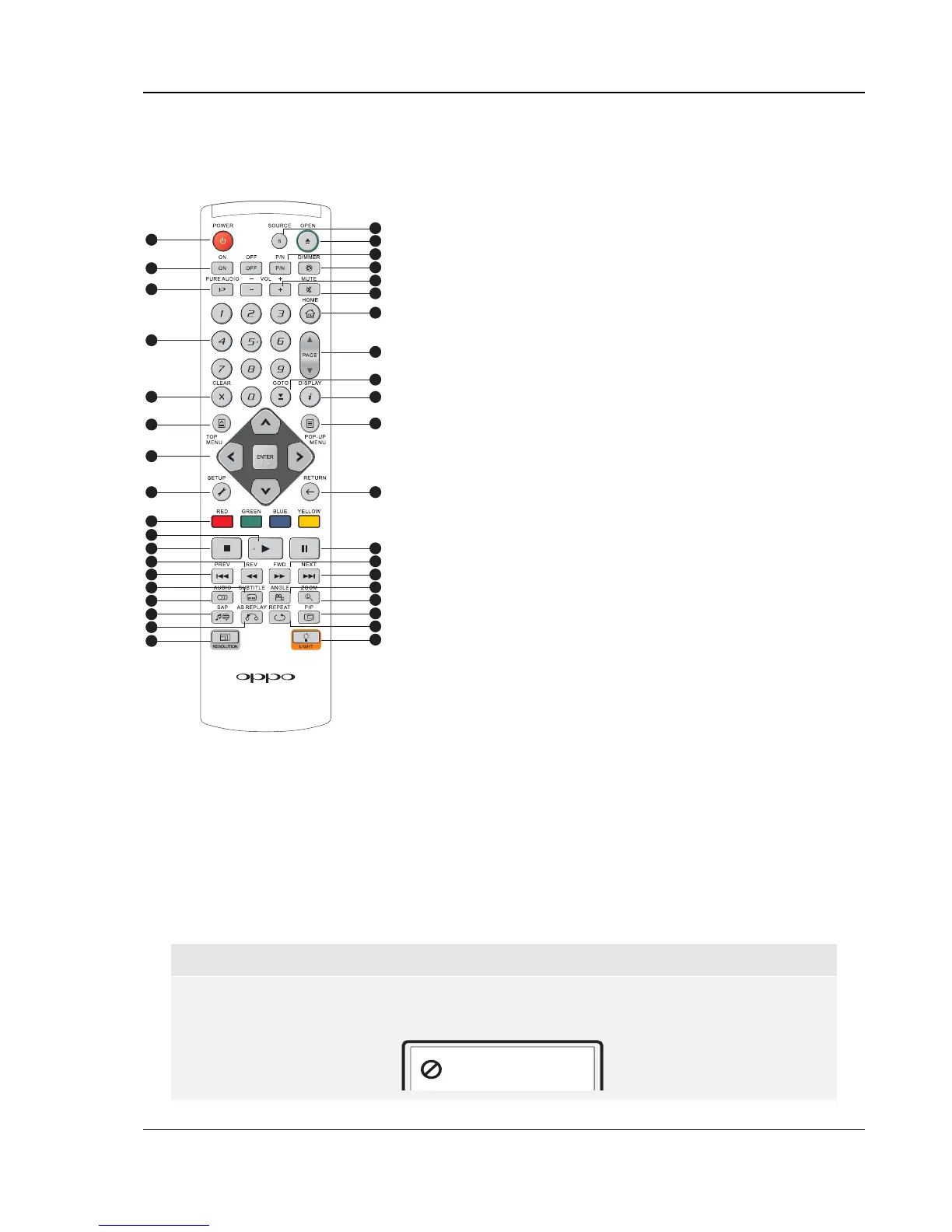
Remote Control
Remote Control Buttons
1
2
3
4
5
6
7
8
9
10
11
2
12
13
14
15
16
17
18
19
20
21
22
23
24
25
26
27
28
29
30
31
32
33
34
35
36
37
38
1. POWER: Toggle power
STANDBY and ON
2. ON/OFF: Discrete on/off
power buttons
3. PURE AUDIO: Turn
off/on video
4. NUMBER Buttons: Enter
numeric values
5. CLEAR: Clear numeric
input
6. TOP MENU: Show BD
top menu or DVD title
menu
7. ARROW and ENTER
Buttons: Navigate menu
selection
8. SETUP: Enter the
player Setup Menu
9. COLOR Buttons:
Function varies by
content
10. PLAY: Start playback
11. STOP: Stop playback
12. REV: Fast reverse play
13. PREV: Skip to previous
14. SUBTITLE: Change
subtitle language
15. AUDIO: Change audio
language or channel
16. SAP: Turn on/off
Secondary Audio
Program
17. A-B REPLAY: Repeat
play the selected
section
18. RESOLUTION: Switch
output resolution
19. SOURCE: Select the
internet media or
application source
20. OPEN: Open/close the
disc tray
21. P/N: Switch output TV
system: NTSC, PAL or
MULTI
22. DIMMER: Dim front
panel display
23. VOLUME +/-
:
Increase/Decrease
volume
24. MUTE: Mute audio
25. HOME: Go to Home
Menu to select media
source
26. PAGE UP/DOWN:
Show previous/next
page
27. GOTO: Play from a
specified location
28. DISPLAY: Show/hide
On-Screen Display
29. POP-UP MENU: Show
BD pop-up menu or
DVD menu
30. RETURN: Return to the
previous menu or mode
31. PAUSE: Pause
playback
32. FWD: Fast forward play
33. NEXT: Skip to next
34. ANGLE: Change
camera angle
35. ZOOM: Zoom in/out
and adjust aspect ratio
36. PIP: Show/hide Picture-
in-Picture
37. REPEAT: Repeat play
38. LIGHT: Activate back
light for the remote
control
NOTE
When a button is pressed but its function is invalid or unavailable at the moment, the TV
screen displays a circle with a diagonal line:



 To Next Page