SETUP MENU OPTIONS
69
not have such functions (most receivers do not offer these functions for their multi-channel analog
input), you may adjust them through the player. Speaker distance delay is only applied if the player
is decoding multi-channel audio. If you use bitstream audio output to your A/V receiver, the
bitstream audio is not adjusted for speaker distance delay.
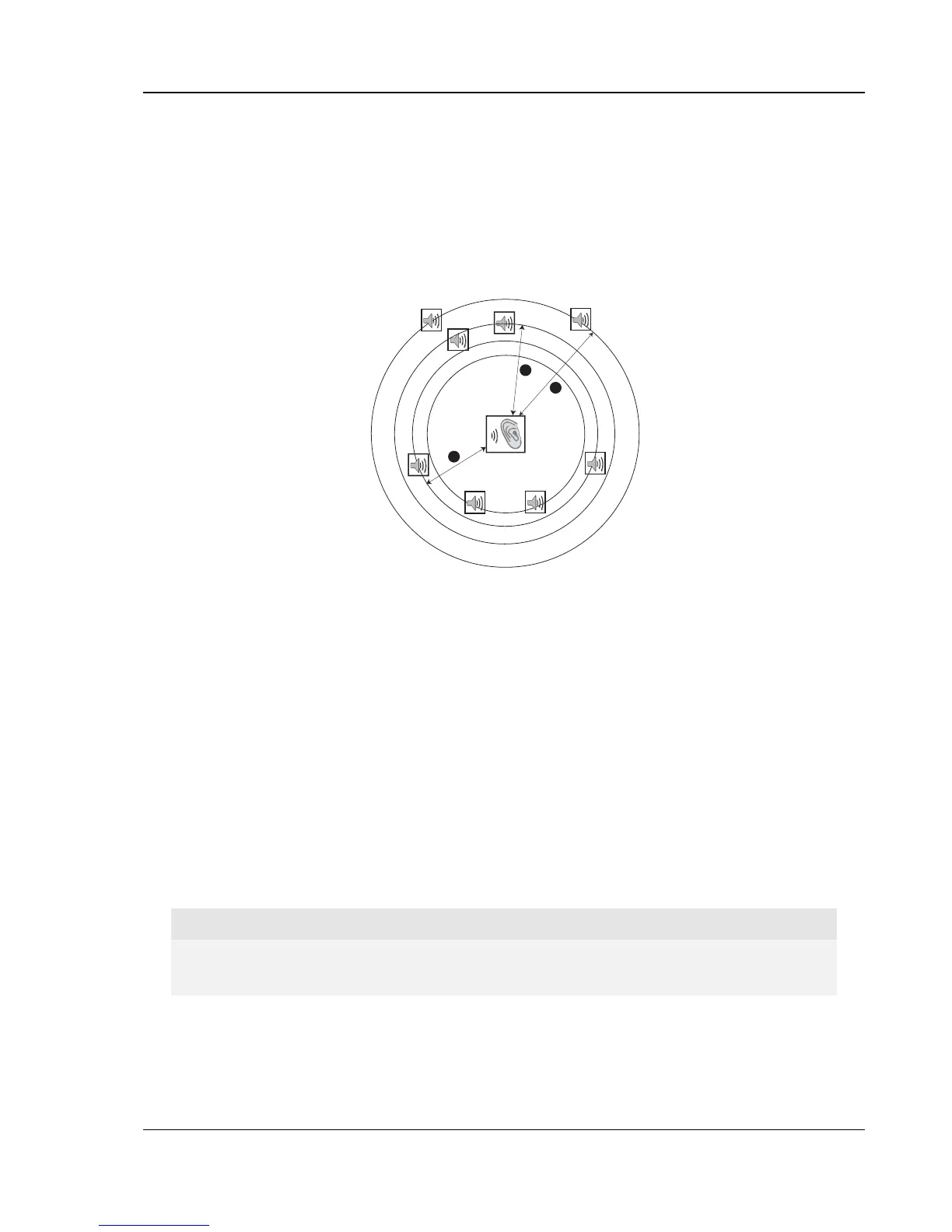
Since the delay is calculated based on the distance difference from each speaker to the listener’s
position, it is important to set the distance for the front speakers first and then the other speakers.
Any time you change the distance of the front speakers, the distance of the other speakers will be
automatically adjusted to maintain the same distance difference.
FL
FR
C
SW
SL
SR
SBL SBR
Speaker Icons:
FL - Front Left
FR - Front Right
C - Center
SW - Subwoofer
SL - Surround Left
SR - Surround Right
SBL - Surround Back Left
SBR - Surround Back Right
1
2
3
Distances:
1 - Listener to Front
2 - Listener to Center
3 - Listener to Surround Left
For example, in the above diagram, measure the distance (in feet) from the primary listening
position to the Front Left or Front Right Speaker. Your Front Right and Left speakers should
measure the same distance. If they do not, please adjust them if possible. Enter the distance of the
Front Speakers (n in the above picture) into the “Speaker Configuration” menu.
Next, measure the distance (in feet) from center speaker (o) to the listening position. Move the
cursor to highlight the Center speaker in the Channel Delay setup page, and enter the distance (as
close as possible) in feet. Repeat for each speaker in the system (Center, Surround Left, Surround
Right, Surround Back Left, Surround Back Right and Subwoofer) as available. The player will insert
appropriate delay to the center, subwoofer and surround channels to make sure sound waves from
different speakers arrive at the listener at the same time.
Distance between the surround speakers and the listener must be shorter than or equal to that
between the front speakers and the listener.
In case the channel delay settings cannot match your speaker configuration, please set all
distances to the same and use your receiver/amplifier to set the channel delay.
NOTE
The front, surround and surround back speakers are configured as pairs. Changes to the
distance of one speaker will automatically change the other speaker of the pair.



 To Next Page