Delta Elec. Inc. ES522 & EX532
Company Confidential Optoma___________________ Delta________________
85
2009/06/30
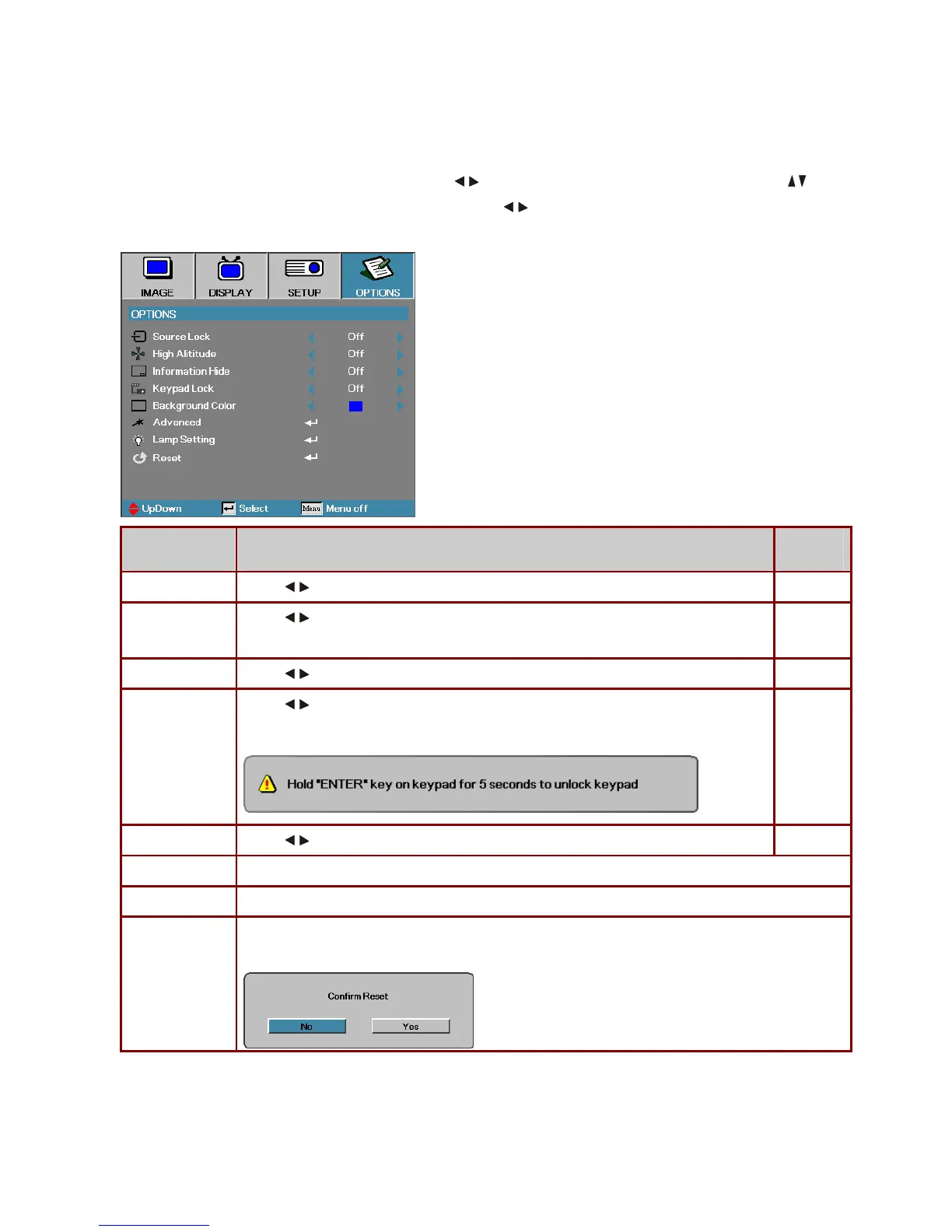
5-8. Options Menu
Press Menu to open the OSD menu. Press
to move to the OPTIONS menu. Press to
move up and down in the OPTIONS menu. Press
to change values for settings, and then
press Enter
to confirm the new setting.
ITEM DESCRIPTION
DEFAULT
Source Lock
Press
to enable or disable the automatic search of all the input sources.
Off
High Altitude
Press
to change fan speed; high speed in high temperature, high humidity or high
altitude area.
Off
Information Hide
Press
to enable or disable the source searching, source resolution, and logo display.
Keypad Lock
Press
to enable or disable keypad function.
The following warning message appears when you select On.
Off
Background Color
Press to select different colors or blank screen.
Blue
Advanced
Press Enter to open the OPTIONS/Advanced menu.
Lamp Setting
Press Enter to open the OPTIONS/Lamp Setting menu.
Reset
Press Enter to reset all menu items to factory default. The following screen displays.
Press Yes to confirm.



 To Next Page