Delta Elec. Inc. ES522 & EX532
Company Confidential Optoma ______________________ Delta____________
9
2009/06/30
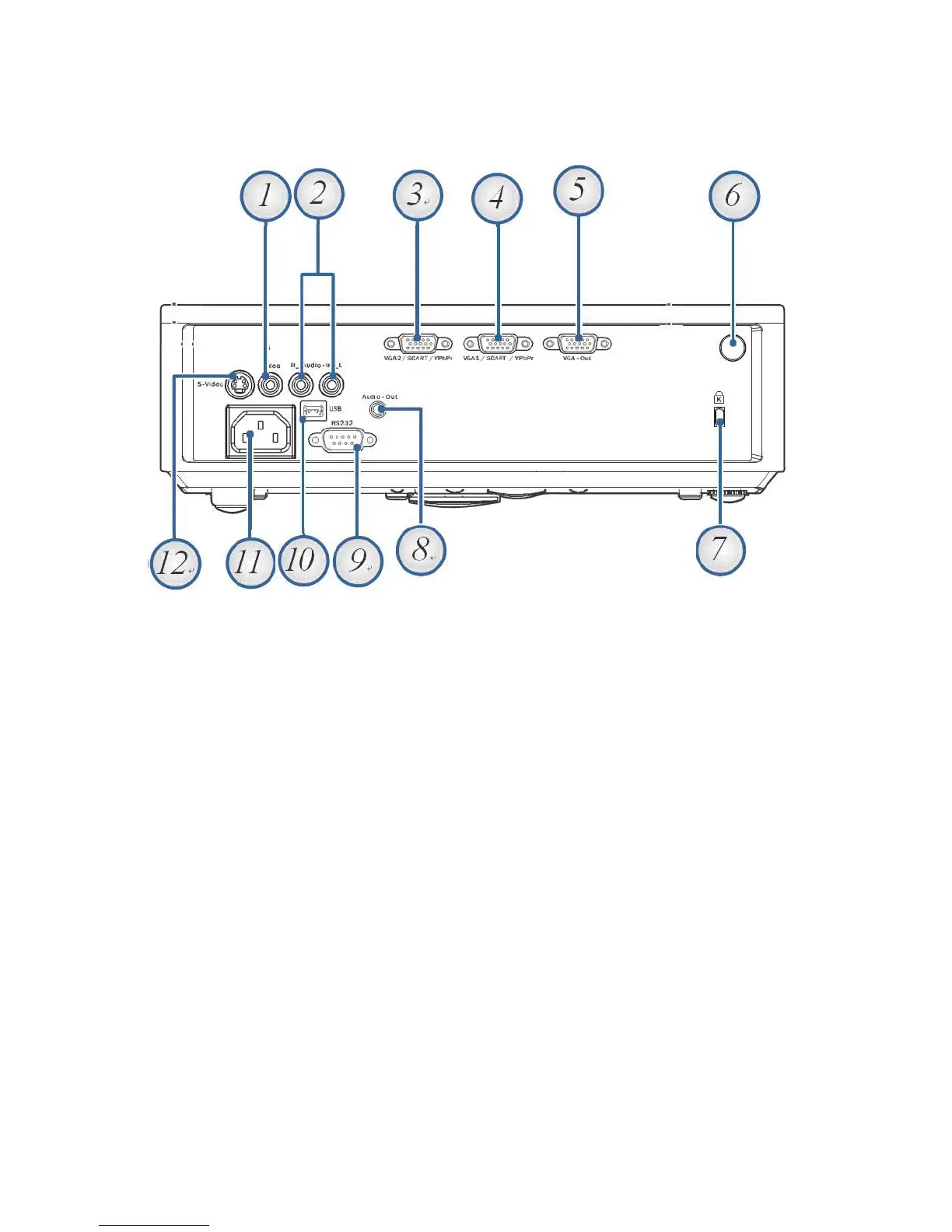
2-7. I/O Ports Illustration about Projector
1. Composite Video Input
2. Audio Input L/R RCA Connectors
3. VGA 2/ SCART/ YPbPr Connector (EX532 only)
4. VGA 1/ SCART/ YPbPr Connector
5. VGA Out (EX532 only)
6. Rear IR receiver
7. KensingtonTM - Lock Port
8. Audio Out 3.5mm Jack
9. RS-232 Connector
10. Mini USB Connector (for remote mouse function)
11. Power Socket
12. S-Video Connector
Note:
If your video equipment has both S-VIDEO and RCA jacks (composite video) connect to the
S-VIDEO connector. S-VIDEO provides a better quality signal



 To Next Page