Optomed Aurora 27
5.1 Retinal Module
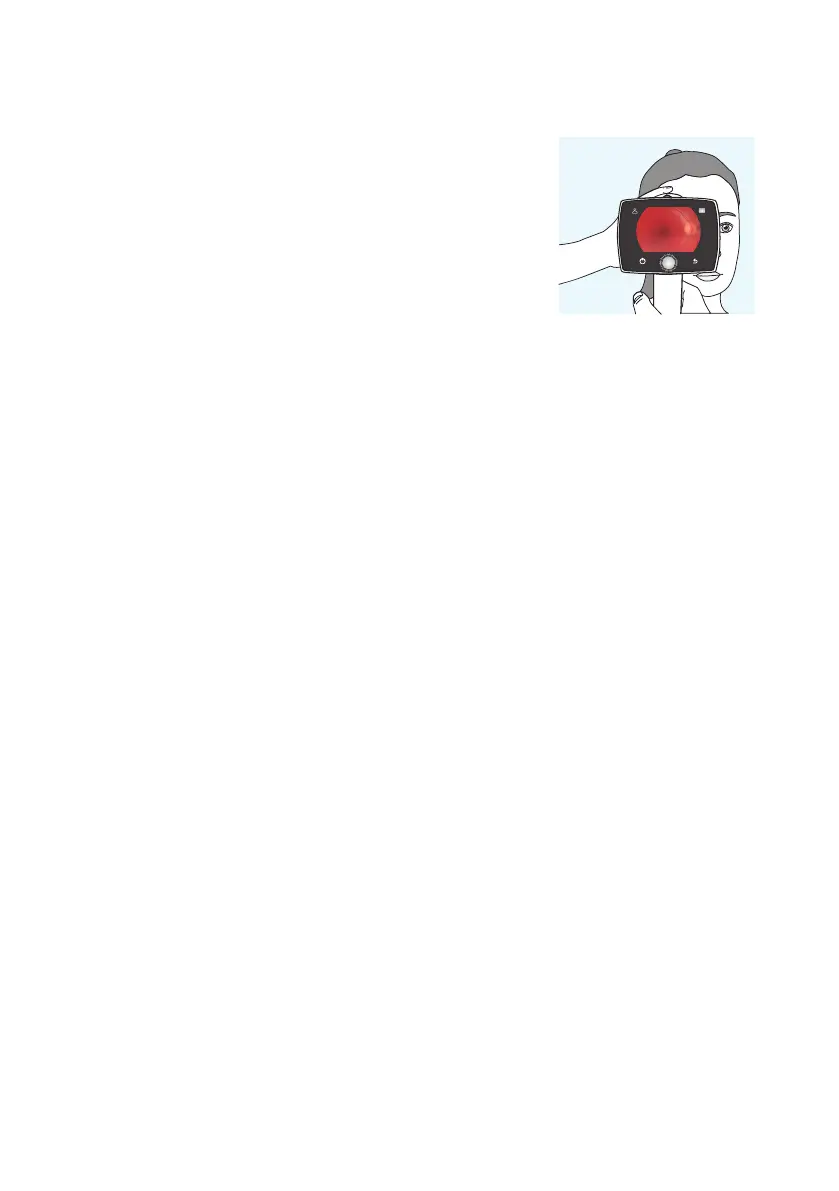
When imaging with Aurora Retinal Module, the examination room
should be as dim as possible. It is recommended that both the patient
and the examiner are seated during the examination. It is also possible
to perform the examination when the patient is lying down.
Ask the patient to keep the eye aligned with the target light and to
cover the other eye. Approach the pupil and stabilize the camera
by supporting the optics module on your thumb and place your
fingers on the patient’s forehead. Press the eye cup firmly around
the examined eye. The pupil is approached until the reflection from the eye fundus can be seen. The right
imaging distance is about 2 cm (0.8 inch).
The aim help circle on the display guides when to capture an image. When the retina is not fully in view,
the circle is red. Once the aim is good and the retina fully appears on the screen, the circle turns green.
CAPTURING STILL IMAGES:
• Manual focus: Capture a still image by pressing the dual action shutter all the way down.
• Autofocus: Automatic focusing begins when the dual action shutter is pressed half way down.
Aer successful focusing, an image is captured when the dual action shutter is pressed all the way
down. An alternative way to capture an autofocused image is to keep the dual action shutter pressed
all the way down when the camera first focuses and then captures an image.
RECORDING VIDEOS:
• Manual focus: To record a video keep the dual action shutter pressed all the way down. When the dual action
shutter is released, the recording ends.
• Autofocus: Automatic focusing starts when the dual action shutter is pressed half way down. Aer
successful focusing, a video is recorded when the dual action shutter is pressed all the way. When the dual
action shutter is released, the recording ends. An alternative way to record an autofocused video is to keep
the dual action shutter pressed all the way down when the camera first focuses and then begins a video
recording. When the dual action shutter is released, the recording ends.
Imaging with Aurora |



 To Next Page